












There is a dichotomy in most offices around the world. On the one hand the digital area with individual and network computers, on the other hand documents in paper form. This sometimes causes chaos and, above all, time is lost. Time spent searching for content.
According to an international report by McKinsey, office workers spend 1.8 hours per day searching and gathering information, which is an average of 9.3 hours per week.
Accountants, secretaries, buyers, clerks, dispatchers and many other professional groups are busy processing administrative processes every day. The work of one employee is often dependent on that of another.
Every company now has a multifunction device that also supports the scan function. But for many, the term and the use of a document management system is still unknown.
In the current article we explain that it is worth using a document management system with your scanner. We will give you at least 15 reasons for using it, which will enable you to make your office paperless and digital and how you can use it to increase the efficiency of your company's core business.
Before we get into the reasons why, let's answer the question:
What use a DMS for in the company?
Invoices, bills of lading, accompanying letters, shipments or operating instructions for new devices and the associated guarantee certificates, to name just a few examples? Their digitization is often a long time coming, simply because there is a lack of staff and time. As a result, the analog mountain grows.

With a DMS and the scanner that is suitable for your needs, you can get the dichotomy and the unnecessary loss of time under control.
DMS also stands for document management software and is intended to manage documents, especially digital documents, which includes the conversion from analogue to digital. PaperOffice AI is such software, as a platform in your browser.
Because PaperOffice AI makes it possible for analog paper to become digital content where it occurs: at the office scanner or on the go with the mobile app.
The AI detects the document type, sender and key fields and assigns each document to the right workspace and process. With full-text and semantic search in PaperOffice AI, all documents can then be found and called up. If needed, PDF Studio converts captured letters into Word, Excel or PowerPoint files so that you can edit them with your Office software.
We recognized the need, but:
What are the advantages of a paperless office?
In today's world, employees deal with a large number of different documents: original paper documents such as letters or contracts, PDFs and electronic documents such as files and emails.
In many companies, these documents are copied, printed out, forwarded, distributed and filed in different places. The search for important information is becoming increasingly difficult and leads to uneconomical workflows and overburdened employees. We have a detailed article, in which the need for document management systems is described and the advantages of using them are listed.

However, if your employees start eliminating or at least reducing paper consumption in the offices or the entire company, you will also improve processes, increase productivity by digitizing data, use paperless methods and thus reduce costs.
Many other advantages and aspects have already been discussed in a detailed article on "Implementation in a paperless office".
Which scanners are suitable for the perfect collaboration?
For example, multifunction devices (MFP) such as those from Brother or Konica Minolta and other manufacturers.
Printer, scanner and copier all-in-one: Via these central devices, the scanned documents go to a scan folder on your NAS or server or, via "direct scan to mail", as an e-mail to a mailbox. A PaperOffice AI connector monitors the folder or mailbox, so every scan automatically enters the document management software.
Or you scan without a scanner at all: the PaperOffice AI mobile app captures paper documents with the camera, with edge detection and perspective correction, and uploads them straight into your workspace. Without a network, the scan goes into the queue and is uploaded later.
Tip
On the topic "Archiving paper documents from the scanner automatically", a short film on the digital mailroom page shows how PaperOffice AI recognizes scans, reads them and routes them automatically to the team in charge:
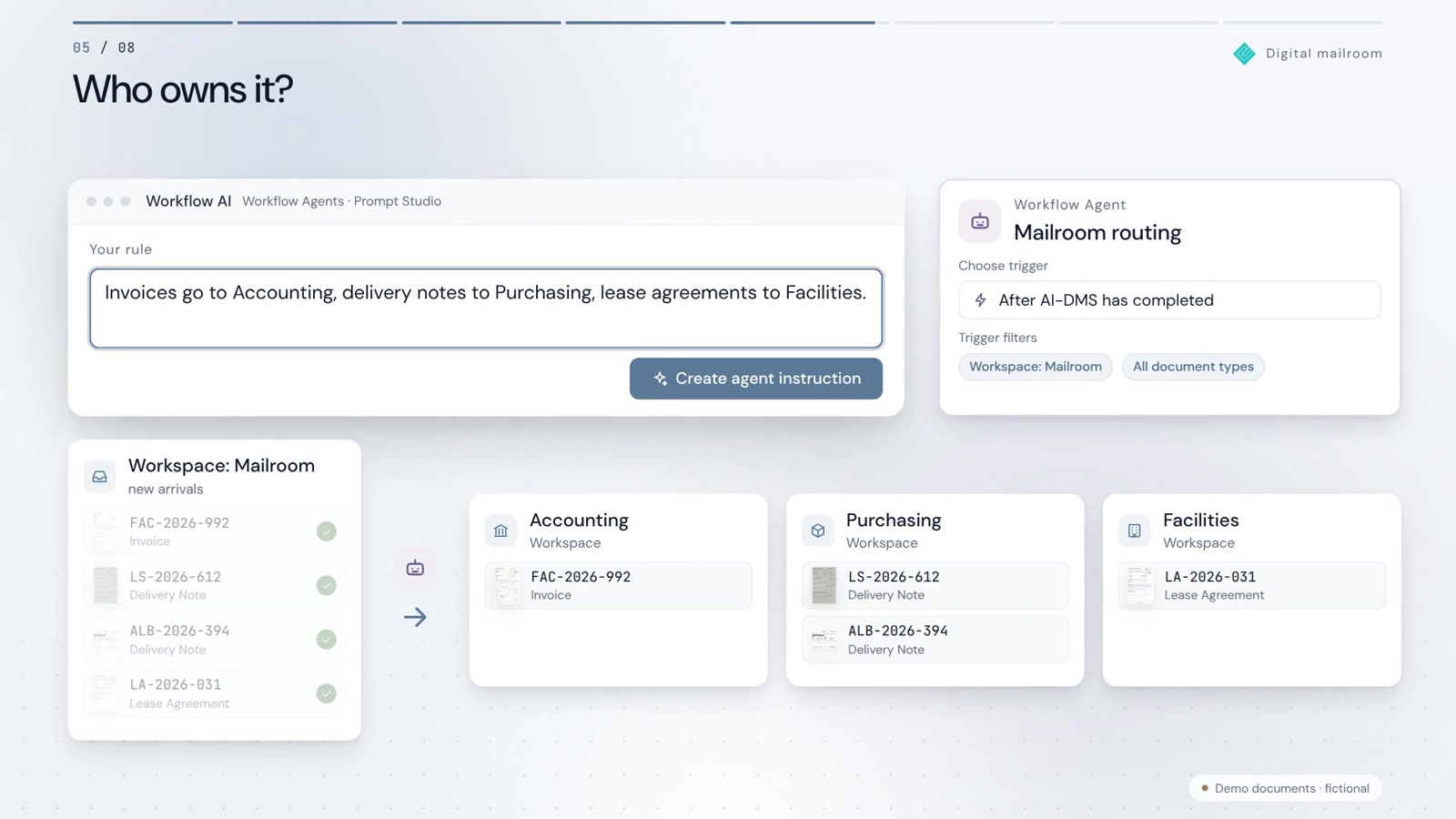
For those who want to scan paper documents one by one, uploading in the browser app is all it takes: simply upload scans, PDFs and photos into your workspace. This works with every scanner, multifunction device or large-capacity copier with a scan unit, without any scanner plugin.
Nevertheless, it does not matter how your paper documents get into PaperOffice AI, because thanks to automated AI-OCR in more than 120 languages, the content of all your scanned documentation is recognized.
No matter what is made of paper: AI-OCR reads printed text, handwriting and mixed layouts, even with skewed pages and poor scan quality.
As soon as documents are recorded, their content is indexed using raw text decomposition. To put it simply, the content is written word by word into a special register, with the algorithm recognizing individual words in a word combination and recording them in the same way.
Digitization and document management
When we talk about document management systems, we must not forget: the higher the level of digitization of the information that is part of the processes, the higher the level of control and automation that we can achieve. We have already written a separate article on the advantages of digitization.
In the first step, you determine which documents belong to our processes, how we integrate them into our document management system and which information is to be extracted and stored together with the documents in your database. Once the information is included, we define its life cycle, how it will interact with other processes and how we can integrate it.
Information comes from different sources
Most likely, we will come across information coming from different sources and in different formats. Some of it in digital form, stored in files or databases and some in the form of printed documents.
What do we do with digital documents in pdf, doc, etc. format? Here the process is very simple.
Upload the digital document to PaperOffice AI in your browser. Or have a connector monitor a folder on your NAS or server and import new files automatically.
Tip
On the topic "Folder monitoring and bulk import", a short film on the Connectors page shows how a PaperOffice AI connector monitors a folder and processes new files automatically:
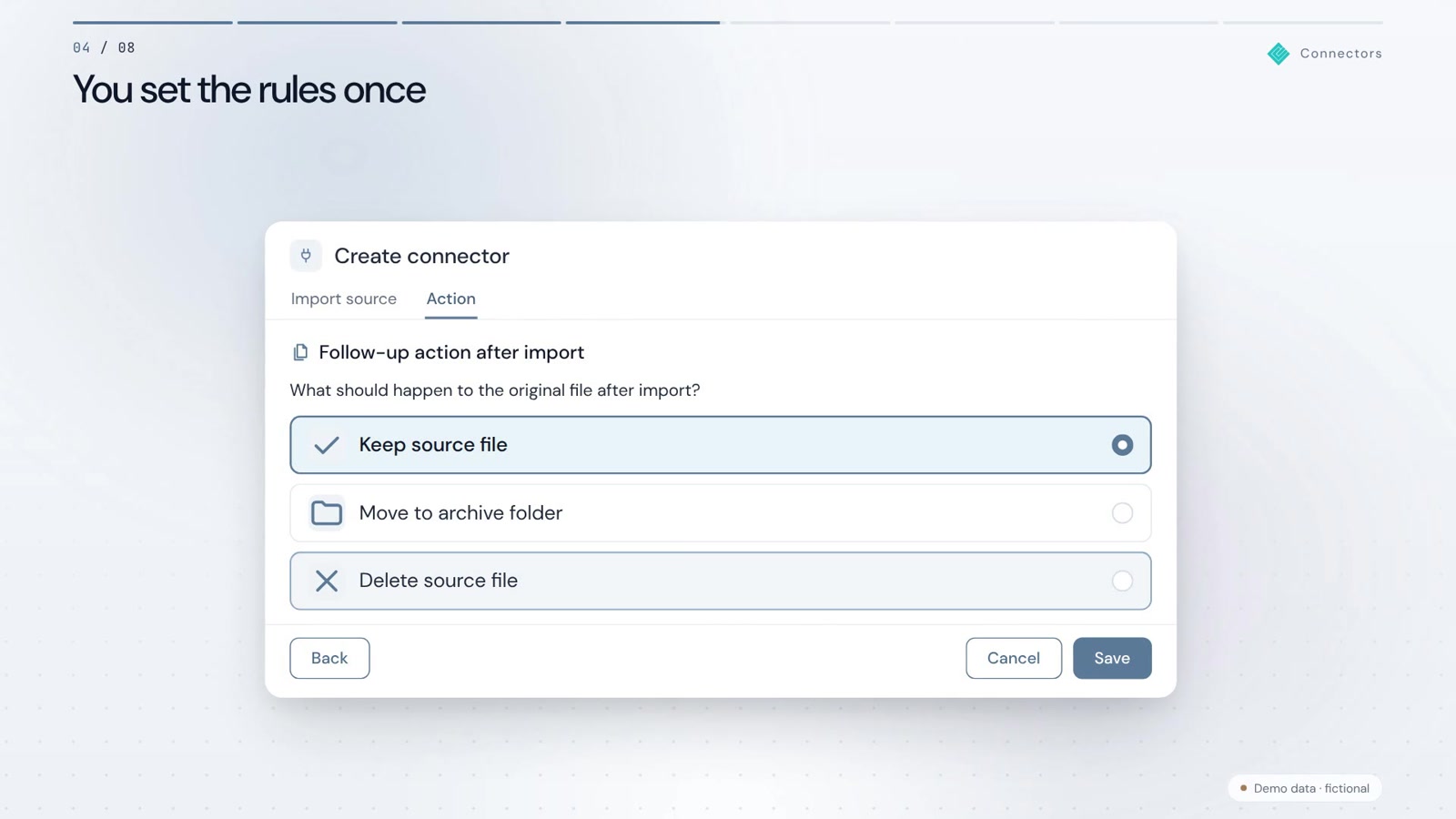
Documents in paper form can easily be scanned with your scanner or the mobile app and converted into digital format.
Thanks to the Optical Character Recognition program (OCR = Optical Character Recognition), we have already taken an important step. Using a scanner or other digitizing device, we not only convert the document into an image, but can also "read" its content electronically.
PaperOffice AI captures more than the pure OCR text: classification detects the document type, and IDP agents read out the fields you need, according to your specifications or fully automatically.
These include, for example, the invoice number, date and amounts and, depending on the processing depth, individual line items. Accordingly, we have all the necessary information in our document management system.
The digitization of information via OCR makes it easier to integrate a wide variety of documentation into the management of processes and workflows.
It all sounds good, but how is mass archiving done from the scanner?
Alongside its key features for text recognition, AI integration and keywording, PaperOffice AI also takes care of bulk archiving from your scanner.
Your scanner saves the entire batch as a multi-page PDF in a monitored folder or mailbox, and a connector brings it into your workspace. There, the Split Agent splits the batch into individual documents.
You do not need separator pages for this: the Split Agent detects document boundaries from the content. Existing separator sheets are recognized and removed.
PaperOffice AI files each sub-document individually, with a meaningful name, in the workspace. Uncertain boundaries go to a person for review first.
15 reasons to use your scanner together with PaperOffice AI
-
Reason 1 - Find documents quickly in PaperOffice AI
Full-text index and semantic search: In a document management system like PaperOffice AI, you can find your scanned documents, receipts and information in seconds. This is possible because your documents are read with AI-OCR and indexed as soon as they are stored.
You simply enter a search term, like with Google, and PaperOffice AI lists all the results. Semantic search even finds documents when you do not know the exact words, and it is tolerant of typos.
In the document chat, you ask questions directly to a document or an entire workspace, with source references. -
Reason 2 – Automatically version paper documents
PaperOffice AI automatically versions every changed document: each change creates a new version and the old one is preserved, so you can open the desired version again at any time.
A SHA-256 checksum per version shows whether a version has remained unchanged since filing, and the audit trail records who created, viewed or approved which version and when. -
Reason 3 – Split batch scans of multiple documents automatically
Scan the entire batch in one go. The PaperOffice AI Split Agent recognizes where one document ends and the next begins, even without a separator sheet and with changing layouts, and saves the documents separately. -
Reason 4 – Direct filing from the scanner
PaperOffice AI offers you every option from manual filing to fully automated filing without any intervention. Classification detects the document type, language and sender and suggests the folder, and IDP extraction fills in the fields automatically. - Reason 5 – Read QR codes and barcodes as well
In Grid mode, the PaperOffice AI OCR reads QR codes and barcodes along with the text, each with its position on the page. You choose the mode per workspace or per API call.
This way, the coded information on your documents is not lost either: it is available in the OCR result, including via API for your systems. - Reason 6 - Scan Folder Directory Monitoring
Your copier can store the scans in a specific folder? Great, just have this folder monitored and you'll have fully automatic filing!
A PaperOffice AI connector monitors folders on your NAS or server via SFTP, S3 buckets and WebDAV directories at the interval you set. As soon as new files appear in these folders, they are archived according to your specifications and processed completely autonomously. -
Reason 7 - Set up rules for monitored folders
Would you like to capture paper documents automatically after scanning, but also automatically tag them down to the smallest detail? Scan all documents into a folder and set up a connector for it. Specify which files are imported (for example *.pdf), how often the folder is checked and what happens to the source file afterwards.
With its processing depth, the target workspace determines what happens to every new document: OCR, classification, IDP fields and embeddings. PaperOffice AI takes care of the entire filing for you. - Reason 8 – Scanning with your smartphone
Single pages, multi-page documents or photo scans: The PaperOffice AI mobile app scans with edge detection, perspective correction and image optimization, including several pages in one pass.
The app runs as a progressive web app without an app store and pairs with your account via QR code. Without a network, the scan goes into the queue and is uploaded later. - Reason 9 – Any scanner fits: scan-to-folder and scan-to-mail
PaperOffice AI needs no scanner driver and no plugin. If your scanner saves scans to a folder on your NAS or server, a connector picks them up there; if it sends them by email, a connector monitors the mailbox via IMAP. - Reason 10 - OCR text recognition of analogue documents in more than 120 languages
The PaperOffice AI OCR reads scans, photos and PDFs in more than 120 languages, including Cyrillic and Asian scripts, and understands layout, tables and handwriting.
This is how international documents can be scanned in your company - PaperOffice AI detects the language automatically and carries out text recognition. This allows you to search for the document in your archive and find it within seconds. - Reason 11 – Conversion to PDF/A for long-term archiving PDF Studio converts your documents to PDF/A under the ISO 19005 standard, the format for long-term archiving: fonts are embedded and external dependencies are excluded. In a workflow, this happens automatically before filing if you wish.
- Reason 12 – Your data stays in the EU, on your own storage if you wish
PaperOffice AI processes your documents in PaperOffice's own data center in Navarra (Spain, EU), on its own hardware, without a public cloud and without US hyperscalers. With Bring Your Own Storage (BYOS), the files stay encrypted on your NAS, such as from Synology or QNAP, or on your server; PaperOffice keeps the index, metadata and AI results in its own EU data center.
This way, the data does not end up with third-party cloud providers. If you want to work entirely locally and without internet, use PaperOffice Classic with the database on your own NAS or server. - Reason 13 – GDPR and GoBD storage
Whether you rotate pages, split documents or redact personal data with PaperOffice AI - the original is preserved, and every version is filed in an audit-proof manner with a checksum and audit trail, as the basis for GoBD record-keeping.
For the GDPR, PaperOffice AI processes your documents in its own data center in the EU, with a DPA under Art. 28 and TOMs under Art. 32 GDPR. The Redact Agent finds personal data and redacts it, after your visual check if you wish. - Reason 14 – Call up digital documents via chat and AI assistant
Ask your archive in plain language: the PaperOffice AI document chat answers questions about a document or an entire workspace, with source references.
Via the verified connector in the Claude directory, you also search, read and archive your documents directly in Claude, with the same permissions and the same audit trail as in the app. - Reason 15 - Transparent pricing
PaperOffice AI works with monthly plans plus credits for completed work. Users are included in every plan, there are no per-seat licenses, and getting started is free with no credit card. You can find all plans on the pricing page.
These were just 15 reasons why you should use your scanner with a document management system. In addition to those listed above, PaperOffice AI offers you many more reasons: retention periods per document type, logging of every access, protection against unauthorized access and encryption, workflows with approvals, metadata per document, and API and MCP for your systems and AI assistants – and much more.
You can see all features in the overview of the AI-DMS modules.
Scanning documents and archiving them in the DMS offers companies enormous advantages. All processes involving documents are optimized. Access rights, encryption and audit logs support data protection and data security.
The paperless office relieves employees. You save a lot of search effort and costs. And you improve the legal certainty of your administrative processes.
For many companies, PaperOffice AI is the first step towards digitization. By scanning documents and archiving them digitally, you create much more than just a digital copy of the original. Scanning turns unstructured information into structured data.
Be sure to avoid this error
While large companies have long appointed digitization officers who deal with the topic of converting analog documents full-time, small and medium-sized companies usually lack human resources, especially since appropriate professional qualifications are required.
However, this is a common mistake and leads to bad investments, because many manufacturers take advantage of this ignorance.Interim conclusion
You don't need an IT specialist or a trained librarian!
All you really need is
- the right software
- reliable IT partner
- corresponding hardware
Tip
By the way, there is a special article on the subject of "Digital invoice processing", which describes the advantages of digitization and digital invoice processing.
Who is a paperless office suitable for?The quick and easy answer to the question is: for every company. All business sectors and sizes benefit from a paperless office, from SMEs and start-ups to large companies. However, the conversion is particularly valuable for small and medium-sized companies: The reduction in processing effort and costs frees up the budget required for further growth boosters.
Can I use a cloud-based DMS provider for my paperless office?Yes – if the provider processes your documents in the EU and signs a data processing agreement (DPA) with you under Art. 28 GDPR. Data protection has been on everyone’s lips at least since the GDPR took effect in 2018: DMS solutions process, manage and store documents that often contain sensitive personal data, and violations of the GDPR can result in heavy fines. PaperOffice AI processes your documents in its own data center in Navarra (Spain, EU); your files can stay on your own storage (Bring Your Own Storage). If you want to work entirely locally, use PaperOffice Classic.
-
Benefits justify the effort and costs
Working digitally and bringing old documents into the new age will be the best key investment to save an incredible amount of time, money and nerves in the future. -
You need someone who knows
You don't need your own IT specialist to take advantage of all the advantages of digitization.
What you need is the right partner at your side who, thanks to his experience, can implement exactly what you need. Avoid scaremongering and choose test positions instead of fancy PowerPoint presentations without having really tested it. -
The hardware is usually already available
Experience has shown that almost every operation, company and company has a large copier that does not use its potential. These devices love mass scans, are tolerant of paperclips and can be the basis for a digital start without a scanner investment. -
Cheaper than expected with the right DMS
Avoid cost traps with DMS / ECM systems where you are mercilessly at the mercy of the manufacturers. Do not make any compromises when it comes to your own administration options, such as setting up document types and making settings yourself. If you need help, the manufacturer will be happy to help you, but remain independent. -
Digital automation is the future
Procedures will be completely identical in the future, but fully automated.
Invoice coming in? The workflow is triggered and everything goes its defined way.
Search through all 1000 folders? No problem, because you have your own Google!


















