



DownloadGuidesPDF · EN2 pages
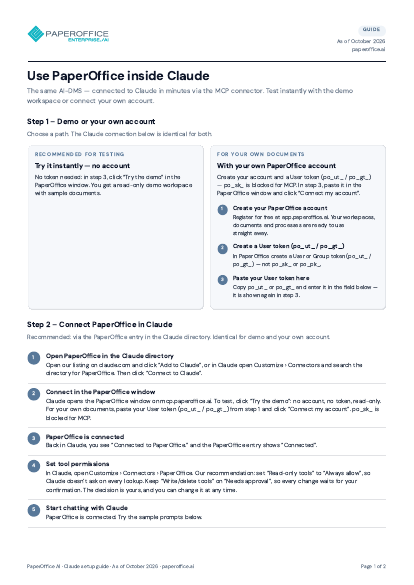
Setting up PaperOffice in Claude: guide
Demo or your own account, connecting via the Claude directory or as a custom connector, tool permissions and example prompts – step by step.
The file is available in English and German; you download the version in the language of this page. Free, no registration.
Trusted by leading companies worldwide








OEM PARTNERSHIP
Hardware giants choose PaperOffice exclusively.

Sole official DMS partner for QNAP: Classic app, AI BYOS.
More

Sole official DMS partner for ASUSTOR: Classic app, AI BYOS.
MoreWhat's inside
- Step 1 – Demo or your own account
- Step 2 – Connect PaperOffice in Claude
- Step 3 – Example prompts
Who it is for
Teams that want to use PaperOffice directly inside Claude – with the demo workspace without an account or with their own PaperOffice account.
Key facts
- Three steps: choose an account, connect PaperOffice in Claude, example prompts
- Connect via the PaperOffice entry in the Claude directory or as a custom connector
- Tool permissions are confirmed in Claude per connection
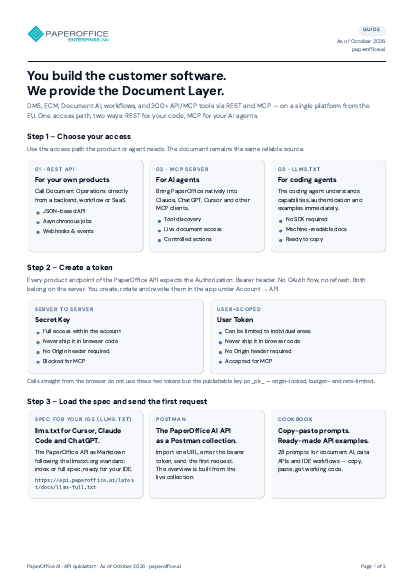
- Connector verified by Anthropic with more than 300 governed operations
Questions and answers
Frequently asked questions about this download
Do I need a PaperOffice account?
Not to try it out: the demo workspace can be connected without an account. For your own documents you connect Claude to your PaperOffice account.
How do I connect PaperOffice to Claude?
Recommended via the PaperOffice entry in the Claude directory; alternatively as a custom connector. Afterwards you confirm the tool permissions in Claude.
What can I ask Claude then?
Search documents, summarize content, extract fields, trigger workflows or retrieve analytics – the guide contains example prompts to copy.
Need personalized advice?
Our experts are happy to help you choose the right solution.
Request consultation