



DownloadGuidesPDF · EN2 pages
API quickstart: first request, tokens, limits, MCP
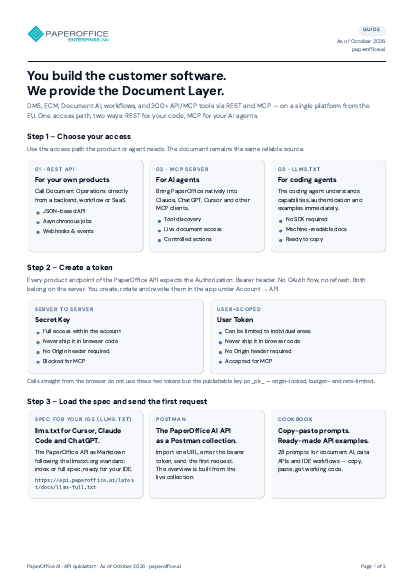
Choose your access (REST, MCP, llms.txt), create a token, load the spec and send the first request, permissions and rate limits, MCP for AI agents – the developer entry point on two pages.
The file is available in English and German; you download the version in the language of this page. Free, no registration.
Trusted by leading companies worldwide








OEM PARTNERSHIP
Hardware giants choose PaperOffice exclusively.

Sole official DMS partner for QNAP: Classic app, AI BYOS.
More

Sole official DMS partner for ASUSTOR: Classic app, AI BYOS.
MoreWhat's inside
- Step 1 – Choose your access
- Step 2 – Create a token
- Step 3 – Load the spec and send the first request
- Step 4 – Permissions and limits
- Step 5 – MCP for AI agents
- Next: webhooks, publishable keys
Who it is for
Developers and integrators who build PaperOffice into their own products as a Document Layer or connect AI agents via MCP – the entry point in five steps.
Key facts
- Five steps: choose access, create a token, load the spec and send the first request, permissions and limits, MCP
- Three ways in: REST API, MCP server, llms.txt for coding agents
- Secret key and user token: every product endpoint expects Authorization: Bearer
- Next: webhooks, publishable keys, Postman collection and cookbook
Questions and answers
Frequently asked questions about this download
Which access paths are there?
The REST API for your own products, the MCP server for AI agents in Claude, ChatGPT, Grok and Cursor, and llms.txt for coding agents such as Cursor, Claude Code and ChatGPT.
How do I authenticate requests?
With a token in the Authorization: Bearer header. A user token carries exactly the areas you grant it at creation time; secret keys stay on the server.
Where do I find the full documentation?
At paperoffice.ai/en/developer/ and in the llms-full.txt spec at api.paperoffice.ai/latest/docs/ – endpoints, limits and plans are always current there.

Need personalized advice?
Our experts are happy to help you choose the right solution.
Request consultation