



DownloadDatasheetsPDF · EN2 pages
Datasheet: Compliance with PaperOffice AI
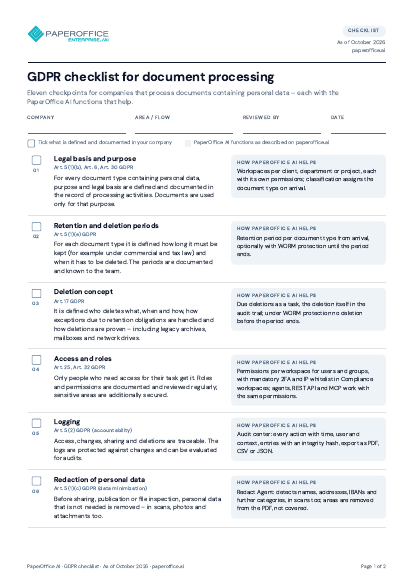
Three security tiers per workspace, a compliance workspace in three steps, Audit Center, retention and redaction, evidence (DPA, TOM, ISO/IEC 27001) plus operations and encryption – on two pages.
The file is available in English and German; you download the version in the language of this page. Free, no registration.

Trusted by leading companies worldwide








OEM PARTNERSHIP
Hardware giants choose PaperOffice exclusively.

Sole official DMS partner for QNAP: Classic app, AI BYOS.
More

Sole official DMS partner for ASUSTOR: Classic app, AI BYOS.
MoreWhat's inside
- Three security tiers per workspace
- How a compliance workspace is set up
- Audit Center
- Retention, redaction, integrity
- Evidence and documents
- Operations and encryption
Who it is for
Compliance owners, data protection officers and IT security who want to know how PaperOffice AI secures workspaces, provides evidence and enforces retention.
Key facts
- Three security tiers per workspace: Standard, Business, Compliance
- Audit Center: who did what with which document and when, findings by severity
- Retention per document type with WORM protection, redaction of personal data, integrity check
- Evidence: DPA generator, TOMs, ISO/IEC 27001 (certificate under NDA), SOC 2 Type II in preparation
Questions and answers
Frequently asked questions about this download
What is a compliance workspace?
A workspace of the highest security tier: created with name, purpose and type, with retention periods, WORM protection and extended logging. The tier is chosen at creation and applies to every document inside.
Which evidence can I present to auditors?
A data processing agreement from the DPA generator, the technical and organizational measures (TOMs), the log from the Audit Center and, on request under NDA, the ISO/IEC 27001 certificate; SOC 2 Type II is in preparation.
Where are documents processed?
In the company’s own PaperOffice DataCenter in Navarra, Spain: documents in, results out – no external AI providers, no AI subprocessors and no training on your data.

Need personalized advice?
Our experts are happy to help you choose the right solution.
Request consultation