


Adobe Acrobat Sign
- Acrobat Sign: podpis v cloudu Adobe. PaperOffice: podpis plus dokument, IDP a MCP.
vs Adobe Acrobat Sign
Acrobat Sign podepisuje soubory; PaperOffice podepisuje objekt v agendě.
Made for real business. Not for hype.
Signature flow from August 5, 2026 · SES · from €6 per 1,000 pages
1 · Choose action
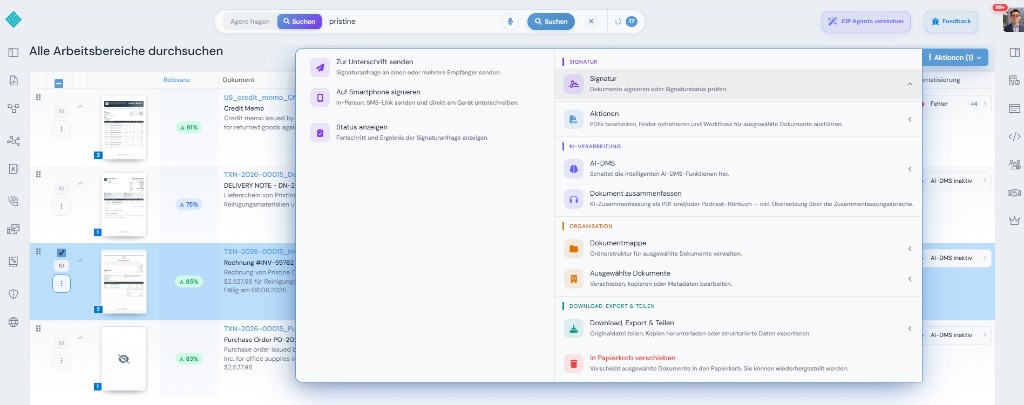
2 · Set up mobile signature
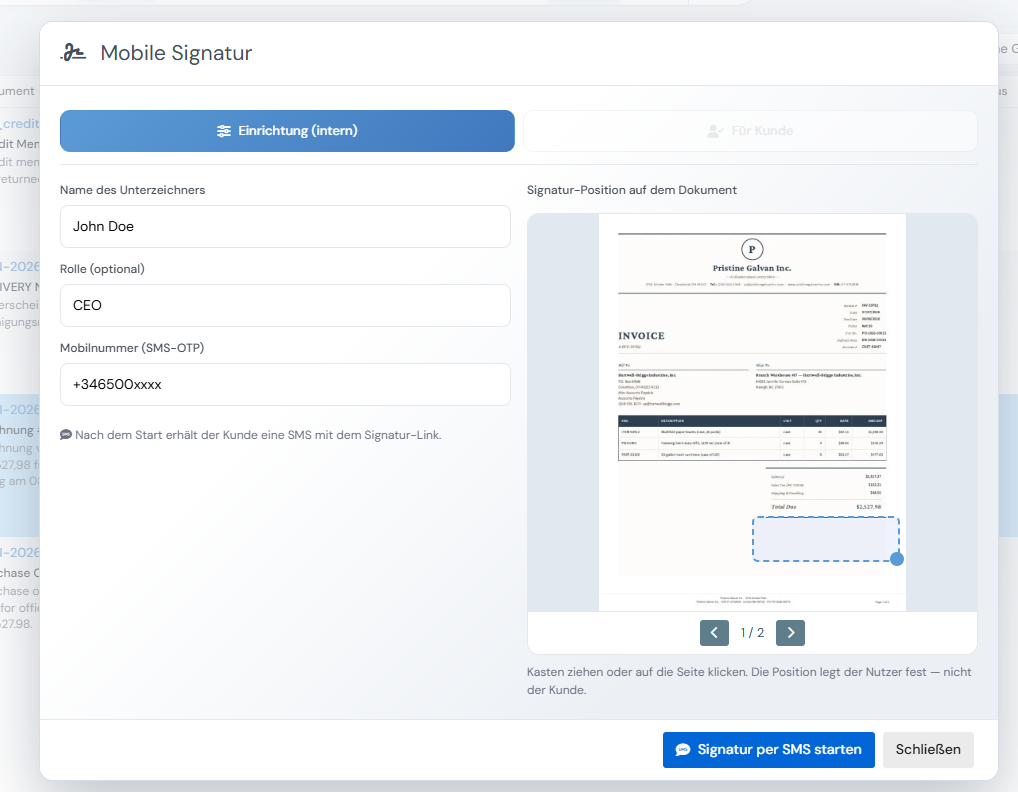
Na mobilu — umístění, podpis, hotovo
3 · Location captured
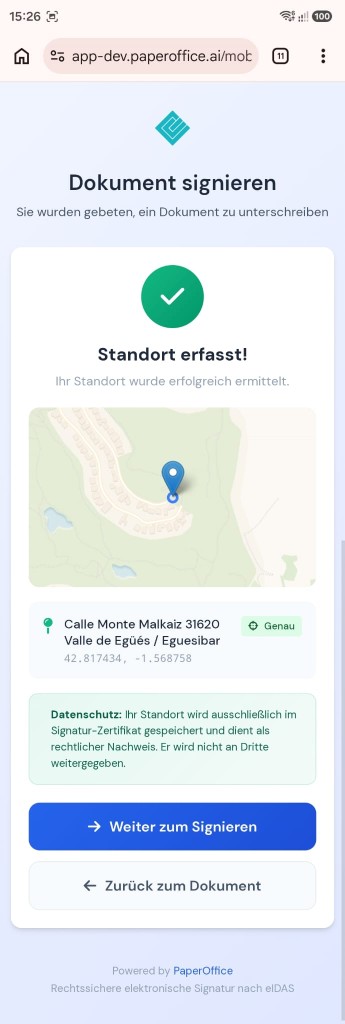
GPS in the signature certificate — eIDAS evidence, not shared with third parties.
4 · Sign on mobile
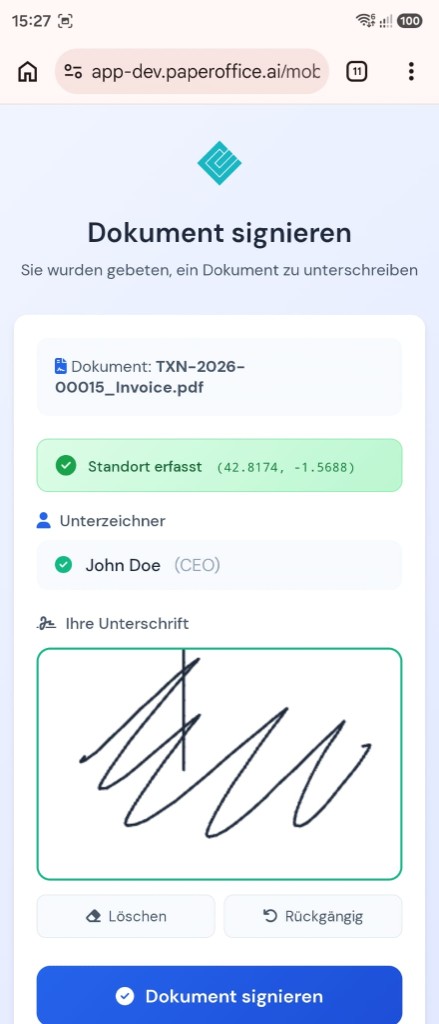
Signer sees document, location and signature pad.
5 · Successfully signed
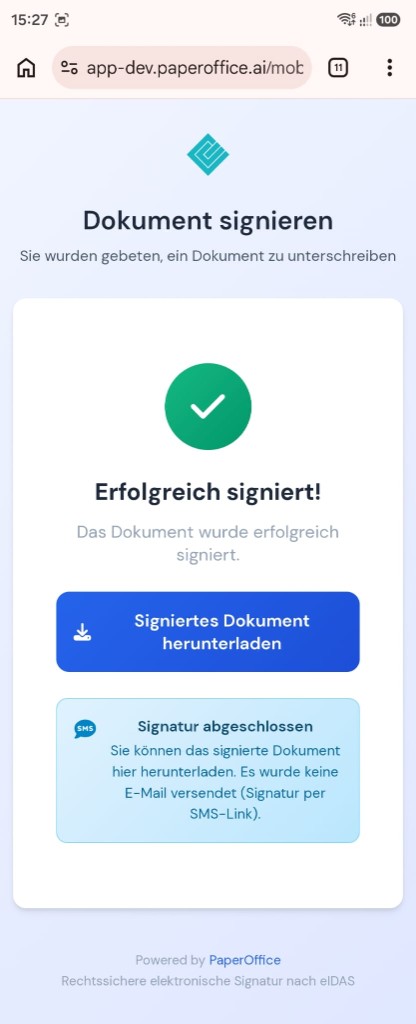
Download the signed document — SES via SMS link.
Ve stejném účtu
SES workflows, reminders and status via API.
SES from the balance
IDP fields before and after signature.
od €6 per 1,000 pages
Announcements and confirmations with over 840 voices.
od €0.03 per 1,000 characters
File the signed document in an audit-proof archive.
included
vs Adobe Acrobat Sign
Adobe Acrobat Sign má veřejné tarify; tabulka zobrazuje model fakturace (stav 09/2026).
| Kritérium | PaperOffice | Adobe Acrobat Sign |
|---|---|---|
| Bounding Boxes (úroveň slov/řádků) | Ano (úroveň slov/řádků, Surya OCR) | n/a |
| PDF-Sandwich / prohledatelný archivní PDF | Ano — prohledatelný archivní PDF | n/a |
| Kliknutí k dokumentu / vizuální validace (HITL) | Ano — kliknutí na doklad / HITL | n/a |
| Strukturovaná IDP pole (připravené typy) | 69 hotových typů dokumentů včetně DATEV/ZUGFeRD/XRechnung | n/a |
| DMS/Archiv včetně (WORM, Audit, Legal Hold) | Ano — WORM, Audit Trail, Legal Hold | Ne — žádný archiv dokumentů/DMS (čistě řešení elektronického podpisu; externí archiv nutný) |
| E-Signaturen am selben Dokument | Ano — na stejném dokumentu v archivu | Acrobat Sign: zaměření na podpis |
| Nativní MCP-server (počet nástrojů) | Ano — 300+ API/MCP nástrojů | Žádný oficiální MCP-server od výrobce pro Acrobat Sign — pouze projekty třetích stran/comunity (např. Zapier, viaSocket); Oficiální MCP-servery Adobe platí pro jiné produkty (stav 09/2026) |
| Úrovně podpisu eIDAS | SES (eIDAS) + zabezpečení důkazů: SMS-OTP, Audit Trail, GPS, WORM archiv | Úrovně Adobe Sign podle plánu |
| Pracovní postupy podpisu přes API | až 10 podpisů, paralelně nebo po sobě; automatické připomínky | Acrobat Sign pracovní postupy a API — podpis, žádný proces DMS |
| Pricing model | One credit balance for all features: from €6.00–€60.00 per 1,000 pages by quality tier | Předplatné na uživatele (měsíčně/ročně); Týmové tarify s ročním stropem transakcí na uživatele; Podnikové podmínky pouze přes obchodní oddělení |
| List price per 1,000 pages | Basic €20.00 / Premium €60.00 / Ultra €200.00 za každých 1.000 stran (2/6/20 ct) | Veřejné tarify předplatného, ne podle stránky |
| Billing | from €6.00 per 1,000 pages (Elite) — same scale on every tier | n/a |
Zdroj: https://www.adobe.com/acrobat/business/pricing-plans.html, staženo 09/2026. Ceny se mohou změnit.
Adobe Acrobat Sign je ochrannou známkou příslušného držitele práv. PaperOffice není se Adobe Acrobat Sign spojen a tento produkt nedoporučuje. Uvedení o konkurentovi vychází z veřejně dostupných zdrojů (stav 08/2026) a probíhá bez záruky.
Naše ceny jsou veřejné — včetně partnerských podmínek.
Jednotka: Price per 1,000 pages
| Tier | Elite Partner (−70%) | Partner (−40%) | Enduser |
|---|---|---|---|
| Basic | €6.00 | €12.00 | €20.00 |
| Premium | €18.00 | €36.00 | €60.00 |
| Ultra | €60.00 | €120.00 | €200.00 |
Fakturace je interní v Credits; částky odpovídají vybrané měně (základ: seznamová cena).
Podmínky Elite po kvalifikaci — kritéria a program jsou veřejné: Ceny · Program pro partnery
Kdo pevně využívá Acrobat Sign v ekosystému Adobe Document Cloud s Acrobat licenci a existujícími pracovními postupy podpisu, tam zůstane. Spis DMS před a po podpisu je jiný produkt.
Pokud naopak platí přístup založený na API, Credits a MCP bez nutnosti klienta nebo balíku suite, je PaperOffice lepší volbou.
Důvěra předních společností po celém světě








Kdo pevně využívá Acrobat Sign v ekosystému Adobe Document Cloud s Acrobat licenci a existujícími pracovními postupy podpisu, tam zůstane. Spis DMS před a po podpisu je jiný produkt.
Adobe Acrobat Sign: žádné veřejné balíčky s naším seznamovým ceníkem na této stránce. PaperOffice účtuje Credits — Basic 2 ct, Premium 6 ct, Ultra 20 ct za stránku, partnerké podmínky veřejné.
Acrobat Sign podepisuje soubory; PaperOffice podepisuje objekt ve spisu. PaperOffice provozuje vlastní servery v EU a ukládá výsledek revizně bezpečně.
vs Adobe Acrobat Sign
https://api.paperoffice.ai/latest/docs/llms-full.txt Nebo připojte přímo: server MCP pro Claude, Cursor a ChatGPT →
Vytvořit žádost o podpis
curl -X POST "https://api.paperoffice.ai/latest/signatures/create" \ -H "Authorization: Bearer poai_xxx" \ -H "Content-Type: application/json" \ -d '{"document_pofid":"pofid_…","signers":[{"email":"a@firma.de","name":"A","phone":"+491701234567"}],"channel":"none"}'{ "status": "success", "data": { "request_id": "…" }
}Úplné parametry: llms-full.txt / Postman.
Ano — pokud oproti Adobe Acrobat Sign potřebujete nejen dílčí krok, ale zachycení, pochopení, archiv a akci v jednom účtu. Výše uvedený srovnání ukazuje rozdíly bod po bodu.
Basic 2 ct, Premium 6 ct, Ultra 20 ct za stránku — ceník společnosti PaperOffice je veřejný. Adobe Acrobat Sign má také veřejné tarify; tabulka zobrazuje model fakturace.
Adobe Acrobat Sign řeší především základní úkol popsaný na této stránce. PaperOffice udržuje extrakci, archiv (WORM), práva, HITL a MCP u stejného dokumentu — s veřejným ceníkem za stránku.
Z Adobe Acrobat Sign: Připravte stav jako ZIP/zdroj skenů, spusťte importovací úlohu, poté workflow přes REST a MCP. Žádný povinný partnerský projekt. llms-full.txt: Import & migrace.
Na našich vlastních serverech v EU — včetně revizně bezpečného uložení a auditního záznamu. Rezidenci Adobe Acrobat Sign zjistíte z údajů poskytovatele.
Přechod z Adobe Acrobat Sign typicky začíná tokenem + importovací API — Self-Service místo povinného projektu. Nejrychleji s llms-full.txt.
Další srovnání ve stejné kategorii jako Adobe Acrobat Sign.
PaperOffice vs DocuSign →Další srovnání ve stejné kategorii jako Adobe Acrobat Sign.
PaperOffice vs Skribble →Další srovnání ve stejné kategorii jako Adobe Acrobat Sign.
PaperOffice vs Yousign →Další srovnání ve stejné kategorii jako Adobe Acrobat Sign.
PaperOffice vs PandaDoc →Další srovnání ve stejné kategorii jako Adobe Acrobat Sign.
PaperOffice vs Dropbox Sign (HelloSign) →Další srovnání ve stejné kategorii jako Adobe Acrobat Sign.
PaperOffice vs SignNow (airSlate) →Spustit token, nahlédnout do cen, porovnat matici funkcí.


Integrator a Reseller lze kombinovat. Doporučení na pozvání.
Zobrazit partnerský program
AI-DMS
Dokumenty. Inteligence. Skutečný dopad.
PaperOffice AI je AI-DMS. Čtyři funkční oblasti postavené na společném základu DMS, dostupné třemi přístupy.
Přehled funkcí, modulů a výhod.
Zachytávejte, organizujte, vyhledávejte a sdílejte dokumenty.
Bezproblémově integrovat do vašich systémů a AI pracovních postupů.
Žádná instalace, připraveno během několika sekund.
Prohledat všechny nástroje














