

Adobe Acrobat Sign
- Acrobat Sign: handtekening in de Adobe Cloud. PaperOffice: handtekening plus dossier, IDP en MCP.


vs Adobe Acrobat Sign
Acrobat Sign ondertekent bestanden; PaperOffice ondertekent het object in het dossier.
Made for real business. Not for hype.
Signature flow from August 5, 2026 · SES · from €6 per 1,000 pages
1 · Choose action
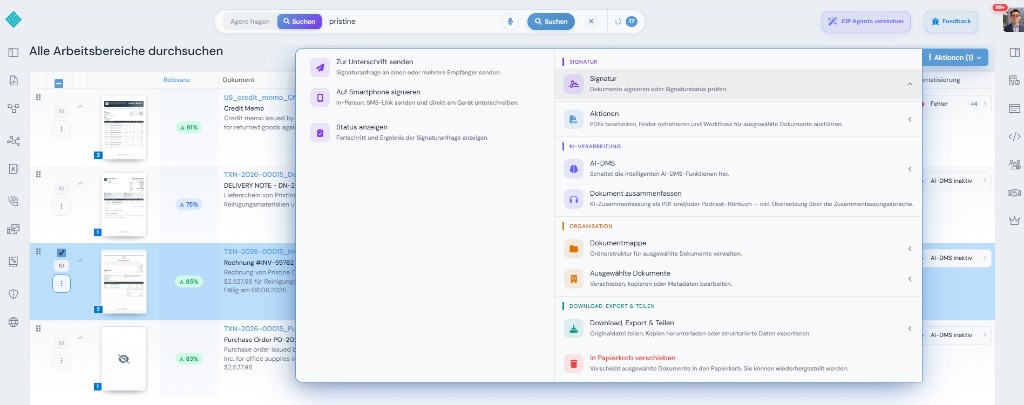
2 · Set up mobile signature
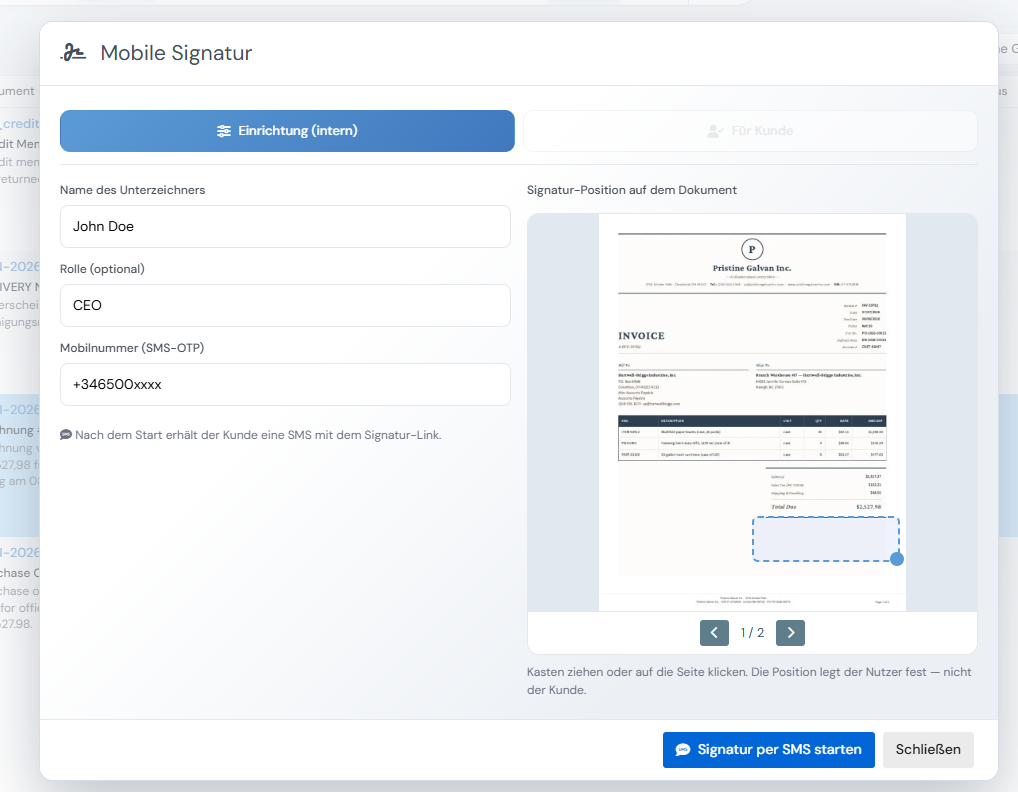
Op mobiel — locatie, handtekening, klaar
3 · Location captured
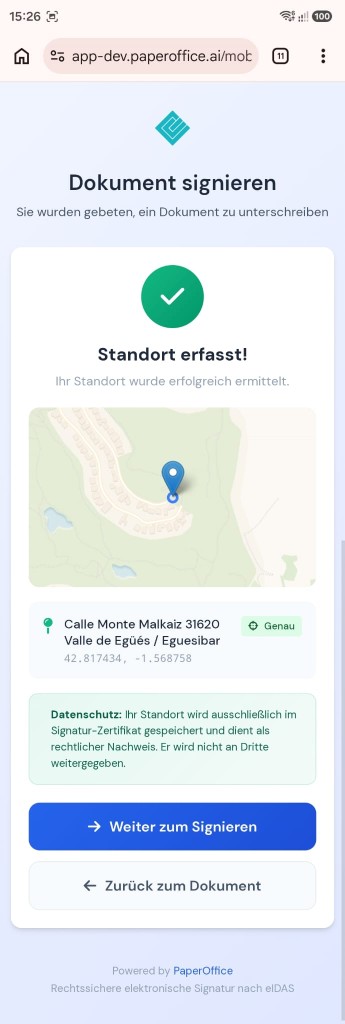
GPS in the signature certificate — eIDAS evidence, not shared with third parties.
4 · Sign on mobile
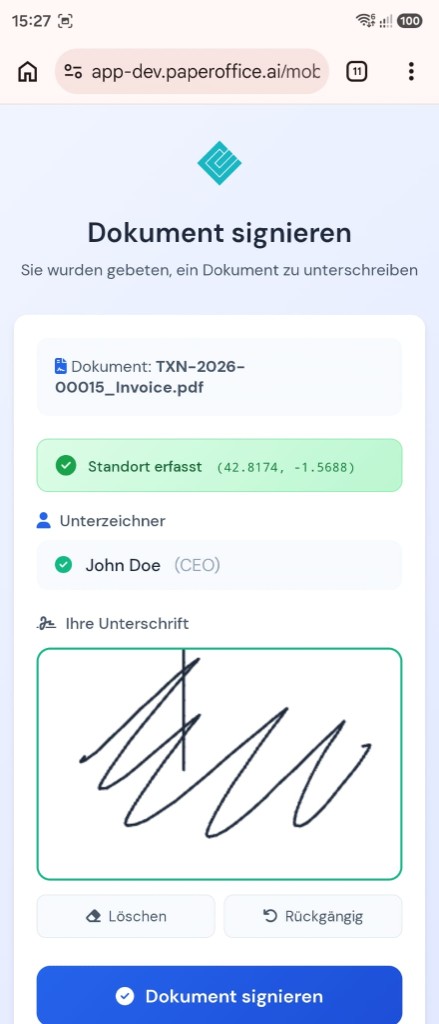
Signer sees document, location and signature pad.
5 · Successfully signed
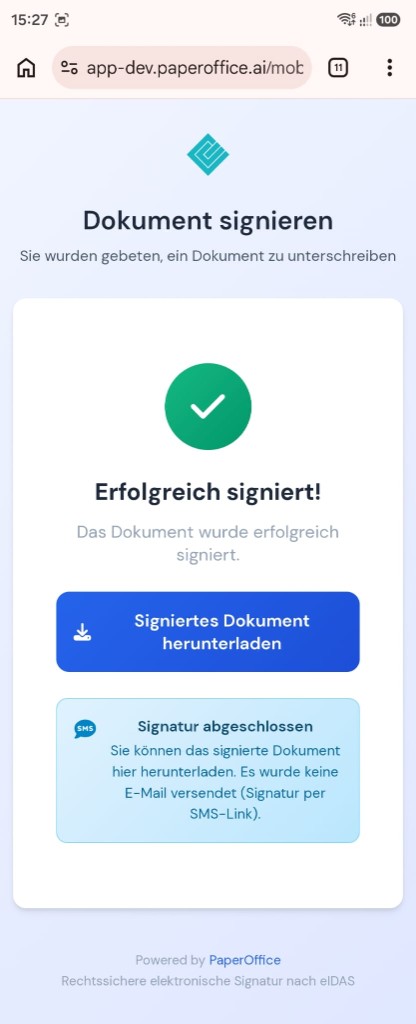
Download the signed document — SES via SMS link.
In hetzelfde account
SES workflows, reminders and status via API.
SES from the balance
IDP fields before and after signature.
vanaf €6 per 1,000 pages
Announcements and confirmations with over 840 voices.
vanaf €0.03 per 1,000 characters
File the signed document in an audit-proof archive.
included
vs Adobe Acrobat Sign
Adobe Acrobat Sign heeft openbare tarieven; de tabel toont het facturatiemodel (stand 09/2026).
| Criterium | PaperOffice | Adobe Acrobat Sign |
|---|---|---|
| Bounding Boxes (woord-/regeliveau) | Ja (woord-/regeliveau, Surya OCR) | n/a |
| Sandwich-PDF / doorzoekbaar archief-PDF | Ja — doorzoekbaar archief-PDF | n/a |
| Klik-naar-bewijs / visuele validatie (HITL) | Ja — klik-naar-document / HITL | n/a |
| Gestructureerde IDP-velden (kant-en-klare typen) | 69 kantoon documenttypen inclusief DATEV/ZUGFeRD/XRechnung | n/a |
| DMS/archief inbegrepen (WORM, audit, legal hold) | Ja — WORM, audit trail, legal hold | Nee — geen documentenarchief/DMS (zuivere e-signatuur-oplossing; extern archief nodig) |
| E-handtekeningen op hetzelfde document | Ja — op hetzelfde document in het archief | Acrobat Sign: focus op handtekening |
| Natieve MCP-server (aantal tools) | Ja — 300+ API/MCP-tools | Geen fabrikant-ondersteunde MCP-server voor Acrobat Sign — alleen derden-/community-projecten (bijv. Zapier, viaSocket); de officiële MCP-servers van Adobe gelden voor andere producten (standaard 09/2026) |
| eIDAS-handtekeningniveaus | SES (eIDAS) + bewijszekerheid: SMS-OTP, audit trail, GPS, WORM-archief | Adobe Sign-stadia per plan |
| Handtekening-workflows via API | tot 10 ondertekenaars, parallel of achtereenvolgens; automatische herinneringen | Acrobat Sign-workflows en API — handtekening, geen DMS-proces |
| Pricing model | One credit balance for all features: from €6.00–€60.00 per 1,000 pages by quality tier | Abonnement per gebruiker (maandelijks/jaarlijks); Teamtarieven met jaarlijkse transactielimiet per gebruiker; Enterprise-condities alleen via de verkoopafdeling |
| List price per 1,000 pages | Basic €20.00 / Premium €60.00 / Ultra €200.00 per 1.000 pagina's (2/6/20 ct) | Openbare abonnementsprijzen, niet per pagina |
| Billing | from €6.00 per 1,000 pages (Elite) — same scale on every tier | n/a |
Bron: https://www.adobe.com/acrobat/business/pricing-plans.html, geraadpleegd 09/2026. Prijzen kunnen wijzigen.
Adobe Acrobat Sign is een merk van de respectievelijke rechthebbende. PaperOffice staat niet in verbinding met Adobe Acrobat Sign en wordt door deze partij niet aanbevolen. Gegevens over de concurrent zijn gebaseerd op openbaar beschikbare bronnen (stand 08/2026) en geschieden zonder garantie.
Onze prijzen zijn openbaar — ook de partnercondities.
Eenheid: Price per 1,000 pages
| Tier | Elite Partner (−70%) | Partner (−40%) | Enduser |
|---|---|---|---|
| Basic | €6.00 | €12.00 | €20.00 |
| Premium | €18.00 | €36.00 | €60.00 |
| Ultra | €60.00 | €120.00 | €200.00 |
Facturering is intern in Credits; bedragen volgen de geselecteerde valuta (basis: lijstprijs).
Elite-condities na kwalificatie — criteria en programma zijn openbaar: Prijzen · Partnerprogramma
Wie Acrobat Sign vast in het Adobe-Document-Cloud-ecosysteem gebruikt met Acrobat-seats en bestaande Sign-workflows, blijft daar. Het DMS-dossier vóór en na de handtekening is een ander product.
Als API-first, Credits en MCP zonder client- of suite-dwang tellen, is PaperOffice de betere match.
Vertrouwd door toonaangevende bedrijven wereldwijd








Wie Acrobat Sign vast in het Adobe-Document-Cloud-ecosysteem gebruikt met Acrobat-seats en bestaande Sign-workflows, blijft daar. Het DMS-dossier vóór en na de handtekening is een ander product.
Adobe Acrobat Sign: geen door ons als lijstprijs vastgelegde openbare pakketten op deze pagina. PaperOffice rekent Credits — Basic 2 ct, Premium 6 ct, Ultra 20 ct per pagina, partnercondities openbaar.
Acrobat Sign ondertekent bestanden; PaperOffice ondertekent het object in het dossier. PaperOffice beheert eigen servers in de EU en bewaart het resultaat revisionssafe.
vs Adobe Acrobat Sign
https://api.paperoffice.ai/latest/docs/llms-full.txt Of verbind direct: MCP-server voor Claude, Cursor en ChatGPT →
Handtekeningaanvraag aanmaken
curl -X POST "https://api.paperoffice.ai/latest/signatures/create" \ -H "Authorization: Bearer po_sk_xxx" \ -H "Content-Type: application/json" \ -d '{"document_pofid":"pofid_…","signers":[{"email":"a@firma.de","name":"A","phone":"+491701234567"}],"channel":"none"}'{ "status": "success", "data": { "request_id": "…" }
}Volledige parameters: llms-full.txt / Postman.
Ja — wanneer naast Adobe Acrobat Sign niet slechts een deelschritt, maar vastlegging, begrip, archief en actie in één account nodig zijn. De bovenstaande vergelijking toont het verschil punt voor punt.
Basic 2 ct, Premium 6 ct, Ultra 20 ct per pagina — de prijslijst van PaperOffice is openbaar. Adobe Acrobat Sign heeft eveneens openbare tarieven; de tabel toont het facturatiemodel.
Adobe Acrobat Sign lost vooral de kernopdracht op die op deze pagina wordt beschreven. PaperOffice houdt extrahering, archief (WORM), rechten, HITL en MCP bij hetzelfde document — met een openbare prijslijst per pagina.
Uit Adobe Acrobat Sign: bestaande data voorbereiden als ZIP/scan-bron, importjob starten, daarna workflows via REST en MCP. Geen verplicht partnerproject. llms-full.txt: Import & migratie.
Op onze eigen servers in de EU — inclusief bewijslastvrije opslag en audittrail. De locatie van Adobe Acrobat Sign vindt u in de gegevens van de aanbieder.
De overstap van Adobe Acrobat Sign start doorgaans met token + import-API — self-service in plaats van verplicht project. Het snelst met llms-full.txt.
Verdere vergelijking in dezelfde categorie als Adobe Acrobat Sign.
PaperOffice vs DocuSign →Verdere vergelijking in dezelfde categorie als Adobe Acrobat Sign.
PaperOffice vs Skribble →Verdere vergelijking in dezelfde categorie als Adobe Acrobat Sign.
PaperOffice vs Yousign →Verdere vergelijking in dezelfde categorie als Adobe Acrobat Sign.
PaperOffice vs PandaDoc →Verdere vergelijking in dezelfde categorie als Adobe Acrobat Sign.
PaperOffice vs Dropbox Sign (HelloSign) →Verdere vergelijking in dezelfde categorie als Adobe Acrobat Sign.
PaperOffice vs SignNow (airSlate) →Tokens starten, prijzen bekijken, functiematrix vergelijken.
Kies taal
Selecteer valuta

Integrator en Reseller combineerbaar. Doorverwijzing op uitnodiging.
Partnerprogramma bekijken
AI-DMS
Documenten. Intelligentie. Echte impact.
PaperOffice AI is het AI-DMS. Vier functiegebieden op één DMS-fundament, bereikbaar via drie toegangen.
Functies, modules en voordelen in overzicht.
Documenten vastleggen, organiseren, zoeken en samen bewerken.
Naadloos integreren in uw systemen en AI-workflows.




