

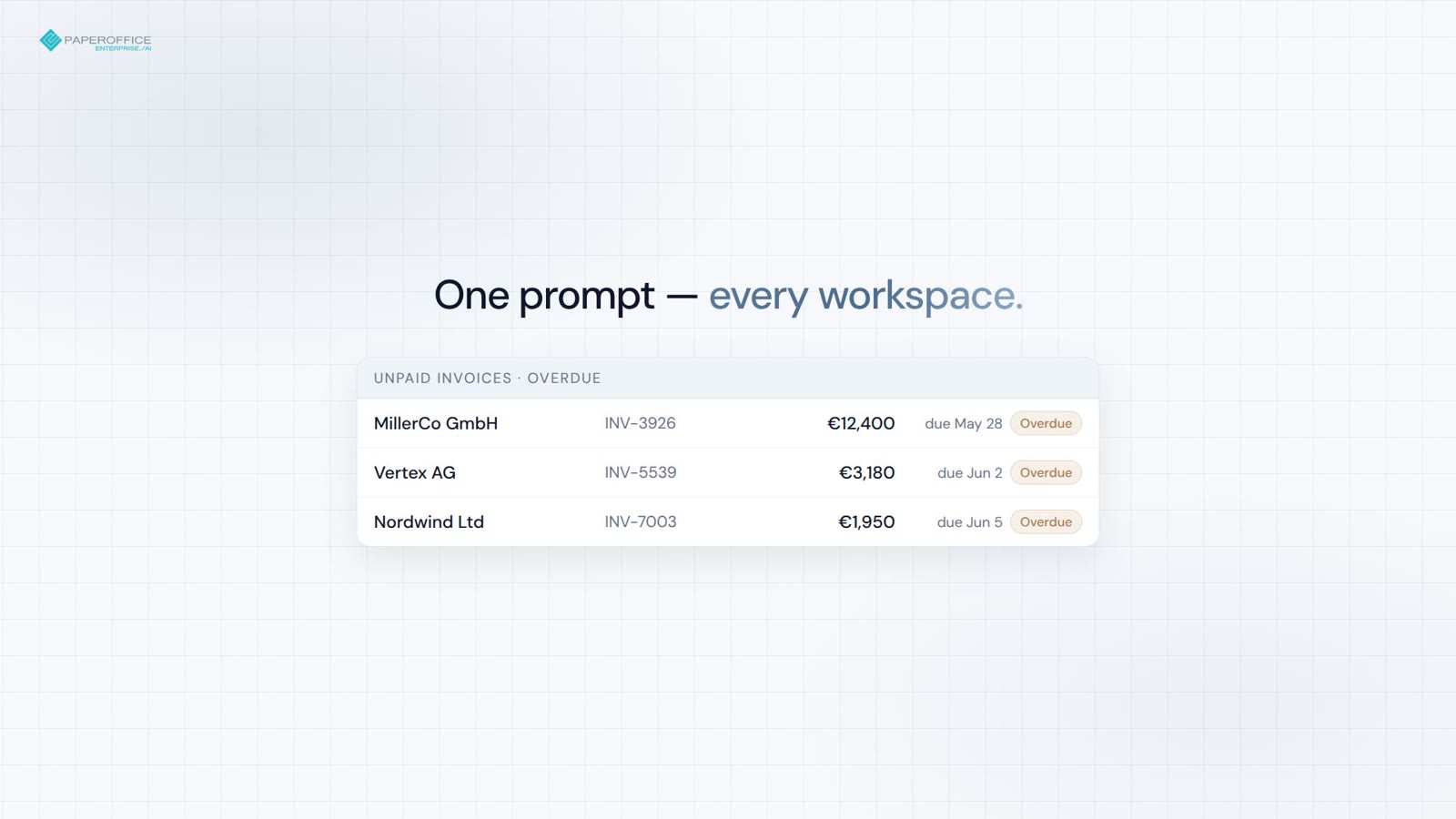
월말 송장
모든 Workspace의 미지급 송장 — 단일 프롬프트로 합계 및 연체 플래그 확인.
MCP 서버
PaperOffice MCP 서버는 Claude, ChatGPT, Grok 및 Cursor에 문서, 검색, 워크플로우 및 분석을 제공합니다.
채팅 도구를 선택하세요. 안내서가 클릭 하나하나를 상세히 보여줍니다. OAuth 2.1, 설치 불필요.

빠른 시작
Claude, ChatGPT, Grok 또는 Cursor의 클릭 하나하나를 안내해 드립니다. 아래에는 복사할 코드 조각만 있습니다.
/claude 디렉토리, 데모 또는 본인 계정.
/chatgpt Connector, 데모 또는 본인 계정.
/grok Grok Bot를 이 URL과 연결하십시오.
/cursor 사용자 토큰으로 mcp.json.
복사할 코드 조각
{
  "mcpServers": {
    "paperoffice": {
      "url": "https://mcp.paperoffice.ai/claude"
    }
  }
}
Claude 디렉토리 URL — OAuth 2.1. TTS 없는 문서 작업. /claude 삽입; 스니펫에 Bearer 없음.
{
  "mcpServers": {
    "paperoffice": {
      "url": "https://mcp.paperoffice.ai/cursor",
      "headers": {
        "Authorization": "Bearer po_ut_..."
      }
    }
  }
}
/dms와 동일한 문서 작업 카탈로그(TTS 포함) — 사용자 토큰(po_ut_ / po_gt_), po_sk_ 아님.
{
  "mcpServers": {
    "paperoffice": {
      "url": "https://mcp.paperoffice.ai/chatgpt",
      "headers": {
        "Authorization": "Bearer po_ut_..."
      }
    }
  }
}
표준 URL: /openai(별칭)인 /chatgpt. 비즈니스 문서용 선별된 도구 세트 — 각 도구가 TTS, OTP 및 잠금 해제 도구를 제외하고 개별적으로 나열됩니다. OAuth 2.1 또는 사용자 토큰(po_ut_ / po_gt_) 사용 — po_sk_ 아님.
{
  "mcpServers": {
    "paperoffice-dms": {
      "url": "https://mcp.paperoffice.ai/dms"
    },
    "paperoffice-full": {
      "url": "https://mcp.paperoffice.ai/mcp-full"
    }
  }
}
실제 경로: /dms, /cursor, /claude, /openai(별칭)인 /chatgpt, /grok, /muse, /mcp, 300개 이상의 도구를 포함하는 /mcp-full.
엔드포인트
각 프로필은 동일한 서버를 가리킵니다 — 도구 범위의 차이만 있습니다. 어떤 URL이 어떤 용도에 적합한지는 아래 표를 참조하세요.
/dms Document Operations — /dms 및 /cursor에서 동일한 카탈로그. 표준 URL.
https://mcp.paperoffice.ai/dms /claude 디렉토리: TTS 없는 Document Operations — Claude-Directory-URL.
https://mcp.paperoffice.ai/claude /cursor /dms와 동일한 Document-Operations 카탈로그 (TTS 포함).
https://mcp.paperoffice.ai/cursor /chatgpt ChatGPT 커넥터 — 비즈니스 문서(송장, 계약서, 납품서, 영수증) 및 지식 베이스 항목용 선별된 도구 세트, 각 도구가 개별적으로 나열됨. TTS 및 Workspace 잠금 해제 기능 제외. 별칭: /openai.
https://mcp.paperoffice.ai/chatgpt Alias: https://mcp.paperoffice.ai/openai
/grok Grok Bot — ChatGPT에서만 사용 가능한 첨부 파일 업로드 기능을 제외한 /chatgpt과 동일한 선별된 도구입니다. 각 도구는 개별적으로 나열됩니다.
https://mcp.paperoffice.ai/grok /muse 메타-Muse 커넥터 — /chatgpt과 동일한 큐레이션된 도구를 사용하며(ChatGPT에서만 사용 가능한 첨부 파일 업로드는 제외), 각 도구는 개별적으로 나열됩니다.
https://mcp.paperoffice.ai/muse /mcp 경량 IDE 세트 — /cursor의 문서 운영 카탈로그가 아닙니다.
https://mcp.paperoffice.ai/mcp /mcp-full 파워 워크플로우를 위한 모든 MCP 도구(300개 이상).
https://mcp.paperoffice.ai/mcp-full /openai는 /chatgpt의 별칭으로 계속 접근 가능합니다. 폐쇄된 모듈 경로는 HTTP 410로 응답합니다.
기능 매트릭스
작업당 한 줄: 권장 URL 및 그 이유. 이 표는 이 페이지의 유일한 전체 경로 목록입니다.
| 작업 | 권장 URL | 이유 |
|---|---|---|
| 문서 작업 (정규) | /dms | Document Operations(300개 이상의 MCP 도구) — /dms 및 /cursor에서 동일한 카탈로그. |
| Claude 데스크톱 / Claude 코드 (디렉토리 URL) | /claude | 디렉토리: TTS 없는 문서 작업. 각 도구별 제목 및 참고 사항. |
| Cursor 코딩 중 IDE | /cursor | /dms와 동일한 문서 작업 카탈로그 (TTS 포함). |
| ChatGPT 커넥터 | /chatgpt | ChatGPT 커넥터 — 비즈니스 문서 및 지식 베이스 항목용 선별된 도구, 각 도구가 개별적으로 나열됨(도구 참조 참조). 별칭: /openai. |
| Grok Bot | /grok | ChatGPT에서만 사용 가능한 첨부 파일 업로드 기능을 제외한 /chatgpt과 동일한 선별된 도구입니다. 연결 프롬프트가 있는 Grok Bot를 통해 연결합니다. |
| 메타-Muse 커넥터 | /muse | /grok와 동일한 큐레이션된 도구: /chatgpt의 세트(ChatGPT에서만 사용 가능한 첨부 파일 업로드는 제외)이며, 각 도구는 도구 참조에 개별적으로 나열됩니다. |
| 경량 IDE 세트 | /mcp | 검색, 읽기, 분석을 위한 컴팩트한 세트이며, 업로드 및 지식 데이터베이스 문서 기능도 포함됩니다. 문서 운영 카탈로그는 아닙니다. |
| 복잡한 다단계 작업 | /mcp-full의 po_agents_ask | 호스트 LLM 에이전트는 /dms가 아닌 전체 표면에서 유지됩니다. |
| 마이그레이션 / 모든 MCP 도구 | /mcp-full | 디버깅 및 레거시 에이전트를 위한 완전한 MCP 인터페이스(300개 이상 도구) |
해체된 모듈 경로는 HTTP 410으로 응답합니다. Document Operations /dms를 사용하세요.
도구 참조
/chatgpt(별칭: /openai)은 56개의 도구를 나열하며, /muse 및 /grok는 55개의 도구를 나열합니다(ChatGPT에서만 사용 가능한 첨부 파일 업로드는 제외). 각 작업은 고유한 설명, 입력 스키마 및 MCP 주석이 있는 개별 도구이며, 탐색 도구나 일반적인 실행기는 없습니다.
각 도구는 OAuth 2.1 with PKCE(Scope mcp:tools) 또는 PaperOffice 사용자 또는 그룹 토큰(po_ut_/po_gt_)을 필요로 합니다. po_sk_ 및 po_pk_은 거부됩니다. 호출은 연결된 PaperOffice 사용자의 권한으로 실행되며, 인수는 실행 전에 게시된 입력 스키마에 대해 검증됩니다.
MCP. 각 도구는 readOnlyHint, destructiveHint, idempotentHint 및 openWorldHint 주석을 포함합니다. 라벨링은 호출이 수행하는 작업을 요약합니다:
/chatgpt: 56개 도구(25 읽기, 18 쓰기, 13 민감한 쓰기). /muse 및 /grok: 55개 도구(25 읽기, 17 쓰기, 13 민감한 쓰기).
| 도구 | 표시명 | 사용 시기 | 입력값 | 출력 및 부작용 | 세션당 병렬 호출 수 |
|---|---|---|---|---|---|
po_workspaces_listList workspaces | 읽기 | The user names a workspace or asks which workspaces exist, or a workspace_id is needed. | 선택 사항limitoffsetsearchworkspace_id | Lists ID, name and document count. Locked workspaces are unlocked only in the PaperOffice app. | 4 |
po_documents_searchSearch documents | 읽기 | The user wants to find or list documents by number, name, keyword, type or date. Knowledge base: po_knowledge_search; sums by currency: po_analytics_financial_summary_get. | 필수queryworkspace_id선택 사항search_scopesearch_modelimitpagesort_bydate_fromdate_toissued_date_fromissued_date_todocument_typeinclude_summaryfilename_onlyinclude_historical | Returns pofid, sender, amount. | 4 |
po_documents_getGet document details | 읽기 | The user wants details of one document: type, sender, amounts, dates, summary, processing status. Stored data only; to extract invoice data use po_extraction_invoice. | 중 하나pofiddocuments_id선택 사항resolvecompact | 부작용이 없습니다. | 4 |
po_extraction_invoiceExtract invoice data | 쓰기 | The user asks to extract invoice data (supplier, number, dates, line items, VAT, total). Not for personal ID numbers. | 중 하나pofidfile_urlupload_id선택 사항modelidp_fields | Runs a new extraction job (uses credits); poll po_job_get. | 1 |
po_job_getGet job status | 읽기 | An extraction or PDF tool returned a job_id. | 필수job_id | Returns status and, once completed, the result. Poll until completed; stop if it failed. | 4 |
po_analytics_financial_summary_getSummarize document amounts | 읽기 | The user asks for totals or a summary of invoice amounts across documents, e.g. by currency. | 선택 사항periodworkspace_id | Sums extracted amounts of all documents (not only invoices) per currency, never mixing currencies. | 4 |
po_knowledge_searchSearch knowledge base | 읽기 | The user asks to search their knowledge base or help articles, or asks about their own policies, FAQs or how-tos. | 필수query선택 사항kb_idscategory_slugslanguagelimit | Returns matching articles with excerpts; for stored documents use po_documents_search. | 4 |
po_documents_create_from_contentCreate PDF from text | 쓰기 | The user asks to create or write a PDF or document (notes, letter, report). | 필수contenttitleworkspace_id선택 사항content_typemetadatalanguageauto_classifycustom_cssheader_htmlfooter_htmlidempotency_key | Pass Markdown text: PaperOffice renders and stores the PDF, returns name and pofid. Costs credits. | 1 |
po_documents_renameRename document | 민감한 쓰기 | The user wants to rename a document or change its file name. | 필수new_file_name중 하나pofiddocuments_id | Overwrites the file name; the original extension (e.g. .pdf) is kept. | 1 |
po_documents_text_getRead document text | 읽기 | The user needs the full text or exact wording of a document. | 중 하나pofiddocuments_id | Returns its OCR text (only after processing); emails, phone and ID numbers are masked where detected. | 4 |
po_documents_creator_agents_listList Creator Agents | 읽기 | The user wants a quote, letter or certificate on their own template, or asks which Creator Agents exist. | 없음 | Lists active agents (agent_id, name, template); then use po_documents_creator_agent_preview. | 4 |
po_documents_creator_agent_previewPreview agent document | 쓰기 | The user asks a Creator Agent to draft a document, e.g. a quote. | 필수agent_idprompt선택 사항variablessource_pofidworkspace_id | Fills the agent's template from the request, its knowledge bases and contacts; stores nothing, costs credits. Returns values, questions, preview_token. | 4 |
po_documents_creator_agent_runCreate agent document | 쓰기 | The user approved a Creator Agent preview and wants the document. | 필수agent_idpreview_tokenconfirm선택 사항variablesaccept_open_questions | Pass preview_token, confirm=true and answers in variables. Stores the PDF in the workspace (costs credits); a repeat returns the same document. | 1 |
po_documents_upload_filesStore chat attachments/chatgpt만 해당 | 쓰기 | The user wants to store files they attached in this chat. To create a PDF from text use po_documents_create_from_content. | 필수files선택 사항workspace_idai_dms_tieron_duplicate | One result per file; retries never store twice; workspace auto-processing may apply. If ChatGPT cannot pass an attachment to this tool (for example BLOCKED_FILE_REFERENCE), call it with files: [] to receive upload_url. | 1 |
po_knowledge_graph_askAsk across documents | 읽기 | A question spans many documents, e.g. which contracts have a termination clause. Best effort; not for knowledge base articles (po_knowledge_search) or totals (po_analytics_financial_summary_get). | 필수question선택 사항pofidsearch_scopeworkspace_idworkspace_idsperiod | 부작용이 없습니다. | 1 |
po_knowledge_get_articleRead knowledge article | 읽기 | The user wants to read one knowledge base article in full, e.g. after a search hit. | 필수id선택 사항language | Returns its title, text and summary in each language. | 4 |
po_analytics_financial_overdue_getList overdue invoices | 읽기 | The user asks which invoices are overdue. | 선택 사항periodworkspace_idlimitdays_overdue | Lists documents whose extracted due date has passed, most overdue first, with amount and currency; totals per currency, never mixed. Payment status is not checked. | 4 |
po_documents_processStart AI processing | 민감한 쓰기 | A stored document needs OCR and AI analysis, e.g. it has no text yet. | 필수ai_dms_tier중 하나pofiddocuments_id선택 사항confirm_reprocessconfirm_tier_downgrade | Runs in the background, costs credits; track via po_documents_get. Re-processing replaces the old analysis. | 1 |
po_documents_downloadGet download link | 읽기 | The user wants to download or save a document's file, e.g. the PDF. | 중 하나pofiddocuments_id | Returns a temporary link to the stored file, valid for about 10 minutes. | 4 |
po_documents_update_indexUpdate index fields | 민감한 쓰기 | The user wants to set or correct document metadata (index fields), e.g. document_type, sender_name, invoice_number, due_date, total_amount or currency. | 필수fields중 하나pofiddocuments_id선택 사항idempotency_key | Only the given fields are overwritten. | 1 |
po_documents_uploadUpload document from URL | 쓰기 | The user gives a public file URL to store, or wants a browser upload page (omit file_url). | 선택 사항upload_idfile_urlfile_nameworkspace_idai_dms_tier | Stores a new document; workspace auto-processing may apply. | 1 |
po_extraction_receiptExtract receipt data | 쓰기 | The user asks to extract receipt data (merchant, date, items, tax, total), e.g. for expenses. | 중 하나pofidfile_urlupload_id선택 사항modelidp_fields | Runs a new extraction job (uses credits); poll po_job_get. | 1 |
po_extraction_delivery_noteExtract delivery note data | 쓰기 | The user asks to extract delivery note data (shipper, recipient, items, quantities, delivery date). | 중 하나pofidfile_urlupload_id선택 사항modelidp_fields | Runs a new extraction job (uses credits); poll po_job_get. | 1 |
po_extraction_purchase_orderExtract purchase order data | 쓰기 | The user asks to extract purchase order data (order number, vendor, buyer, items, delivery date, total). | 중 하나pofidfile_urlupload_id선택 사항modelidp_fields | Runs a new extraction job (uses credits); poll po_job_get. | 1 |
po_tasks_list_my_tasksList my tasks | 읽기 | The user asks about their tasks or pending approvals. | 선택 사항statusprioritystep_typelimitoffset | Lists tasks assigned to them, their role or group (default: open) with ID, status, priority and due date. | 4 |
po_tasks_get_task_detailsGet task details | 읽기 | The user asks what a specific task or approval is about. | 필수task_id선택 사항include_interaction | Returns description, status, due date, history and whether completing needs an approve decision. | 4 |
po_tasks_claim_taskClaim task | 민감한 쓰기 | The user explicitly wants to claim an open task. Optional; if claimed, pass claim_session_id to po_tasks_complete_task or po_tasks_reject_task. | 필수task_id | Locks it to them for 15 minutes and may notify the assignee. | 1 |
po_tasks_complete_taskComplete task | 민감한 쓰기 | The user approves a task or marks it done. | 필수task_id선택 사항resultcommentclaim_session_id | For approvals pass result {"decision":"approve"}. Final, cannot be undone; reject with po_tasks_reject_task. hitl_review tasks are done in the app. | 1 |
po_tasks_reject_taskReject task | 민감한 쓰기 | The user rejects or declines a task or approval. | 필수task_idreason선택 사항claim_session_id | Records the reason; a waiting workflow continues without the requested action. Final, cannot be undone. hitl_review tasks are done in the app. | 1 |
po_documents_moveMove document | 쓰기 | The user wants to move a document to another workspace. | 필수target_workspace_id중 하나pofiddocuments_id선택 사항confirm | All its versions move along and keep their pofids. Documents under retention or legal hold cannot be moved. | 1 |
po_documents_copyCopy document | 쓰기 | The user wants to copy or duplicate a document into a workspace. | 필수target_workspace_id중 하나pofiddocuments_id선택 사항new_file_name | Each call creates a new copy with its own pofid; a target workspace with automatic AI processing processes it, which costs credits. | 1 |
po_documents_tags_listList document tags | 읽기 | The user asks which tags or labels a document has. | 중 하나pofiddocuments_id | Returns tag names and colors. | 4 |
po_documents_tags_createAdd document tag | 쓰기 | The user wants to tag or label a document. | 필수tag_name중 하나pofiddocuments_id선택 사항tag_color | Adds one tag per call; a tag the document already has is rejected. | 1 |
po_documents_folders_listList document folders | 읽기 | The user asks for document folders, i.e. bundles of related documents, in a workspace. | 필수workspace_id | Lists folders only; po_documents_search lists documents. | 4 |
po_documents_folders_createCreate document folder | 쓰기 | The user wants to bundle or staple related documents, e.g. an invoice and its delivery note, into one new document folder; the files stay separate. | 필수pofids선택 사항folder_namefolder_description | A document can be in only one folder. | 1 |
po_vat_validateValidate EU VAT ID | 읽기 | The user wants to check if a company's EU VAT ID is valid. | 필수vat_id | Checks EU VIES or a recent cached result (check date returned); returns validity and, if disclosed, company name and address. | 4 |
po_currency_convertConvert currency | 읽기 | The user asks to convert an amount to another currency. | 필수fromto선택 사항amount | Uses the latest available rate (rate date returned); no historical rates. | 4 |
po_pdfstudio_mergeMerge PDFs | 쓰기 | The user wants to merge or combine two or more PDF documents into one file. | 중 하나pofidsfile_urls선택 사항orderoutput_filename | Starts a job; po_job_get returns the download link. | 1 |
po_pdfstudio_splitSplit PDF | 쓰기 | The user wants to split a PDF into single pages or page ranges. | 중 하나pofidfile_urlupload_id선택 사항modesplitsoutput_prefix | Starts a job; po_job_get returns the download link(s). | 1 |
po_pdfstudio_compressCompress PDF | 쓰기 | The user wants to compress a PDF or reduce its file size. | 중 하나pofidfile_urlupload_id선택 사항qualityremove_metadata | Starts a job; po_job_get returns the download link. | 1 |
po_dataripper_office2pdfConvert Office to PDF | 쓰기 | The user wants to convert a Word, Excel or PowerPoint file to PDF. | 중 하나file_urlupload_id | Pass a public file_url, or omit it to get an upload page, then pass the upload_id shown there. po_job_get returns the PDF link. | 4 |
po_documents_versions_listList document versions | 읽기 | The user asks for earlier versions or the version history of a document. | 필수pofid선택 사항include_trashed | Returns its versions with number, pofid, date, comment and which is current. | 4 |
po_documents_audit_trail_getGet change history | 읽기 | The user asks what changed in a document or workspace, or for an audit trail or change log. | 선택 사항pofiddocuments_idactionworkspace_idlimitoffset | Only revision-secure documents log changes; returns the latest entries with action, field, old and new value. | 4 |
po_documents_trash_listList recycle bin | 읽기 | The user asks what is in the recycle bin or trash, or looks for a deleted document. | 선택 사항workspace_idpageper_page | Returns deleted documents (newest first, 50 per page) with pofid and days left before permanent deletion. | 4 |
po_documents_restoreRestore document | 쓰기 | The user wants to restore or undelete a document from the recycle bin. | 중 하나pofiddocuments_id선택 사항target_workspace_id | Puts it back with its versions into its original workspace (a fallback one if that was deleted) or target_workspace_id. | 1 |
po_documents_deleteDelete document | 민감한 쓰기 | The user wants to delete a document and all its versions (not a tag or folder entry). | 중 하나pofiddocuments_id선택 사항confirm | Permanent in standard workspaces, recycle bin in business and compliance ones. Retention or legal hold blocks it. | 1 |
po_knowledge_list_basesList knowledge bases | 읽기 | The user asks which knowledge bases they have or a knowledge base ID is needed. | 선택 사항include_archived | Returns ID, name, visibility and languages of each active knowledge base. | 4 |
po_knowledge_list_articlesList knowledge articles | 읽기 | The user wants to browse or list the articles of a knowledge base instead of searching. | 선택 사항kb_idpagelimitcategory_idlanguagesearch | Returns articles (50 per page) with IDs, titles, status and content. | 4 |
po_knowledge_categoriesList knowledge categories | 읽기 | The user asks which categories their knowledge base articles are sorted into. | 선택 사항kb_idlanguage | Returns each category's ID, name and article count. | 4 |
po_knowledge_get_baseGet knowledge base | 읽기 | The user asks about one knowledge base's settings, visibility or languages. | 필수id | Returns its details with article and category counts. | 4 |
po_knowledge_add_articleCreate knowledge article | 민감한 쓰기 | The user asks to add or write a new knowledge base article. | 필수kb_idtitlecontentlanguage선택 사항category_idtype | Saves it and indexes it for search; in a public knowledge base it is published at once. | 1 |
po_knowledge_update_articleUpdate knowledge article | 민감한 쓰기 | The user asks to edit or rewrite a knowledge base article. | 필수idlanguage중 하나titlecontentcategory_idtypeis_active | Replaces the title and/or text of one language version and clears its summary and tags; public articles change at once. | 1 |
po_knowledge_translateTranslate knowledge article | 민감한 쓰기 | The user asks to translate a knowledge base article. | 필수idtarget_language선택 사항source_language | AI translates it and saves that language version, replacing an existing one; in a public knowledge base it goes live. Costs credits. | 1 |
po_knowledge_create_baseCreate knowledge base | 민감한 쓰기 | The user asks to create a new knowledge base for help articles. | 필수name선택 사항descriptionprimary_languageenabled_languagesvisibility | By default it is internal (team only) with primary language en; visibility public puts its articles on the help center. | 1 |
po_knowledge_update_baseUpdate knowledge base | 민감한 쓰기 | The user asks to rename a knowledge base, change its description or make it public or internal. | 필수id중 하나namedescriptionvisibilityprimary_languageenabled_languages | Overwrites the given fields; public puts its published articles online, internal takes them offline. | 1 |
po_knowledge_delete_articleDelete knowledge article | 민감한 쓰기 | The user asks to delete a knowledge base article. | 필수id | Permanently removes it in all languages, also from search and the help center; cannot be undone. | 1 |
입력 항목의 이름에 마우스를 올리면 유형과 설명을 확인할 수 있습니다. 마지막 열은 MCP 세션에서 동시에 실행할 수 있는 도구 호출 수를 나타냅니다.
도구 오류는 isError: true와 함께 MCP 도구 결과로 반환됩니다. 동일한 JSON 객체는 structuredContent와 첫 번째 텍스트 콘텐츠 블록에 모두 포함됩니다:
{
  "error_code": "WORKSPACE_ACCESS_DENIED",
  "code": "WORKSPACE_ACCESS_DENIED",
  "message": "This connection has no access to this workspace.",
  "details": {
    "error_code": "WORKSPACE_ACCESS_DENIED",
    "workspace_id": 12345
  },
  "hint": "Use po_workspaces_list to see the workspaces this connection can access. Retrying will not change the result."
}error_codemessagedetailshintretryablehttp_status| 코드 | 의미 | 재시도? |
|---|---|---|
INVALID_PARAMS | 인수가 스키마 검사를 통과하지 못했습니다. details.validation_errors에 필드가 나열됩니다. | 아니요 — 인수 수정 |
TOOL_UNKNOWN | 이 연결에서 이 이름의 도구는 존재하지 않습니다. 커넥터의 도구 목록에서 이름을 사용하십시오. | 아니요 |
TOOL_NOT_ON_THIS_CONNECTOR | 이 도구는 PaperOffice에는 존재하지만 이 커넥터에는 없습니다. 안내는 경로를 알려줍니다: po_mcp_tools_call_read 또는 po_mcp_tools_call_write를 통해 /dms 및 /cursor에서, 또는 PaperOffice 앱에서. | 아니요 — 안내를 따르십시오 |
WORKSPACE_ACCESS_DENIED | 연결이 Workspace 또는 문서에 대한 액세스 권한이 없습니다. | 아니요 |
DOCUMENT_NOT_FOUND | 알 수 없는 pofid 또는 documents_id입니다. | 아니요 |
CONFIRMATION_REQUIRED | 이 작업은 확인이 필요합니다. 예를 들어 6개 이상의 요소에 대한 일괄 작업, 공유 취소 또는 Legal Hold 해제가 해당됩니다. 영향을 받는 요소의 미리보기가 포함되어 있으며, 확인 후 confirm=true으로 호출을 다시 수행하십시오. | 사용자가 확인한 후 |
APP_ONLY_ACTIONINSTANT_DELETE_APP_ONLYFOLDER_DELETE_NOT_ALLOWED | 최종 단계는 PaperOffice 앱에서만 수행할 수 있습니다: 영구 삭제, 휴지통 비우기, Workspace 삭제, 휴지통 보관 변경 또는 전체 폴더 삭제. MCP를 통해 삭제된 문서는 휴지통으로 이동됩니다. | 아니요 — 앱에서 처리하십시오 |
LEGAL_HOLD_ACTIVEUNDER_RETENTIONWORM_PROTECTED | 문서가 보호되어 있어 변경이 거부되었습니다. | 아니요 |
GROUP_RESTRICTION | 토큰의 그룹에 해당 권한(예: 삭제 권한)이 없습니다. | 아니요 |
PLAN_UPGRADE_REQUIRED | 이 기능은 상위 플랜부터 제공됩니다. 자세한 플랜 정보는 details.required_plan에서 확인하실 수 있으며, Tarif페이지는 details.plans_url에서 확인하세요. | 아니요 — 플랜 업그레이드 후에만 가능합니다 |
INSUFFICIENT_CREDITS | Credits가 부족합니다 (HTTP 402); 요금이 부과되지 않았습니다. | 충전 후 |
TASK_REQUIRES_APP_REVIEWCLAIM_SESSION_MISMATCHTASK_CLAIM_EXPIRED | 승인 작업에 대한 결정을 저장할 수 없습니다. 안내 메시지에서 다음 단계를 확인하세요. | 안내 메시지에 설명된 대로 |
TRANSLATION_IN_PROGRESS | 지식 데이터베이스에서 번역이 진행 중입니다. | 예, 약 60초 후 동일한 인수로 재시도하세요 |
WRITE_OUTCOME_UNKNOWN | 지식 데이터베이스 쓰기 작업이 시간 제한 내에 응답을 받지 못했습니다. 저장되었을 가능성이 높습니다. | 먼저 확인한 후 다시 시도하세요 |
TRANSIENT_TRANSPORT_ERROR | 백엔드에서 시간 초과(408) 또는 HTTP 429, 502, 503, 504 오류가 발생했습니다. details.retryable은 true이며, suggested_backoff_ms는 2000이고, details.http_status가 원인을 나타냅니다. | 예, 대기 시간을 두고 재시도하세요 |
SESSION_BUSYACCOUNT_BUSY | 동시 호출 한도에 도달했습니다(속도 제한 참조). retry_safe는 true이며, retry_after_ms가 포함되어 있습니다. | 예, retry_after_ms 후 재시도하세요 |
MCP_MAINTENANCE | 서버 유지보수 또는 재시작; retry_after_ms는 2000입니다. | 예 |
SECRET_ARGUMENT_REJECTED | 인자가 접근 날짜처럼 보였습니다. 도구 인자는 토큰이나 비밀번호를 포함할 수 없습니다. | 아니요 |
TOOL_ERROR | 특정 코드가 적용되지 않을 때의 일반적 오류입니다. | 메시지에 따라 다릅니다 |
오류 아님: 파일 입력이 누락된 경우, 파일 기반 도구(추출, PDF)는 FILE_UPLOAD_REQUIRED로 시작하는 일반 텍스트 결과를 반환하며, 허용된 입력 또는 브라우저 업로드 페이지를 명시합니다.
전송 계층에서 누락, 유효하지 않음, 만료 또는 취소된 토큰은 HTTP 401과 WWW-Authenticate 헤더(OAuth 재수행)를 반환합니다. 로그인이나 도구 카탈로그가 일시적으로 사용 불가능한 경우, 서버는 HTTP 503과 Retry-After(2–5초)로 응답합니다.
도구
MCP 도구는 작업별로 그룹화됩니다. 클라이언트는 제목과 간단한 설명으로 이를 보고 적합한 도구를 선택합니다.
문서, OCR, IDP, 검색, PDF 운영, 서명 및 AI DMS.
document-ai 워크플로우, 작업, 태스크, HITL, 승인 및 프로세스 자동화.
workflow-ai CRM, 파트너, 리드, 헬프데스크 및 일정.
relations-ai 애널리틱스, BI, 지식 그래프, 엔티티 및 RAG.
analytics-ai 이미지 스튜디오, TTS, STT 및 번역.
media-ai 검증, 부가가치세(VAT), 통화, 지오데이터 및 보안 조회.
data-ai 포함된 영역
예시
네 가지 일상 문장과 이를 위해 클라이언트가 호출하는 MCP 도구입니다. 권한은 채팅이 아닌 Workspace에서 나옵니다.
첨부된 청구서의 모든 데이터를 추출하세요.
po_aiocr_analyze 청구서 분석 완료 — 추출된 데이터:
이 문서를 '청구서-2026-0042'로 이름 변경하세요.
po_documents_rename 문서 이름 변경 완료:
페이지 2에 검토 댓글을 추가하세요.
po_documents_comments_create 댓글 작성 완료:
우리 문서 양은 어떻게 변화했나요?
po_analytics_trends_get 최근 6개월간 트렌드 분석:
하이라이트
MCP 서버는 REST API를 감싸는 래퍼가 아닙니다. 계정 권한, Workspaces 및 크레딧을 갖춘 동일한 핵심입니다.
Claude, ChatGPT 및 Grok용 OAuth; Cursor용 사용자 토큰(po_ut_ / po_gt_) — po_sk_는 차단됨.
PaperOffice 임베딩과 전체 텍스트가 협력하여 클라이언트가 적합한 도구를 찾을 수 있도록 합니다.
서명된 업로드 URL 제공 — 채팅에서 Base64 사용 안함.
비즈니스 케이스, 타임라인 및 문서 관계의 자연어 처리.
요청 시 트렌드, 재무, 히트맵 및 Workspace 지표를 제공합니다.
자체 EU 인프라에서 처리 — 앱과 동일한 권한 및 워크스페이스 사용 가능.
사용 사례
Claude 의 네 가지 실제 워크플로우 — 각각 짧은 비디오 링크.
자주 묻는 질문
다음 정류장
개발자 퍼널에서 권장되는 다음 단계와 두 가지 관련 분기.


AI-DMS
문서. 지능. 진정한 영향력.
PaperOffice AI는 AI-DMS입니다. 하나의 DMS 기반 위에 네 가지 기능 영역을 갖추고, 세 가지 이용 방법을 제공합니다.
기능, 모듈 및 이점을 한눈에 확인하세요.
문서를 캡처, 조직화, 검색 및 공동 편집합니다.
귀하의 시스템 및 AI 워크플로우에 원활하게 통합됩니다.
설치 불필요, 몇 초 만에 준비 완료.
모든 도구 검색