
Sơ đồ trang web Cập nhật
Tiếng Việt
VND
MỚI
Claude & ChatGPT — Supercharged.
Tất cả tài liệu · 95+ công cụ AI · Cài đặt 30 giây
Claude· ChatGPT· Cursor· Gemini· +50
Kết nối ngay
Nền tảng
50+ mô-đun và công cụ AI
Giải pháp
Ngành, quy trình, rủi ro
Nhà phát triển
API, SDK, tài liệu
Tài nguyên
Hướng dẫn, blog, hỗ trợ
Công ty
Đội ngũ, đối tác, tuyển dụng
Giá cả
Công thức AI

Sao chép. Dán. Vận chuyển. |

15 Công thức sẵn sàng cho sản xuất cho các trường hợp sử dụng thực tế. Từ các nhà phát triển, dành cho các nhà phát triển. Không nói nhảm.

15 Công thức
5 Ngôn ngữ
0 SDK cần thiết

Được tin tưởng bởi các công ty hàng đầu trên toàn thế giới

Đối tác DMS Độc quyền

DMS chính thức duy nhất

AI-IDP + Bounding Boxes – Hiển thị VỊ TRÍ giá trị
AI PDF Split – Lên đến 3000 trang
VISITOR Mode – Kiểm tra mà không cần đăng ký
MCP Protocol – Tích hợp IDE gốc
🚀 Chiến thắng nhanh

Năng suất trong vài giây

Các dòng lệnh và mã tối thiểu – sao chép & dán ngay lập tức

Trích xuất hóa đơn + Hộp giới hạn

BOUNDING BOXES 30s Easy

Trích xuất dữ liệu hóa đơn CÓ VỊ TRÍ trong tài liệu – để xác minh giao diện người dùng.

# VISITOR Mode - kein Token nötig!
# AI-IDP Invoice mit Bounding Boxes
curl -X POST "https://api.paperoffice.ai/latest/job" \
  -F "file_1=@invoice.pdf" \
  -F "model=premium" \
  -F "idp_collection=invoice" \
  -F "priority=900"

# Response enthält BOUNDING BOXES!
# → "vendor": {"value": "Acme Corp", "bbox": [x1, y1, x2, y2]}
import requests

# VISITOR Mode - kein Token nötig!
response = requests.post(
    "https://api.paperoffice.ai/latest/job",
    files={"file_1": open("invoice.pdf", "rb")},
    data={
        "model": "premium",
        "idp_collection": "invoice",
        "priority": 900
    }
)

# Bounding Boxes zeigen WO der Wert steht!
result = response.json()
for field, data in result["job_result"]["fields"].items():
    print(f"{field}: {data['value']} @ {data['bbox']}")
// VISITOR Mode - kein Token nötig!
const form = new FormData();
form.append('file_1', fs.createReadStream('invoice.pdf'));
form.append('model', 'premium');
form.append('idp_collection', 'invoice');
form.append('priority', '900');

const response = await fetch('https://api.paperoffice.ai/latest/job', {
  method: 'POST',
  body: form
});

// Bounding Boxes für jedes extrahierte Feld!
const { job_result } = await response.json();
console.log(job_result.fields.vendor); // { value: "Acme", bbox: [...] }

OCR Một dòng

VISITOR MODE 10s Easy

Văn bản từ hình ảnh/PDF trong một dòng. Chế độ KHÁCH = không cần mã thông báo!

# KEIN TOKEN NÖTIG! VISITOR Mode = kostenlos testen
curl -X POST "https://api.paperoffice.ai/latest/job" \
  -F "file_1=@document.png" \
  -F "ocr_mode=complete" \
  -F "priority=900"

# ocr_mode: complete (+tables), grid (+bbox), text (nur Text)
import requests

# VISITOR Mode - kein Token nötig!
response = requests.post(
    "https://api.paperoffice.ai/latest/job",
    files={"file_1": open("document.png", "rb")},
    data={
        "ocr_mode": "complete",  # oder "grid" für nur Bounding Boxes
        "priority": 900
    }
)

result = response.json()
print(result["job_result"]["text"])
// VISITOR Mode - Zero Signup!
const form = new FormData();
form.append('file_1', fs.createReadStream('document.png'));
form.append('ocr_mode', 'complete'); // oder 'grid' für nur bbox
form.append('priority', '900');

const { job_result } = await fetch(
  'https://api.paperoffice.ai/latest/job',
  { method: 'POST', body: form }
).then(r => r.json());

console.log(job_result.text);

Tách PDF AI (3000 Trang)

3000 SEITEN 60s Easy

Tách thông minh các tệp PDF hàng loạt. Tự động phát hiện ranh giới tài liệu.

# VISITOR Mode - kein Token nötig!
# AI PDF Split - bis 3000 Seiten!
curl -X POST "https://api.paperoffice.ai/latest/job" \
  -F "file=@sammel_dokument.pdf" \
  -F "template=pdf_ai_split" \
  -F "naming_instruction=Dokumenttyp_Datum_Absender" \
  -F "locale=de_DE" \
  -F "priority=900"

# → AI erkennt Dokumentgrenzen automatisch!
import requests

# VISITOR Mode - kein Token nötig!
response = requests.post(
    "https://api.paperoffice.ai/latest/job",
    files={"file": open("sammel_dokument.pdf", "rb")},
    data={
        "template": "pdf_ai_split",
        "naming_instruction": "Dokumenttyp_Datum_Absender",
        "locale": "de_DE",
        "priority": 900
    }
)

result = response.json()
for doc in result["job_result"]["documents_created"]:
    print(f"{doc['suggested_filename']}: {doc['page_range']}")
// VISITOR Mode - kein Token nötig!
const form = new FormData();
form.append('file', fs.createReadStream('sammel_dokument.pdf'));
form.append('template', 'pdf_ai_split');
form.append('naming_instruction', 'Dokumenttyp_Datum_Absender');
form.append('locale', 'de_DE');
form.append('priority', '900');

const response = await fetch('https://api.paperoffice.ai/latest/job', {
  method: 'POST',
  body: form
});

// AI erkennt Dokumentgrenzen automatisch
const { job_result } = await response.json();
job_result.documents_created.forEach(doc => {
  console.log(doc.suggested_filename + ': ' + doc.page_range);
});

Ẩn danh GDPR

DSGVO 15s Easy

Tự động phát hiện và xóa dữ liệu cá nhân. Tên, IBAN, email.

# VISITOR Mode - kein Token nötig!
# DSGVO Anonymisierung - PII Preview
curl -X POST "https://api.paperoffice.ai/latest/job" \
  -F "file=@dokument.pdf" \
  -F "template=document_anonymize_preview" \
  -F "redact_categories=all" \
  -F "priority=900"

# → simplified_boxes mit allen erkannten PII
import requests

# VISITOR Mode - kein Token nötig!
response = requests.post(
    "https://api.paperoffice.ai/latest/job",
    files={"file": open("dokument.pdf", "rb")},
    data={
        "template": "document_anonymize_preview",
        "redact_categories": "all",  # oder: names,addresses,iban
        "whitelist": "PaperOffice",   # Diese NICHT schwärzen
        "priority": 900
    }
)

# Response enthält simplified_boxes mit allen PII
result = response.json()
boxes = result["job_result"]["workflow_output"]["simplified_boxes"]
print(f"Gefunden: {len(boxes)} sensible Elemente")
// VISITOR Mode - kein Token nötig!
const form = new FormData();
form.append('file', fs.createReadStream('dokument.pdf'));
form.append('template', 'document_anonymize_preview');
form.append('redact_categories', 'all');
form.append('whitelist', 'PaperOffice'); // Diese NICHT schwärzen
form.append('priority', '900');

const response = await fetch('https://api.paperoffice.ai/latest/job', {
  method: 'POST',
  body: form
});

const { job_result } = await response.json();
const boxes = job_result.workflow_output.simplified_boxes;
console.log('Gefunden: ' + boxes.length + ' sensible Elemente');

Trình tạo TTS

VOICE AI 20s Easy

Chuyển văn bản thành âm thanh với giọng nói gốc. Có nhiều ngôn ngữ.

# VISITOR Mode - kein Token nötig!
# Text-to-Speech mit neuronalen Stimmen
curl -X POST "https://api.paperoffice.ai/latest/job" \
  -F "text=Hallo, das ist ein Test der Sprachausgabe." \
  -F "voice=Nadja" \
  -F "output_format=mp3" \
  -F "output=url" \
  -F "speed=1.0" \
  -F "priority=999"

# Stimmen: Nadja, Thomas, Anna, Hans (DE) + 100+ mehr
import requests

# VISITOR Mode - kein Token nötig!
response = requests.post(
    "https://api.paperoffice.ai/latest/job",
    data={
        "text": "Hallo, das ist ein Test der Sprachausgabe.",
        "voice": "Nadja",       # Klingt am natürlichsten
        "output_format": "mp3", # oder: wav
        "output": "url",        # oder: base64, inline
        "speed": "1.0",
        "priority": 999         # Sync für TTS
    }
)

result = response.json()
print(f"Audio: {result['job_result']['audio_url']}")
// VISITOR Mode - kein Token nötig!
const form = new FormData();
form.append('text', 'Hallo, das ist ein Test der Sprachausgabe.');
form.append('voice', 'Nadja');
form.append('output_format', 'mp3');
form.append('output', 'url');
form.append('speed', '1.0');
form.append('priority', '999');

const response = await fetch('https://api.paperoffice.ai/latest/job', {
  method: 'POST',
  body: form
});

const { job_result } = await response.json();
console.log('Audio: ' + job_result.audio_url);
🤖 Công thức Công cụ AI

Dành cho Claude, Cursor & Co.

Sao chép-dán các lời nhắc thực sự hoạt động

Claude

Quy trình hóa đơn với Claude

Prompt
Read this API documentation:
https://api.paperoffice.ai/latest/docs/postman

Create a Python script that:
1. Takes a folder of invoice PDFs
2. Extracts all fields using POST /job with idp_collection=invoice
3. Returns bounding boxes for verification (bbox array)
4. Exports to CSV

Important: Use file_1 for uploads, model=premium.
Handle both sync (priority>=900) and async modes.
Kịch bản Python hoàn chỉnh với xác minh hộp giới hạn
Cursor

MCP Server in Cursor

Prompt
Read this API documentation:
https://api.paperoffice.ai/latest/docs/postman

Help me set up the MCP Server for PaperOffice in Cursor.
I want to use Document AI directly in my IDE.

Show me:
1. How to configure the MCP connection (POST /mcp)
2. Available tools via tools/list
3. How to process documents from my workspace
Cấu hình MCP Server + Document AI gốc trong IDE
Any AI

Xây dựng Tác nhân Giọng nói

Prompt
Read this API documentation:
https://api.paperoffice.ai/latest/docs/postman

Create a voice agent that:
1. Takes audio input (Speech-to-Text)
2. Processes the text
3. Generates audio response (Text-to-Speech)

Use POST /job with:
- TTS: voice=Nadja, output_format=mp3, output=url
- Use priority=999 for sync TTS response.
Tác nhân giọng nói với TTS + STT
Any AI

Hệ thống phát hiện gian lận

Prompt
Read this API documentation:
https://api.paperoffice.ai/latest/docs/postman

Build a fraud detection system that:
1. Checks device fingerprints
2. Validates IP geolocation
3. Detects suspicious patterns

Use the Security & Data AI endpoints.
These are instant APIs (no polling needed).
Phát hiện gian lận với dấu vân tay thiết bị
Any AI

Tách hàng loạt 3000 Trang

Prompt
Read this API documentation:
https://api.paperoffice.ai/latest/docs/postman

Create a batch processor that:
1. Takes a folder of large PDFs (up to 3000 pages each)
2. Uses POST /job with template=pdf_ai_split
3. Uses naming_instruction for smart filenames
4. Handles async jobs with polling (priority<900)

Use locale=de_DE for German document types.
Bộ xử lý hàng loạt cho các tệp PDF 3000 trang
Windsurf

windsurf-classifier

Prompt
Read this API documentation:
https://api.paperoffice.ai/latest/docs/postman

Build a document classifier that:
1. Watches a folder for new PDFs
2. Uses OCR (POST /job, ocr_mode=complete) to extract text
3. Classifies into: invoice, contract, receipt, correspondence
4. Moves files to category subfolders
5. Logs results to classification_log.csv

Use VISITOR Mode (no token) for testing.
Priority=900 for sync response.
Auto-Classification System mit Folder Watch
📄 Trường hợp sử dụng thực tế

Quy trình làm việc đầu cuối

Giải pháp hoàn chỉnh cho các vấn đề thực tế

Kreditorenbuchhaltung

Hóa đơn → Kế toán

1 Tải lên PDF
2 AI-IDP + Hộp giới hạn
3 Xác thực
4 Xuất
Python
# Produktion: Mit Token | Test: Ohne Token (VISITOR Mode)
import requests

def process_invoice(pdf_path, token=None):
    # Header nur wenn Token vorhanden
    headers = {"Authorization": f"Bearer {token}"} if token else {}
    
    # 1. AI-IDP mit Bounding Boxes
    response = requests.post(
        "https://api.paperoffice.ai/latest/job",
        headers=headers,
        files={"file_1": open(pdf_path, "rb")},
        data={
            "model": "premium",
            "idp_collection": "invoice",
            "priority": 900
        }
    )
    
    invoice = response.json()["job_result"]
    
    # 2. Bounding Boxes für Review
    for field, data in invoice["fields"].items():
        if data.get("confidence", 0) < 0.9:
            print(f"⚠️ Review: {field} @ bbox {data['bbox']}")
    
    # 3. Export für Buchhaltung
    return {
        "vendor": invoice["fields"]["vendor"]["value"],
        "amount": invoice["fields"]["total"]["value"],
        "date": invoice["fields"]["date"]["value"],
        "iban": invoice["fields"]["iban"]["value"]
    }

# Test ohne Token (VISITOR Mode)
process_invoice("invoice.pdf")

# Produktion mit Token
process_invoice("invoice.pdf", "po_usr_YOUR_TOKEN")
Legal Tech

Phân tích hợp đồng + Knowledge Graph

1 Tải lên hợp đồng
2 Các điều khoản chính
3 Knowledge Graph
4 Cảnh báo
Python
# Produktion: Mit Token | Test: Ohne Token (VISITOR Mode)
import requests

def analyze_contract(pdf_path, token=None):
    headers = {"Authorization": f"Bearer {token}"} if token else {}
    
    # Vertrag analysieren mit AI-IDP
    response = requests.post(
        "https://api.paperoffice.ai/latest/job",
        headers=headers,
        files={"file_1": open(pdf_path, "rb")},
        data={
            "model": "premium",
            "idp_collection": "contract",
            "priority": 900
        }
    )
    
    contract = response.json()["job_result"]
    
    # Key Terms extrahieren (mit Bounding Boxes!)
    key_terms = {
        "parties": contract["fields"]["parties"],
        "start_date": contract["fields"]["start_date"],
        "end_date": contract["fields"]["end_date"],
        "notice_period": contract["fields"]["notice_period"]
    }
    
    # Jedes Feld hat bbox für Verification
    for field, data in key_terms.items():
        print(f"{field}: {data['value']} @ {data['bbox']}")
    
    return key_terms
Document Conversion

PDF → Word/PowerPoint/PDF-A

1 Tải lên PDF
2 Chọn định dạng
3 Chuyển đổi
4 Tải xuống
Python
# Produktion: Mit Token | Test: Ohne Token (VISITOR Mode)
import requests

def convert_pdf(pdf_path, target_format, token=None):
    """
    target_format: 'word', 'powerpoint', 'pdfa', 'webp'
    """
    headers = {"Authorization": f"Bearer {token}"} if token else {}
    
    response = requests.post(
        "https://api.paperoffice.ai/latest/job",
        headers=headers,
        files={"file_1": open(pdf_path, "rb")},
        data={
            "target_format": target_format,
            "priority": 900
        }
    )
    
    return response.json()["job_result"]["output_url"]

# VISITOR Mode (kein Token)
word_url = convert_pdf("report.pdf", "word")

# Mit Token für Produktion
pdfa_url = convert_pdf("contract.pdf", "pdfa", "po_usr_...")
Real-time Processing

Bộ xử lý sự kiện Webhook

1 Đăng ký Webhook
2 Gửi tài liệu
3 Nhận sự kiện
4 Xử lý
Python
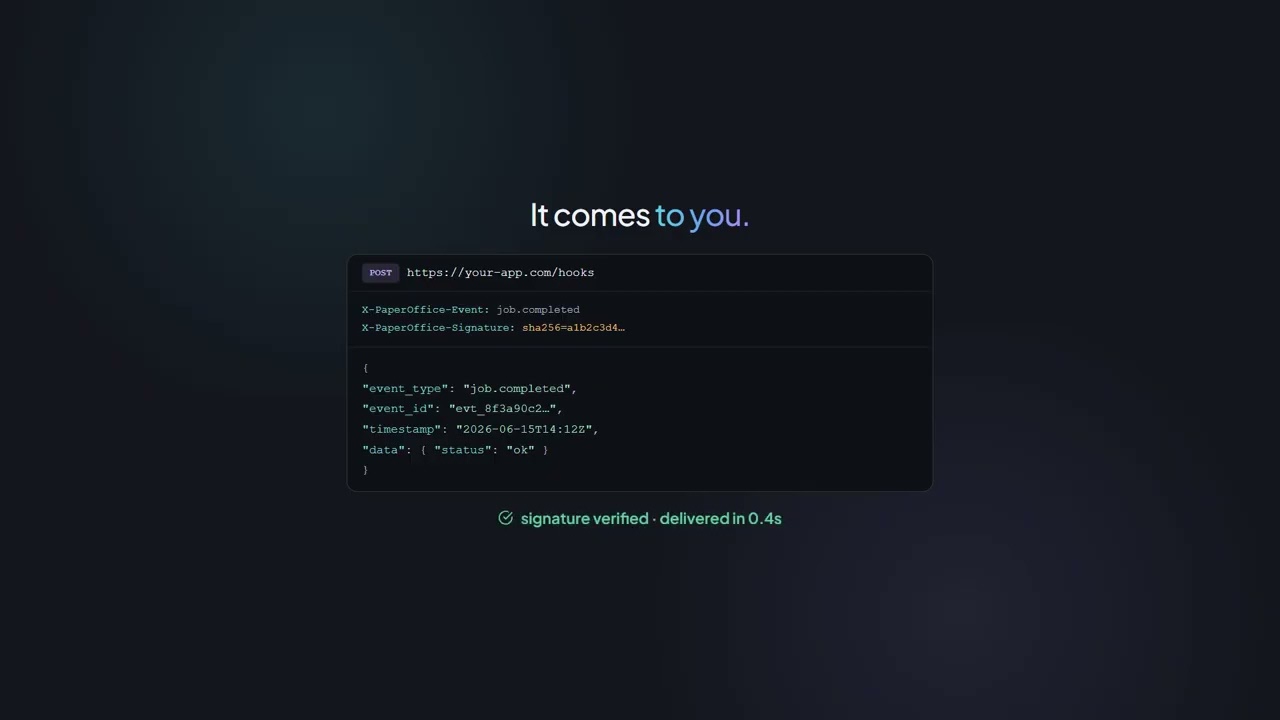
# Webhooks benötigen Token (für Account-Zuordnung)
from flask import Flask, request
import requests
import hmac
import hashlib

app = Flask(__name__)
WEBHOOK_SECRET = "your_webhook_secret"
TOKEN = "po_usr_YOUR_TOKEN"  # Token erforderlich für Webhooks

# 1. Webhook registrieren
def setup_webhook():
    requests.post(
        "https://api.paperoffice.ai/latest/webhooks",
        headers={"Authorization": f"Bearer {TOKEN}"},
        json={
            "url": "https://your-server.com/webhook",
            "events": ["job.completed", "job.failed"],
            "secret": WEBHOOK_SECRET
        }
    )

# 2. Webhook empfangen
@app.route("/webhook", methods=["POST"])
def handle_webhook():
    signature = request.headers.get("X-PaperOffice-Signature")
    expected = hmac.new(
        WEBHOOK_SECRET.encode(),
        request.data,
        hashlib.sha256
    ).hexdigest()
    
    if not hmac.compare_digest(signature, expected):
        return "Invalid signature", 401
    
    event = request.json
    if event["event"] == "job.completed":
        process_result(event["job_result"])
    
    return "OK", 200
Accessibility

Tài liệu → Tệp âm thanh

1 OCR tài liệu
2 Chuẩn bị văn bản
3 Tạo TTS
4 Lưu âm thanh
Python
# Produktion: Mit Token | Test: Ohne Token (VISITOR Mode)
import requests

def document_to_audio(pdf_path, voice="Nadja", token=None):
    headers = {"Authorization": f"Bearer {token}"} if token else {}
    
    # 1. OCR - Text extrahieren
    ocr_response = requests.post(
        "https://api.paperoffice.ai/latest/job",
        headers=headers,
        files={"file_1": open(pdf_path, "rb")},
        data={"ocr_mode": "complete", "priority": 900}
    )
    
    text = ocr_response.json()["job_result"]["text"]
    
    # 2. Text in Abschnitte teilen (max 5000 Zeichen)
    chunks = [text[i:i+5000] for i in range(0, len(text), 5000)]
    
    # 3. TTS für jeden Abschnitt
    audio_urls = []
    for chunk in chunks:
        tts_response = requests.post(
            "https://api.paperoffice.ai/latest/job",
            headers=headers,
            data={
                "text": chunk,
                "voice": voice,
                "output_format": "mp3",
                "output": "url",
                "priority": 999
            }
        )
        audio_urls.append(tts_response.json()["job_result"]["audio_url"])
    
    return audio_urls

# VISITOR Mode
urls = document_to_audio("handbuch.pdf")
print(f"Audio-Files: {len(urls)}")
Data Extraction

Ordner → OCR → CSV Export

1 Ordner scannen
2 Batch OCR
3 Text sammeln
4 CSV Export
Python
# Produktion: Mit Token | Test: Ohne Token (VISITOR Mode)
import requests
import os
import csv
from pathlib import Path

def batch_ocr_to_csv(folder_path, output_csv, token=None):
    """
    Verarbeitet alle PDFs/Bilder in einem Ordner und exportiert nach CSV.
    """
    headers = {"Authorization": f"Bearer {token}"} if token else {}
    
    # Unterstützte Formate
    extensions = {'.pdf', '.png', '.jpg', '.jpeg', '.tiff', '.webp'}
    files = [f for f in Path(folder_path).iterdir() 
             if f.suffix.lower() in extensions]
    
    results = []
    
    for file_path in files:
        print(f"Verarbeite: {file_path.name}")
        
        # OCR Request
        response = requests.post(
            "https://api.paperoffice.ai/latest/job",
            headers=headers,
            files={"file_1": open(file_path, "rb")},
            data={
                "ocr_mode": "complete",
                "priority": 900
            }
        )
        
        result = response.json()["job_result"]
        
        results.append({
            "filename": file_path.name,
            "pages": result.get("page_count", 1),
            "text_length": len(result.get("text", "")),
            "text_preview": result.get("text", "")[:500],
            "confidence": result.get("confidence", 0)
        })
    
    # CSV Export
    with open(output_csv, 'w', newline='', encoding='utf-8') as f:
        writer = csv.DictWriter(f, fieldnames=results[0].keys())
        writer.writeheader()
        writer.writerows(results)
    
    print(f"✅ {len(results)} Dokumente → {output_csv}")
    return results

# VISITOR Mode - kein Token nötig!
batch_ocr_to_csv("./documents", "ocr_results.csv")

# Mit Token für Produktion
batch_ocr_to_csv("./documents", "results.csv", "po_usr_...")
💡 Mẹo chuyên nghiệp

Kiến thức nội bộ

Đồng bộ hóa so với Bất đồng bộ hóa

ưu tiên >= 900 = kết quả tức thì, ưu tiên < 900 = ID công việc + thăm dò

priority=900 → Sync | priority=100 → Async

Chế độ KHÁCH

Không có mã thông báo? Không vấn đề gì! Chỉ cần để trống bearer_token.

Authorization: Bearer (leer)

Hộp giới hạn

Phản hồi AI-IDP bao gồm bbox cho mỗi trường – hoàn hảo cho giao diện xác minh.

{"bbox": [x1, y1, x2, y2]}

Giọng nói tốt nhất

Giọng nói gốc nghe tự nhiên nhất. Tốc độ 1.0 là tối ưu.

voice=Nadja, speed=1.0
ready_to_ship.sh
$ echo "Recipe copied?"
✓ Recipe copied!
$ echo "API Key ready?"
✓ Chế độ KHÁCH đang hoạt động (hoặc khóa của riêng bạn)
$ ./ship_it.sh
🚀 Sẵn sàng để vận chuyển!