



साझा करें
ईमेल के माध्यम से प्राप्तकर्ता को वर्कस्पेयर साझा करें और इस साझाकरण के लिए फोन पहुंच सक्रिय करें। पढ़ने का अधिकार या अधिक, दिनों में वैधता, वैकल्पिक रूप से केवल फोन ऐप पहुंच के बिना।



एकीकरणकर्ता और रीसेलर संयोजित किए जा सकते हैं।
पार्टनर कार्यक्रम देखना
फोन एजेंट · AI-DMS मॉड्यूल
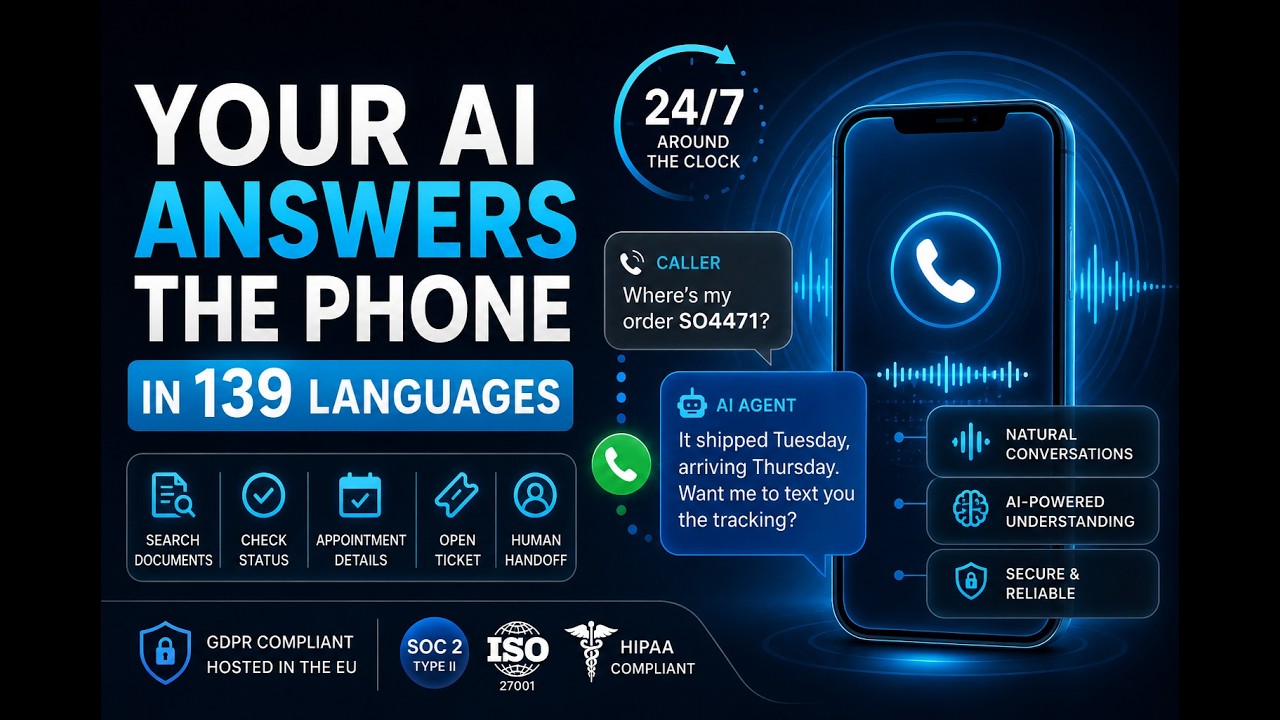
फोन एजेंट साझा प्राप्तकर्ताओं को ऐप और लॉगिन के बिना वर्कस्पेस तक पहुंच देता है: कॉल करें, PIN, पूछें।
एक गेटवे, कई साझाकरण, प्रत्येक में मोबाइल नंबर और PIN। वर्कस्पेस से उत्तर, ईमेल के माध्यम से सुरक्षित भेजा गया।
दुनिया भर की अग्रणी कंपनियों का भरोसा








OEM PARTNERSHIP
यह कैसे काम करता है
फोन एजेंट वर्कस्पेयर शेयर से जुड़ा होता है, एक अलग फोन खाते से नहीं। कौन कॉल कर सकता है वह साझाकरण में निर्धारित होता है।
ईमेल के माध्यम से प्राप्तकर्ता को वर्कस्पेयर साझा करें और इस साझाकरण के लिए फोन पहुंच सक्रिय करें। पढ़ने का अधिकार या अधिक, दिनों में वैधता, वैकल्पिक रूप से केवल फोन ऐप पहुंच के बिना।
प्राप्तकर्ता का मोबाइल नंबर और PIN, प्रत्येक साझाकरण के लिए भाषा और आवाज़। प्रत्येक फोन एजेंट के लिए एक केंद्रीय गेटवे, प्रत्येक साझाकरण तार्किक रूप से अलग रहता है।
प्राप्तकर्ता इनबॉइंग नंबर डायल करता है, मोबाइल नंबर और PIN से पहचाना जाता है और वर्कस्पेयर के बारे में एजेंट से बात करता है: दस्तावेज़ खोजें, सामग्री सुनें, स्थिति पूछें, भेजना शुरू करें।
क्षमताएं
साझेदारों, ग्राहकों और बाहरी टीमों के लिए एक एक्सेस चैनल जो ऐप नहीं चाहते।
भाषा से टेक्स्ट, वर्कस्पेयर ज्ञान के साथ उत्तर, टेक्स्ट से भाषा, कुछ सौ मिलीसेकंड में।
प्रत्येक फोन एजेंट के लिए एक इनबॉइंग नंबर, प्रत्येक साझाकरण में अपना मोबाइल नंबर, PIN और भाषा।
केवल साझा प्राप्तकर्ता पंजीकृत नंबर और PIN के साथ वर्कस्पेयर तक पहुंचते हैं।
भाषा स्वचालित रूप से पहचानी गई या प्रत्येक साझाकरण के लिए निर्धारित, प्राकृतिक HD आवाज़ें।
दस्तावेज़ खोजें, सामग्री और मेटाडेटा सुनें, स्थिति पूछें।
इच्छा पर दस्तावेज़ ऑडिट-सुरक्षित ईमेल भेजने के माध्यम से पंजीकृत पते पर जाता है।
एजेंट साझा वर्कस्पेयर के दस्तावेज़, मेटाडेटा और अधिकार देखता है, खाता नहीं।
गेटवे और एजेंट सदैव सक्रिय रहते हैं, प्रत्येक कॉल लॉग की गई है।
तुलना
अंतर यह है कि दूसरी ओर आपके दस्तावेज़ों से ज्ञान बैठा है या नहीं।
| तुलना | फोन हॉटलाइन | वॉयस मैन्यू | PaperOffice फोन एजेंट |
|---|---|---|---|
| जानकारी | कर्मचारी सिस्टम में खोज रहा है | कोई सामग्री नहीं | वर्कस्पेस से उत्तर |
| पहचान | पुनः प्रश्न | ग्राहक संख्या | प्रत्येक अनुमति के लिए मोबाइल नंबर और PIN |
| पहुँच योग्यता | व्यापार घंटे | हमेशा | हमेशा, बिना वेटिंग लूप के |
| दस्तावेज़ भेजें | बाद में मैन्युअल रूप से | संभव नहीं | सुरक्षित, तत्काल, लॉग किया गया |
| पहुँच सीमा | कर्मचारी अधिकार | कोई सामग्री नहीं | केवल साझा वर्कस्पेस |
curl -X GET \ "https://api.paperoffice.ai/latest/paperoffice_account/workspace_telephony_agent?workspace_id=1553" \ -H "Authorization: Bearer po_ut_YOUR_API_KEY"डेवलपर्स के लिए
फोन पहुँच के साथ वर्कस्पेस अनुमति बनाएं, पहुँच स्तर और वैधता सेट करें, प्रत्येक वर्कस्पेस के लिए एजेंट आवंटन पढ़ें।
प्रत्येक अनुमति के लिए ईमेल चैनल और फोन चैनल, पहुँच स्तर पढ़ें, लिखें या प्रशासक, दिनों में वैधता।
कौन सा फोन एजेंट किस वर्कस्पेस के लिए उत्तर देता है, पढ़ने योग्य और सेट करने योग्य।
Claude, ChatGPT और Cursor में रिलीज़ और वर्कस्पेस टूल के रूप में।
सुरक्षा और अनुपालन
फोन एजेंट अनुमति के अधिकारों का सम्मान करता है, मोबाइल नंबर और PIN के माध्यम से कॉलर की पहचान करता है और प्रत्येक कॉल को लॉग करता है। भाषा प्रसंस्करण और वर्कस्पेस यूरोपीय डेटा सेंटर में स्थित हैं।
अक्सर पूछे जाने वाले प्रश्न
केवल उन वर्कस्पेस अनुमति प्राप्तकर्ताओं के लिए, जिनके लिए फोन पहुँच सक्रिय है। वे अपनी पंजीकृत मोबाइल नंबर और एक PIN के माध्यम से पहचान करते हैं।
साझा वर्कस्पेस के दस्तावेज़, मेटाडेटा और अधिकार, पूरा खाता नहीं। पढ़ने के अधिकार का अर्थ है जानकारी और भेजना, लिखने के अधिकार अतिरिक्त कार्राइयों की अनुमति देते हैं।
नहीं। फोन और PIN पर्याप्त हैं। एक अनुमति केवल फोन के लिए भी हो सकती है, ऐप तक पहुँच के बिना।
भाषा को रियल-टाइम में ट्रांसक्राइब किया जाता है, उत्तर वर्कस्पेस ज्ञान और प्राकृतिक आवाज़ के साथ कुछ सौ मिलीसेकंड में आता है।
हाँ। इच्छा पर, यह ऑडिट-सुरक्षित ईमेल भेजना शुरू करता है, पंजीकृत पते पर, PDF पासवर्ड और लॉग के साथ।
वह यह कहता है और कर्मचारी या टिकेट को हस्तांतरित करने का प्रस्ताव देता है। कुछ भी गढ़ा नहीं जाता है।
हाँ। फोन पहुँच के साथ अनुमतियाँ और प्रत्येक वर्कस्पेस के लिए एजेंट आवंटन REST-API और MCP सर्वर पर उपलब्ध हैं।
 खनन और संसाधन
 हमारे सभी खनन संचालन के लिए एंटरप्राइज़ दस्तावेज़ प्रबंधन। विश्वस्तरीय।
 मुद्रण और पैकेजिंग
 FDA-नियंत्रित फार्मा लेबल के लिए पूर्ण दस्तावेज़ीकरण आवश्यक है। PaperOffice ने हमारी अनुमोदन प्रक्रिया को दिनों से घटाकर घंटों में कर दिया है।
 उद्योग और विनिर्माण
 तकनीकी दस्तावेज़ीकरण और ऑर्डर प्रोसेसिंग अब पूरी तरह स्वचालित है।
 लोक प्रशासन
 डिजिटलीकरण ने हमारे प्रशासन में क्रांति ला दी है। नागरिक पूछताछ अब दिनों के बजाय मिनटों में संसाधित होती है।
स्वास्थ्य और चिकित्सा मरीजों के रिकॉर्ड, रिपोर्ट और रेफरल स्वचालित रूप से कैप्चर और वर्गीकृत किए जाते हैं। हमारी क्लिनिक टीम के पास अब मरीजों के लिए समय है।
 आतिथ्य और मनोरंजन
 8,000 कर्मचारी, रोजाना हजारों अतिथि दस्तावेज़। PaperOffice ने हमारी बैक-ऑफिस प्रक्रियाओं को पूरी तरह से डिजिटल कर दिया है।
 क्षेत्रीय बैंक
 ऋण आवेदन और अनुपालन दस्तावेज़ अब घंटों के बजाय मिनटों में संसाधित होते हैं। नियामक जांच पूरी तरह से स्वचालित है।
 निर्माण और रियल एस्टेट
 निर्माण परियोजना दस्तावेज़ीकरण और अनुपालन अब डिजिटल और ट्रेस करने योग्य हैं।
 आतिथ्य और पर्यटन
 चेक-इन फॉर्म, बिल और अतिथि संचार पूरी तरह से डिजिटल हैं। हमारी कंसियर्ज टीम अब उत्कृष्ट सेवा पर केंद्रित है।
ऊर्जा और पेट्रोल पंप 250+ स्टेशनों से पेट्रोल पंप बिल, आपूर्तिकर्ता दस्तावेज़ और अनुपालन कागजात स्वचालित रूप से संसाधित और संग्रहीत किए जाते हैं।
फार्मा और लेबल फार्मास्यूटिकल फंक्शन लेबल के लिए GMP-अनुरूप दस्तावेज़ीकरण अब पूरी तरह से स्वचालित है। ऑडिट ट्रेल पूर्ण और तुरंत उपलब्ध हैं।
निर्माण और लकड़ी हमारे लकड़ी के घरों के लिए नीलामान, अनुमति और ग्राहक डोजियर अब केंद्रीय रूप से प्रबंधित होते हैं। छठी पीढ़ी में наконец कागज मुक्त।
ई-कॉमर्स और रिटेल दुनिया भर की सैकड़ों रोस्टरीज़ के लिए आपूर्तिकर्ता अनुबंध, प्रमाण पत्र और सीमा शुल्क कागजात स्वचालित रूप से कैप्चर और सही उत्पाद से जोड़े जाते हैं।
लॉजिस्टिक्स और परिवहन तापमान प्रमाण, CMR कंसignment नोट और खाद्य प्रमाण पत्र स्वचालित रूप से स्कैन और आदेश से जोड़े जाते हैं। गलत मिलान अब इतिहास हैं।
लॉजिस्टिक्स और परिवहन भारी परिवहन अनुमति, मार्ग योजना और परियोजना दस्तावेज़ीकरण अब तुरंत डिजिटल रूप से उपलब्ध हैं। अब कोई फ़ाइल खोजने की जरूरत नहीं।
 लॉजिस्टिक्स और परिवहन
 हमारे पूर्वी यूरोप नेटवर्क के लिए सीमा शुल्क दस्तावेज़, गोदाम रसीद और फ्रेट आदेश स्वचालित रूप से वर्गीकृत होते हैं। चार पीढ़ियों की लॉजिस्टिक्स, наконец डिजिटल।
मुद्रण और पैकेजिंग प्रिंटिंग विशिष्टताएं, ग्राहक अनुमोदन और सामग्री प्रमाण पत्र अब केंद्रीय रूप से उपलब्ध हैं। उत्पादन में त्रुटि दर शून्य के करीब पहुंच गई है।
 पैकेजिंग और लेबल
 स्थिरता प्रमाण पत्र, आपूर्तिकर्ता अनुबंध और ग्राहक विशिष्टताएं स्वचालित रूप से संसाधित होती हैं। स्विस परिशुद्धता, अब डिजिटल भी।
 निर्माण और रियल एस्टेट
 हमारी वाणिज्यिक संपत्तियों के लिए निर्माण अनुमति, उप-ठेकेदार अनुबंध और स्वीकृति प्रोटोकॉल अब पूर्ण रूप से डिजिटल दस्तावेज़ित हैं।
रियल एस्टेट और प्रबंधन 30+ वर्षों के बाजार नेतृत्व के लिए खरीद अनुबंध, एक्सपोसे और ग्राहक डोजियर अब डिजिटल रूप से खोजने योग्य हैं। हर दलाल सेकंडों में सब कुछ पा सकता है।
लॉजिस्टिक्स और माल ढुलाई समुद्री माल दस्तावेज़, सीमा शुल्क घोषणा और बिल ऑफ लैडिंग स्वचालित रूप से कैप्चर होते हैं। बाल्टिक सागर लॉजिस्टिक्स इतनी कुशल कभी नहीं थी।
 ई-कॉमर्स और पैकेजिंग
 प्रति सप्ताह हजारों कस्टम पैकेजिंग आदेश डिजाइन अनुमोदन, प्रिंट डेटा और डिलीवरी दस्तावेज़ों के साथ। PaperOffice सब कुछ एक साथ रखता है।
 प्रयोगशाला और चिकित्सा प्रौद्योगिकी
 पैथोलॉजी लैब दस्तावेज़ीकरण और उपकरण प्रमाणिकरण अब पूरी तरह से स्वचालित हैं। हर नमूने के लिए पूर्ण ट्रेसबिलिटी।
क्षेत्रीय बैंक ऋण दस्तावेज़, सुरक्षा दस्तावेज़ और ग्राहक पत्राचार घंटों के बजाय मिनटों में संसाधित होते हैं। नियामक जांच पूर्ण है।
इस्पात निर्माण और उद्योग हमारे इस्पात उत्पादन के लिए तकनीकी विशिष्टताएं, गुणवत्ता प्रमाण पत्र और रीसाइक्लिंग प्रोटोकॉल केंद्रीय और तुरंत उपलब्ध हैं।
 फार्मा और लेबल
 नियामक आवश्यकताओं वाले फार्मा और कॉस्मेटिक लेबल विशिष्टताएं स्वचालित रूप से जांची और अनुमोदित होती हैं। अब कोई मैनुअल चेकलिस्ट नहीं।
 फिनटेक और संपत्ति प्रबंधन
 KYC दस्तावेज़, निवेश रिपोर्ट और नियामक फाइलिंग सेकंडों में वर्गीकृत होती हैं। MAS-नियंत्रित रोबो-एडवाइजर के रूप में पूर्ण अनुपालन आवश्यक है।
लॉजिस्टिक्स और परिवहन रसायन लॉजिस्टिक्स के लिए सुरक्षा डेटा शीट, परिवहन अनुमति और ADR दस्तावेज़ स्वचालित रूप से जोड़े जाते हैं। त्रुटियों के लिए शून्य सहनशीलता।
 लक्ज़री और आभूषण
 हमारे मोती संग्रह के लिए प्रामाणिकता प्रमाण पत्र, आपूर्तिकर्ता प्रमाण और ग्राहक गारंटी स्वचालित रूप से संग्रहीत और तुरंत उपलब्ध होते हैं।
 वाणिज्यिक बैंक
 SME ऋण आवेदन, सुरक्षा दस्तावेज़ और नियामक रिपोर्ट स्वचालित रूप से वर्गीकृत होते हैं। हमारे सलाहकारों के पास ग्राहक सलाह के लिए अधिक समय है।
 निजी बैंक
 135+ वर्षों के बैंक इतिहास से ग्राहक रिकॉर्ड क्रमिक रूप से डिजिटल किए जा रहे हैं। 5,000 कर्मचारी अब सभी दस्तावेज़ों तक तुरंत पहुंच सकते हैं।
 विकास बैंक
 लाखों ग्राहकों के लिए माइक्रोक्रेडिट आवेदन और अनुपालन दस्तावेज़ अब दिनों के बजाय मिनटों में संसाधित होते हैं। वित्तीय समावेशन के लिए एक गेमचेंजर।
 ई-कॉमर्स लॉजिस्टिक्स
 प्रति दिन लाखों डिलीवरी नोट और रिटर्न रसीदें स्वचालित रूप से संसाधित होती हैं। वियतनाम का अग्रणी ई-कॉमर्स लॉजिस्टिक्स प्रदाता, अब कागज मुक्त।
 प्रेसिजन मेटल और विनिर्माण
 तेल, गैस और एयरोस्पेस परियोजनाओं के लिए CNC विनिर्माण प्रोटोकॉल, सामग्री प्रमाण पत्र और ग्राहक विशिष्टताएं अब पूर्ण रूप से डिजिटल दस्तावेज़ित हैं।
 GovTech और IT
 विजन 2030 के लिए पूर्ण डिजिटलीकरण आवश्यक है। PaperOffice सऊदी अरब के डिजिटल बैकबोन के लिए सरकारी दस्तावेज़ संसाधित करता है।
 विशेष इस्पात और उद्योग
 सामग्री प्रमाण पत्र, हार्डनिंग प्रोटोकॉल और ग्राहक विशिष्टताएं स्वचालित रूप से सही आदेश से जोड़ी जाती हैं। ऑस्ट्रेलिया का एकमात्र Q&T निर्माता, अब कागज मुक्त।
 इस्पात निर्माण और विनिर्माण
 वेल्डिंग सीम प्रोटोकॉल, स्थिरता गणना और परियोजना योजनाएं डिजिटल रूप से प्रबंधित होती हैं। हमारी वर्कशॉप टीमों को रीयल-टाइम एक्सेस है।
 प्रेसिजन पार्ट्स और विनिर्माण
 एयरोस्पेस प्रमाण पत्र, CNC प्रोग्राम और ग्राहक सहनशीलताएं स्वचालित रूप से वर्गीकृत होती हैं। AS9100 अनुपालन इतना आसान कभी नहीं था।
 फिनटेक और भुगतान
 सैकड़ों हजारों SME के लिए डीलर अनुबंध, KYC दस्तावेज़ और लेनदेन रसीदें सेकंडों में संसाधित होती हैं। मेक्सिको का भुगतान क्रांति, कागज मुक्त।
 प्रीमियम वाइनरी
 हमारे ऊंचाई वाले मालबेक वाइन के लिए फसल दस्तावेज़ीकरण, निर्यात प्रमाण पत्र और गुणवत्ता प्रोटोकॉल स्वचालित रूप से संग्रहीत होते हैं। 120 वर्षों की वाइन खेती परंपरा, अब डिजिटल।
डिजिटल बैंकिंग लाखों उपयोगकर्ता सत्यापन और नियामक दस्तावेज़ पूरी तरह से स्वचालित रूप से संसाधित होते हैं। कागज के बिना स्केलिंग।
 फिनटेक और भुगतान
 अफ्रीका के अग्रणी भुगतान प्रदाता के लिए डीलर ऑनबोर्डिंग दस्तावेज़ और अनुपालन प्रमाण दिन के बजाय मिनटों में संसाधित होते हैं।
ई-कॉमर्स और ऑर्गेनिक हजारों प्राकृतिक उत्पादों के लिए जैविक प्रमाण पत्र, आपूर्तिकर्ता ऑडिट और उत्पाद लेबल स्वचालित रूप से जांचे और संग्रहीत होते हैं।
 फिनटेक और भुगतान
 33 अफ्रीकी देशों से नियामक दस्तावेज़, साझेदार अनुबंध और ऑडिट ट्रेल पूरी तरह से स्वचालित रूप से प्रबंधित होते हैं। $3 बिलियन फिनटेक के लिए एंटरप्राइज DMS।
 फार्मा और स्वास्थ्य सेवा
 प्रिस्क्रिप्शन और दवा प्रबंधन अब पूरी तरह स्वचालित है। हमारे रोगियों के लिए अधिक समय।
धार्मिक संस्थान सदियों पुराने दस्तावेज अब डिजिटल रूप से खोजने योग्य हैं। हमारे ऐतिहासिक अभिलेखागार के लिए एक मील का पत्थर।
देखभाल और स्वास्थ्य हमारे देखभालकर्ताओं के पास अंततः कागजी कार्रवाई के बजाय निवासियों के लिए अधिक समय है।
सरकार और प्रशासन 500,000+ रिकॉर्ड डिजिटलीकृत। हमारे अधिकारी अब सभी जानकारी तुरंत ढूंढ लेते हैं।
चिकित्सा और स्वास्थ्य सेवा मरीज रिकॉर्ड प्रबंधन अब आसान है। सब कुछ स्वचालित रूप से कैप्चर और संग्रहीत।
 संपत्ति सेवाएं
 विरासत और संपत्ति दस्तावेज़ीकरण अब कुशल और त्रुटि-मुक्त है।
रियल एस्टेट और प्रबंधन हमारे सभी आवासीय परिसरों के लिए डिजिटल संपत्ति प्रबंधन। किरायेदार और मालिक खुश हैं।
उद्योग और पैकेजिंग PaperOffice के साथ हमने अपनी बिल प्रसंस्करण गति को 99% तक बढ़ा दिया है। AI स्वचालित रूप से सभी प्रासंगिक डेटा को पहचानती है और सही ढंग से जोड़ती है।
हस्तशिल्प और व्यापार PaperOffice अब हमारे दैनिक कार्य से अलग नहीं किया जा सकता। आदेश, प्रस्ताव और बिल अब स्वचालित रूप से चलते हैं।
देखभाल और स्वास्थ्य हमारी देखभाल सेवाओं की दस्तावेज़ीकरण अब डिजिटल और स्वचालित है। हमारे मरीजों के लिए अधिक समय।
मैकेनिकल इंजीनियरिंग और विनिर्माण तकनीकी ड्राइंग, बिल ऑफ मटेरियल और गुणवत्ता प्रोटोकॉल तुरंत खोजे जा सकते हैं। वह खोज जिसमें पहले 30 मिनट लगते थे, अब 30 सेकंड में पूरी होती है।
कर सलाह और कानूनी ग्राहक रसीदें, कर अधिसूचनाएं और वार्षिक वित्तीय विवरण स्वचालित रूप से छांटे और सही ग्राहक से जोड़े जाते हैं। रसीद अव्यवस्था अब अतीत की बात है।
IT और परामर्श हमारी IT परामर्श परियोजनाओं के लिए परियोजना दस्तावेज़ीकरण, SLA और ग्राहक संचार स्वचालित रूप से वर्गीकृत और संग्रहीत होते हैं।
हमारे ग्राहकों की मापने योग्य सफलताएँ
 Kumul Minerals Holdings Limited
 The Challenge Printing Company Inc.
 K60-Gitterrostsysteme GmbH & Co. KG
 Ayuntamiento de Carrión de los Condes
"हमारे सभी खनन संचालन के लिए एंटरप्राइज़ दस्तावेज़ प्रबंधन। विश्वस्तरीय।"
खनन और संसाधन "FDA-नियंत्रित फार्मा लेबल के लिए पूर्ण दस्तावेज़ीकरण आवश्यक है। PaperOffice ने हमारी अनुमोदन प्रक्रिया को दिनों से घटाकर घंटों में कर दिया है।"
मुद्रण और पैकेजिंग "तकनीकी दस्तावेज़ीकरण और ऑर्डर प्रोसेसिंग अब पूरी तरह स्वचालित है।"
उद्योग और विनिर्माण "डिजिटलीकरण ने हमारे प्रशासन में क्रांति ला दी है। नागरिक पूछताछ अब दिनों के बजाय मिनटों में संसाधित होती है।"
लोक प्रशासन "मरीजों के रिकॉर्ड, रिपोर्ट और रेफरल स्वचालित रूप से कैप्चर और वर्गीकृत किए जाते हैं। हमारी क्लिनिक टीम के पास अब मरीजों के लिए समय है।"
स्वास्थ्य और चिकित्सा "8,000 कर्मचारी, रोजाना हजारों अतिथि दस्तावेज़। PaperOffice ने हमारी बैक-ऑफिस प्रक्रियाओं को पूरी तरह से डिजिटल कर दिया है।"
 आतिथ्य और मनोरंजन
 "ऋण आवेदन और अनुपालन दस्तावेज़ अब घंटों के बजाय मिनटों में संसाधित होते हैं। नियामक जांच पूरी तरह से स्वचालित है।"
 क्षेत्रीय बैंक
 "निर्माण परियोजना दस्तावेज़ीकरण और अनुपालन अब डिजिटल और ट्रेस करने योग्य हैं।"
 निर्माण और रियल एस्टेट
 "चेक-इन फॉर्म, बिल और अतिथि संचार पूरी तरह से डिजिटल हैं। हमारी कंसियर्ज टीम अब उत्कृष्ट सेवा पर केंद्रित है।"
 आतिथ्य और पर्यटन
 "250+ स्टेशनों से पेट्रोल पंप बिल, आपूर्तिकर्ता दस्तावेज़ और अनुपालन कागजात स्वचालित रूप से संसाधित और संग्रहीत किए जाते हैं।"
ऊर्जा और पेट्रोल पंप "फार्मास्यूटिकल फंक्शन लेबल के लिए GMP-अनुरूप दस्तावेज़ीकरण अब पूरी तरह से स्वचालित है। ऑडिट ट्रेल पूर्ण और तुरंत उपलब्ध हैं।"
फार्मा और लेबल "हमारे लकड़ी के घरों के लिए नीलामान, अनुमति और ग्राहक डोजियर अब केंद्रीय रूप से प्रबंधित होते हैं। छठी पीढ़ी में наконец कागज मुक्त।"
निर्माण और लकड़ी "दुनिया भर की सैकड़ों रोस्टरीज़ के लिए आपूर्तिकर्ता अनुबंध, प्रमाण पत्र और सीमा शुल्क कागजात स्वचालित रूप से कैप्चर और सही उत्पाद से जोड़े जाते हैं।"
ई-कॉमर्स और रिटेल "तापमान प्रमाण, CMR कंसignment नोट और खाद्य प्रमाण पत्र स्वचालित रूप से स्कैन और आदेश से जोड़े जाते हैं। गलत मिलान अब इतिहास हैं।"
लॉजिस्टिक्स और परिवहन "भारी परिवहन अनुमति, मार्ग योजना और परियोजना दस्तावेज़ीकरण अब तुरंत डिजिटल रूप से उपलब्ध हैं। अब कोई फ़ाइल खोजने की जरूरत नहीं।"
लॉजिस्टिक्स और परिवहन "हमारे पूर्वी यूरोप नेटवर्क के लिए सीमा शुल्क दस्तावेज़, गोदाम रसीद और फ्रेट आदेश स्वचालित रूप से वर्गीकृत होते हैं। चार पीढ़ियों की लॉजिस्टिक्स, наконец डिजिटल।"
 लॉजिस्टिक्स और परिवहन
 "प्रिंटिंग विशिष्टताएं, ग्राहक अनुमोदन और सामग्री प्रमाण पत्र अब केंद्रीय रूप से उपलब्ध हैं। उत्पादन में त्रुटि दर शून्य के करीब पहुंच गई है।"
मुद्रण और पैकेजिंग "स्थिरता प्रमाण पत्र, आपूर्तिकर्ता अनुबंध और ग्राहक विशिष्टताएं स्वचालित रूप से संसाधित होती हैं। स्विस परिशुद्धता, अब डिजिटल भी।"
 पैकेजिंग और लेबल
 "हमारी वाणिज्यिक संपत्तियों के लिए निर्माण अनुमति, उप-ठेकेदार अनुबंध और स्वीकृति प्रोटोकॉल अब पूर्ण रूप से डिजिटल दस्तावेज़ित हैं।"
 निर्माण और रियल एस्टेट
 "30+ वर्षों के बाजार नेतृत्व के लिए खरीद अनुबंध, एक्सपोसे और ग्राहक डोजियर अब डिजिटल रूप से खोजने योग्य हैं। हर दलाल सेकंडों में सब कुछ पा सकता है।"
रियल एस्टेट और प्रबंधन "समुद्री माल दस्तावेज़, सीमा शुल्क घोषणा और बिल ऑफ लैडिंग स्वचालित रूप से कैप्चर होते हैं। बाल्टिक सागर लॉजिस्टिक्स इतनी कुशल कभी नहीं थी।"
लॉजिस्टिक्स और माल ढुलाई "प्रति सप्ताह हजारों कस्टम पैकेजिंग आदेश डिजाइन अनुमोदन, प्रिंट डेटा और डिलीवरी दस्तावेज़ों के साथ। PaperOffice सब कुछ एक साथ रखता है।"
 ई-कॉमर्स और पैकेजिंग
 "पैथोलॉजी लैब दस्तावेज़ीकरण और उपकरण प्रमाणिकरण अब पूरी तरह से स्वचालित हैं। हर नमूने के लिए पूर्ण ट्रेसबिलिटी।"
 प्रयोगशाला और चिकित्सा प्रौद्योगिकी
 "ऋण दस्तावेज़, सुरक्षा दस्तावेज़ और ग्राहक पत्राचार घंटों के बजाय मिनटों में संसाधित होते हैं। नियामक जांच पूर्ण है।"
क्षेत्रीय बैंक "हमारे इस्पात उत्पादन के लिए तकनीकी विशिष्टताएं, गुणवत्ता प्रमाण पत्र और रीसाइक्लिंग प्रोटोकॉल केंद्रीय और तुरंत उपलब्ध हैं।"
इस्पात निर्माण और उद्योग "नियामक आवश्यकताओं वाले फार्मा और कॉस्मेटिक लेबल विशिष्टताएं स्वचालित रूप से जांची और अनुमोदित होती हैं। अब कोई मैनुअल चेकलिस्ट नहीं।"
 फार्मा और लेबल
 "KYC दस्तावेज़, निवेश रिपोर्ट और नियामक फाइलिंग सेकंडों में वर्गीकृत होती हैं। MAS-नियंत्रित रोबो-एडवाइजर के रूप में पूर्ण अनुपालन आवश्यक है।"
 फिनटेक और संपत्ति प्रबंधन
 "रसायन लॉजिस्टिक्स के लिए सुरक्षा डेटा शीट, परिवहन अनुमति और ADR दस्तावेज़ स्वचालित रूप से जोड़े जाते हैं। त्रुटियों के लिए शून्य सहनशीलता।"
लॉजिस्टिक्स और परिवहन "हमारे मोती संग्रह के लिए प्रामाणिकता प्रमाण पत्र, आपूर्तिकर्ता प्रमाण और ग्राहक गारंटी स्वचालित रूप से संग्रहीत और तुरंत उपलब्ध होते हैं।"
 लक्ज़री और आभूषण
 "SME ऋण आवेदन, सुरक्षा दस्तावेज़ और नियामक रिपोर्ट स्वचालित रूप से वर्गीकृत होते हैं। हमारे सलाहकारों के पास ग्राहक सलाह के लिए अधिक समय है।"
 वाणिज्यिक बैंक
 "135+ वर्षों के बैंक इतिहास से ग्राहक रिकॉर्ड क्रमिक रूप से डिजिटल किए जा रहे हैं। 5,000 कर्मचारी अब सभी दस्तावेज़ों तक तुरंत पहुंच सकते हैं।"
 निजी बैंक
 "लाखों ग्राहकों के लिए माइक्रोक्रेडिट आवेदन और अनुपालन दस्तावेज़ अब दिनों के बजाय मिनटों में संसाधित होते हैं। वित्तीय समावेशन के लिए एक गेमचेंजर।"
 विकास बैंक
 "प्रति दिन लाखों डिलीवरी नोट और रिटर्न रसीदें स्वचालित रूप से संसाधित होती हैं। वियतनाम का अग्रणी ई-कॉमर्स लॉजिस्टिक्स प्रदाता, अब कागज मुक्त।"
 ई-कॉमर्स लॉजिस्टिक्स
 "तेल, गैस और एयरोस्पेस परियोजनाओं के लिए CNC विनिर्माण प्रोटोकॉल, सामग्री प्रमाण पत्र और ग्राहक विशिष्टताएं अब पूर्ण रूप से डिजिटल दस्तावेज़ित हैं।"
 प्रेसिजन मेटल और विनिर्माण
 "विजन 2030 के लिए पूर्ण डिजिटलीकरण आवश्यक है। PaperOffice सऊदी अरब के डिजिटल बैकबोन के लिए सरकारी दस्तावेज़ संसाधित करता है।"
 GovTech और IT
 "सामग्री प्रमाण पत्र, हार्डनिंग प्रोटोकॉल और ग्राहक विशिष्टताएं स्वचालित रूप से सही आदेश से जोड़ी जाती हैं। ऑस्ट्रेलिया का एकमात्र Q&T निर्माता, अब कागज मुक्त।"
 विशेष इस्पात और उद्योग
 "वेल्डिंग सीम प्रोटोकॉल, स्थिरता गणना और परियोजना योजनाएं डिजिटल रूप से प्रबंधित होती हैं। हमारी वर्कशॉप टीमों को रीयल-टाइम एक्सेस है।"
 इस्पात निर्माण और विनिर्माण
 "एयरोस्पेस प्रमाण पत्र, CNC प्रोग्राम और ग्राहक सहनशीलताएं स्वचालित रूप से वर्गीकृत होती हैं। AS9100 अनुपालन इतना आसान कभी नहीं था।"
 प्रेसिजन पार्ट्स और विनिर्माण
 "सैकड़ों हजारों SME के लिए डीलर अनुबंध, KYC दस्तावेज़ और लेनदेन रसीदें सेकंडों में संसाधित होती हैं। मेक्सिको का भुगतान क्रांति, कागज मुक्त।"
 फिनटेक और भुगतान
 "हमारे ऊंचाई वाले मालबेक वाइन के लिए फसल दस्तावेज़ीकरण, निर्यात प्रमाण पत्र और गुणवत्ता प्रोटोकॉल स्वचालित रूप से संग्रहीत होते हैं। 120 वर्षों की वाइन खेती परंपरा, अब डिजिटल।"
 प्रीमियम वाइनरी
 "लाखों उपयोगकर्ता सत्यापन और नियामक दस्तावेज़ पूरी तरह से स्वचालित रूप से संसाधित होते हैं। कागज के बिना स्केलिंग।"
डिजिटल बैंकिंग "अफ्रीका के अग्रणी भुगतान प्रदाता के लिए डीलर ऑनबोर्डिंग दस्तावेज़ और अनुपालन प्रमाण दिन के बजाय मिनटों में संसाधित होते हैं।"
 फिनटेक और भुगतान
 "हजारों प्राकृतिक उत्पादों के लिए जैविक प्रमाण पत्र, आपूर्तिकर्ता ऑडिट और उत्पाद लेबल स्वचालित रूप से जांचे और संग्रहीत होते हैं।"
ई-कॉमर्स और ऑर्गेनिक "33 अफ्रीकी देशों से नियामक दस्तावेज़, साझेदार अनुबंध और ऑडिट ट्रेल पूरी तरह से स्वचालित रूप से प्रबंधित होते हैं। $3 बिलियन फिनटेक के लिए एंटरप्राइज DMS।"
 फिनटेक और भुगतान
 "प्रिस्क्रिप्शन और दवा प्रबंधन अब पूरी तरह स्वचालित है। हमारे रोगियों के लिए अधिक समय।"
 फार्मा और स्वास्थ्य सेवा
 "सदियों पुराने दस्तावेज अब डिजिटल रूप से खोजने योग्य हैं। हमारे ऐतिहासिक अभिलेखागार के लिए एक मील का पत्थर।"
धार्मिक संस्थान "हमारे देखभालकर्ताओं के पास अंततः कागजी कार्रवाई के बजाय निवासियों के लिए अधिक समय है।"
देखभाल और स्वास्थ्य "500,000+ रिकॉर्ड डिजिटलीकृत। हमारे अधिकारी अब सभी जानकारी तुरंत ढूंढ लेते हैं।"
सरकार और प्रशासन "मरीज रिकॉर्ड प्रबंधन अब आसान है। सब कुछ स्वचालित रूप से कैप्चर और संग्रहीत।"
चिकित्सा और स्वास्थ्य सेवा "विरासत और संपत्ति दस्तावेज़ीकरण अब कुशल और त्रुटि-मुक्त है।"
 संपत्ति सेवाएं
 "हमारे सभी आवासीय परिसरों के लिए डिजिटल संपत्ति प्रबंधन। किरायेदार और मालिक खुश हैं।"
रियल एस्टेट और प्रबंधन "PaperOffice के साथ हमने अपनी बिल प्रसंस्करण गति को 99% तक बढ़ा दिया है। AI स्वचालित रूप से सभी प्रासंगिक डेटा को पहचानती है और सही ढंग से जोड़ती है।"
उद्योग और पैकेजिंग "PaperOffice अब हमारे दैनिक कार्य से अलग नहीं किया जा सकता। आदेश, प्रस्ताव और बिल अब स्वचालित रूप से चलते हैं।"
हस्तशिल्प और व्यापार "हमारी देखभाल सेवाओं की दस्तावेज़ीकरण अब डिजिटल और स्वचालित है। हमारे मरीजों के लिए अधिक समय।"
देखभाल और स्वास्थ्य "तकनीकी ड्राइंग, बिल ऑफ मटेरियल और गुणवत्ता प्रोटोकॉल तुरंत खोजे जा सकते हैं। वह खोज जिसमें पहले 30 मिनट लगते थे, अब 30 सेकंड में पूरी होती है।"
मैकेनिकल इंजीनियरिंग और विनिर्माण "ग्राहक रसीदें, कर अधिसूचनाएं और वार्षिक वित्तीय विवरण स्वचालित रूप से छांटे और सही ग्राहक से जोड़े जाते हैं। रसीद अव्यवस्था अब अतीत की बात है।"
कर सलाह और कानूनी "हमारी IT परामर्श परियोजनाओं के लिए परियोजना दस्तावेज़ीकरण, SLA और ग्राहक संचार स्वचालित रूप से वर्गीकृत और संग्रहीत होते हैं।"
IT और परामर्श आप PaperOffice को कहाँ आज़माना चाहते हैं?
आपका टेस्ट वर्जन तैयार है
आप कहाँ से शुरू करना चाहेंगे?
पूर्ण वर्कस्पेस कंप्यूटर के लिए अनुकूलित है। मोबाइल संस्करण दस्तावेज़ों को कैप्चर करने, जांचने और साझा करने के लिए उपयुक्त है।
app.paperoffice.aiकंप्यूटर पर शुरू करें
हम आपकी ईमेल आईडी पर आपका व्यक्तिगत एक्सेस लिंक भेजेंगे।
PaperOffice Mobile खोलें
स्मार्टफोन का उपयोग करके दस्तावेज़ों को सीधे कैप्चर और संपादित करें।
मोबाइल संस्करण खोलें