


Skribble
- Skribble: signature product with its own subscription. After signing, filing happens in the connected systems.
vs Skribble
QES stays honestly out of scope — SES, OTP and audit trail are the live path — 1 access path for REST and MCP.
Skribble specializes in qualified electronic signatures (QES) — if QES is required, that is the right place. PaperOffice offers SES with evidence retention and the full document path: capture, archive and workflow in the same account (via credit packs from €25).
Made for real business. Not for hype.
Signature flow from August 5, 2026 · SES
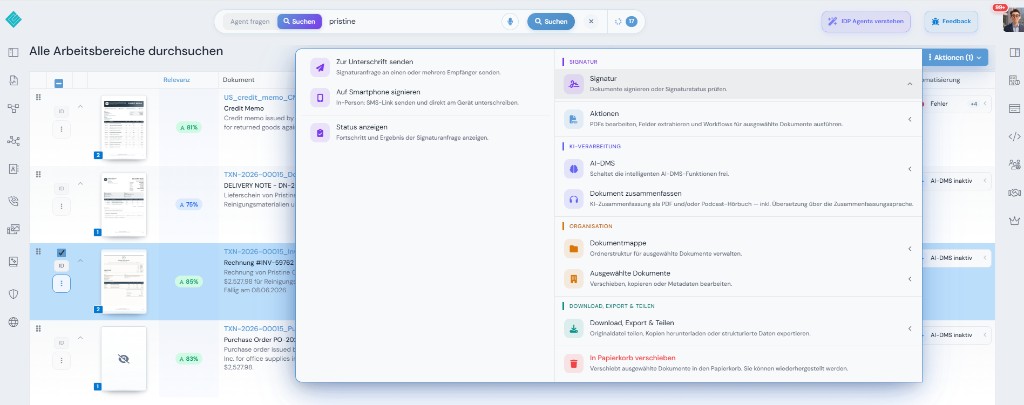
1 · Choose action
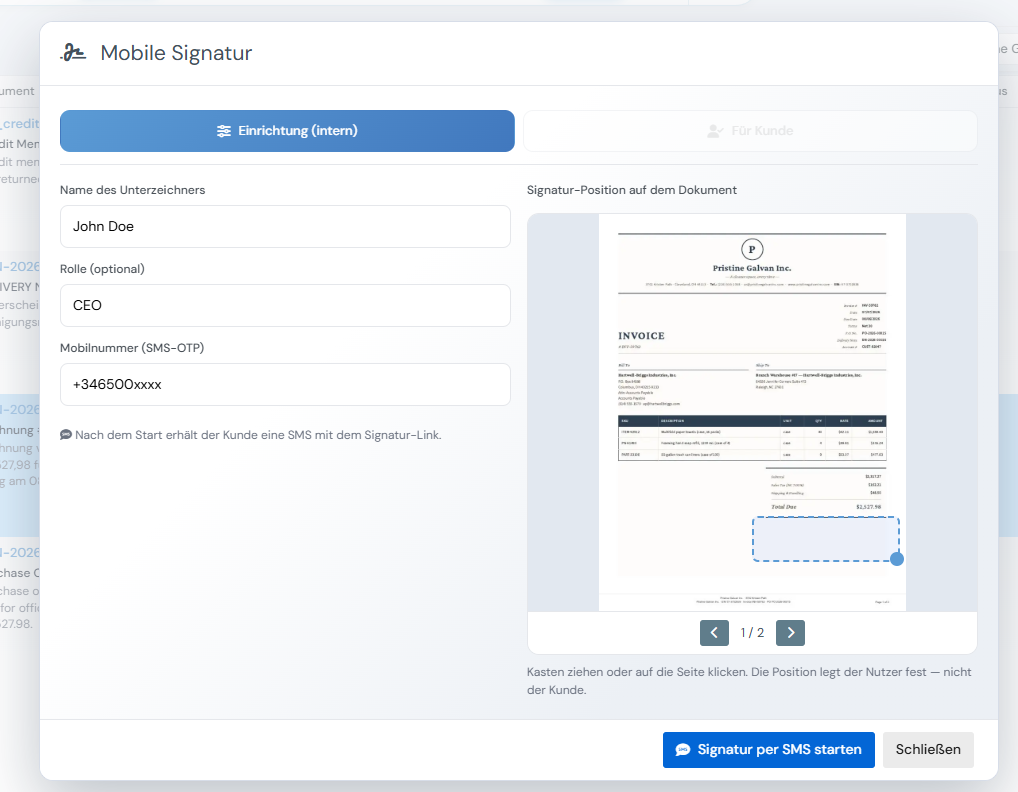
2 · Set up mobile signature
On mobile — location, signature, done
3 · Location captured
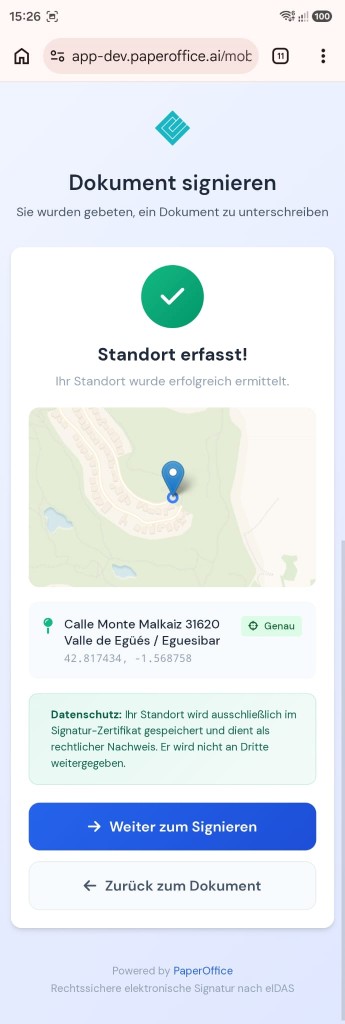
GPS in the signature certificate — eIDAS evidence, not shared with third parties.
4 · Sign on mobile
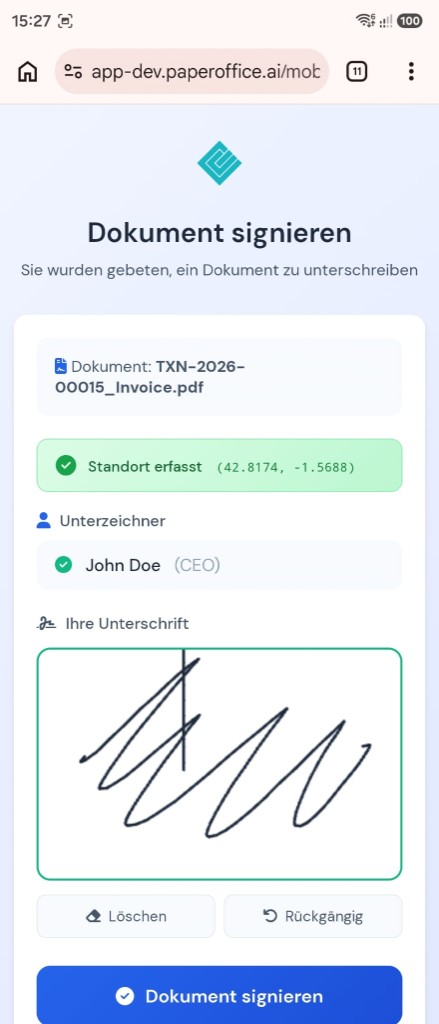
Signer sees document, location and signature pad.
5 · Successfully signed
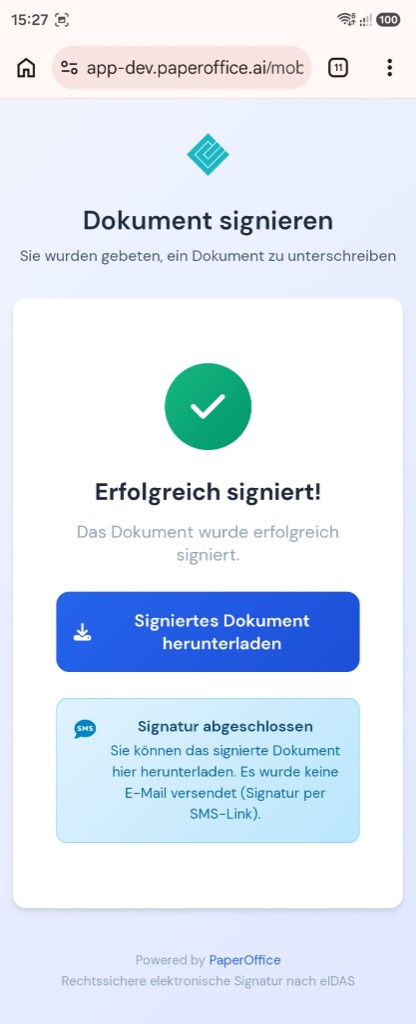
Download the signed document — SES via SMS link.
In the same account
SES workflows, reminders and status via API.
SES from the balance
IDP fields before and after signature.
from €6 per 1,000 pages
Announcements and confirmations with over 840 voices.
from €0.03 per 1,000 chars
File the signed document in an audit-proof archive.
included
vs Skribble
Skribble publishes tiers; the table shows the billing model (as of 09/2026).
| Criterion | PaperOffice | Skribble |
|---|---|---|
| Bounding boxes (word/line level) | Yes (word/line level, Surya OCR) | n/a |
| Sandwich PDF / searchable archive PDF | Yes — searchable archive PDF | n/a |
| Click-to-evidence / visual validation (HITL) | Yes — click-to-evidence / HITL | n/a |
| Structured IDP fields (ready types) | 69 ready document types incl. DATEV/ZUGFeRD/XRechnung | n/a |
| DMS/archive included (WORM, audit, legal hold) | Yes — WORM, audit trail, legal hold | no — no document archive |
| Native MCP server (tool count) | Yes — 300+ API/MCP Tools | no MCP server documented (as of 09/2026) |
| Pricing model | One credit balance for all features: from €6.00–€60.00 per 1,000 pages by quality tier | Subscription with signature quotas and pay-per-signature component |
| List price per 1,000 pages | Basic €20.00 / Premium €60.00 / Ultra €200.00 per 1,000 pages (2/6/20¢) | Public subscription tiers, not per page |
| Billing | from €6.00 per 1,000 pages (Elite) — same scale on every tier | n/a |
Source: https://www.skribble.com/en-eu/pricing/, retrieved 09/2026. Prices may change.
Skribble is a trademark of its respective owner. PaperOffice is not affiliated with or endorsed by Skribble. Competitor details are based on publicly available sources (as of 08/2026) and are provided without warranty.
Our prices are public — including partner terms.
Unit: Price per 1,000 pages
| Tier | Elite Partner (−70%) | Partner (−40%) | Enduser |
|---|---|---|---|
| Basic | €6.00 | €12.00 | €20.00 |
| Premium | €18.00 | €36.00 | €60.00 |
| Ultra | €60.00 | €120.00 | €200.00 |
Billing is internal in credits; amounts follow the selected currency (base: list price).
Elite terms after qualification — criteria and program are public: Pricing · Partner program
Anyone who needs QES (e.g. Swiss/EU form requirements) with Skribble needs a QES provider — PaperOffice offers SES with evidence, not QES.
When SES in the DMS/API stack matters, PaperOffice is the better fit.
Trust, verification & partnerships
Verified in Claude and ChatGPT, certified to ISO/IEC 27001:2022
and the sole official DMS partner of QNAP and ASUSTOR.






In scope:
Verified MCP connector.
Learn moreVerified MCP plugin.
Learn more
Sole official DMS partner.
Learn more
Sole official DMS partner.
Learn moreThe result from Skribble stays in that product context. PaperOffice keeps extraction and archive on the same document.
Besides Skribble, additional tools may be needed for adjacent steps. PaperOffice combines extraction, filing and further processing in one account with one credit balance.
After signing with Skribble, filing is often organized separately. PaperOffice runs its own EU servers — signed document and audit trail land directly in the archive.
vs Skribble
https://api.paperoffice.ai/latest/docs/llms-full.txt Or connect directly: MCP server for Claude, ChatGPT and Cursor →
Create signature request
curl -X POST "https://api.paperoffice.ai/latest/signatures/create" \ -H "Authorization: Bearer poai_xxx" \ -H "Content-Type: application/json" \ -d '{"document_pofid":"pofid_…","signers":[{"email":"a@firma.de","name":"A","phone":"+491701234567"}],"channel":"none"}'{ "status": "success", "data": { "request_id": "…" }
}Full parameters: llms-full.txt / Postman.
Yes. PaperOffice AI can be evaluated as an alternative to Skribble — along signature lifecycle, archive and IDP, API-first.
Basic 2¢, Premium 6¢, Ultra 20¢ per page — PaperOffice’s price list is public. Skribble also publishes tiers; the table shows the billing model.
Skribble primarily solves the core job described on this page. PaperOffice keeps extraction, archive (WORM), permissions, HITL and MCP on the same document — with a public per-page price list.
Parallel to Skribble: store the document in PaperOffice, create a signature request via /signatures/create, then run IDP/archive on the same POFID. llms-full.txt: eSignatures.
On our own servers in the EU — including audit-proof filing and an audit trail. Where Skribble processes data is documented by the vendor.
Versus Skribble, only verified eIDAS levels are stated — focus on API, archive and IDP; no invented QES/AES claims. Fastest with llms-full.txt.
Another comparison in the same category as Skribble.
PaperOffice vs DocuSign →Another comparison in the same category as Skribble.
PaperOffice vs Yousign →Another comparison in the same category as Skribble.
PaperOffice vs PandaDoc →Another comparison in the same category as Skribble.
PaperOffice vs Dropbox Sign (HelloSign) →Another comparison in the same category as Skribble.
PaperOffice vs Adobe Acrobat Sign →Another comparison in the same category as Skribble.
PaperOffice vs SignNow (airSlate) →Get a token, review pricing, compare the feature matrix.

