



ข้ามไปยังเนื้อหาหลัก
ภาพรวม ภาพรวม ข่าว ข่าว
แชร์

Cookbook

Prompts สำหรับคัดลอก ตัวอย่าง API สำเร็จรูป

28 prompts สำหรับ Document AI, Data APIs และ IDE-Workflows — คัดลอก วาง รับโค้ด

llms.txt ของ PaperOffice อ่านโดย LLM ทุกตัวสมัยใหม่: Claude, Cursor และ IDE ของคุณเขียนส่วนที่เหลือ

28 prompts สำเร็จรูป จุดสิ้นสุดที่แท้จริง REST และ MCP

การผสานรวม

จาก llms.txt ไปสู่การผสานรวมอย่างต่อเนื่อง

สามขั้นตอน: เชื่อมโยงเอกสาร, ระบุความตั้งใจ, นำโค้ดไปใช้

  1. แทรก llms.txt

    วางใน Claude, Cursor หรือ IDE ของคุณ

  2. ระบุวัตถุประสงค์

    สิ่งที่ต้องการสร้าง หรือป้อนคำสั่งจากหน้านี้

  3. ให้เขียนโค้ด

    IDE จะให้การผสานรวมแบบเรียลไทม์

Document AI

อ่าน ตรวจสอบ และส่งเอกสาร

คัดลอกคำสั่ง วางลงใน Claude หรือ Cursor — เสร็จสิ้น

IDP ใบแจ้งหนี้ + AI-OCR + กล่องกำหนดขอบเขต

แยกข้อมูลจากใบแจ้งหนี้ รวมถึงตำแหน่งในเอกสาร

พรอมต์
Read this llms.txt (AI-optimized API docs):
https://api.paperoffice.ai/latest/docs/llms.txt

Build me an invoice extractor that:
1. Uploads a PDF via POST /job/add/workflow (multipart, field file_1)
2. Uses idp_collection=invoice, processing_lane=instant (sync)
3. Reads every field from result.pages_idp[0].suggested_fields
   (keys like _supplier_name, _total_amount, _invoice_date)
   and the boxes from result.pages_aiocr.pages
4. Renders a verification view highlighting each value
   at its bounding box position

Auth: Authorization: Bearer po_ut_YOUR_API_KEY
AI-OCR — ดึงข้อความจากภาพ/PDF

ข้อความเต็มรูปแบบผ่าน POST /job/add/paperoffice_aiocr___generate (ocr_mode=complete)

พรอมต์
Read this llms.txt (AI-optimized API docs):
https://api.paperoffice.ai/latest/docs/llms.txt

Write a minimal script that:
1. Sends an image or PDF to POST /job/add/paperoffice_aiocr___generate
   (multipart, field file_1)
2. Uses ocr_mode=complete and processing_lane=instant (sync)
3. Prints the extracted text from result ?? job_result (pages)

Modes: complete (+tables), grid (+bounding boxes), text (plain).
Auth: Authorization: Bearer po_ut_YOUR_API_KEY

แยก PDF ด้วย AI — แยกไฟล์รวม

ตรวจจับขอบเขตเอกสารและตั้งชื่อไฟล์เดี่ยว

พรอมต์
Read this llms.txt (AI-optimized API docs):
https://api.paperoffice.ai/latest/docs/llms.txt

Build a splitter for large batch PDFs (up to 3000 pages):
1. POST /job/add/workflow with template=pdf_ai_split (multipart, field file)
2. naming_instruction=Dokumenttyp_Datum_Absender,
   locale=de_DE, processing_lane=instant
3. List every created document from the result
   (suggested filename + page range)

The AI detects document boundaries automatically.
Auth: Authorization: Bearer po_ut_YOUR_API_KEY

ทำให้เอกสารเป็นนิรนาม — บดบังข้อมูลส่วนบุคคล (PII)

ตรวจจับและแก้ไขชื่อ, เลขที่บัญชีธนาคาร (IBAN), ที่อยู่

พรอมต์
Read this llms.txt (AI-optimized API docs):
https://api.paperoffice.ai/latest/docs/llms.txt
Also use llms-full.txt for anonymize parameters (scenario, apply).

Build a GDPR anonymizer (preview → apply):
1. POST /job/add/workflow template=document_anonymize_preview (field file)
2. Set scenario=gdpr_auskunft (or externe_weitergabe / finanzdaten),
   redact_categories=all, optional whitelist / custom_redact
3. client_wait=false then poll GET /job/get/{job_id}
4. Show detected_pii.redact_box_ids + simplified_boxes
5. Apply: POST /job/add/paperoffice_dataripper___redact_image
   with files + bounding_boxes + redact_boxes from the preview
   (or MCP: po_anonymization_pii_detect → po_anonymization_redaction_apply
   with preview_job_id)
Optional one-shot: REST template=document_anonymize OR MCP po_anonymization_anonymize
  (no HITL; pass scenario/whitelist).
Redact Agent: POST /documents/redact-agent-run or MCP po_documents_redact_agent_run.

Auth: Authorization: Bearer po_ut_YOUR_API_KEY

เสียง TTS — แปลงข้อความเป็นเสียง

ไฟล์ MP3 แบบซิงโครนัสผ่าน voice=Nadja (และอื่นๆ)

พรอมต์
Read this llms.txt (AI-optimized API docs):
https://api.paperoffice.ai/latest/docs/llms.txt

Build a text-to-speech generator:
1. POST /job/add/paperoffice_voice___tts with text=..., voice=Nadja,
   output_format=mp3
2. output=url and processing_lane=instant for a synchronous audio link
3. Play or download the audio URL from result ?? job_result

Voices: Nadja, Thomas, Anna, Hans (DE) + 100+ more.
Auth: Authorization: Bearer po_ut_YOUR_API_KEY

IDP สัญญา + AI-OCR + กล่องกำหนดขอบเขต (Bounding Boxes)

แยกข้อมูลจากสัญญาพร้อมระบุตำแหน่งในเอกสาร

พรอมต์
Read this llms.txt (AI-optimized API docs):
https://api.paperoffice.ai/latest/docs/llms.txt

Build a contract extractor that:
1. Uploads a PDF via POST /job/add/workflow (multipart, field file_1)
2. Uses idp_collection=contract, processing_lane=instant (sync)
3. Reads parties, dates and notice period from
   result.pages_idp[0].suggested_fields (value + bounding box)
4. Renders a verification view with bounding boxes

Auth: Authorization: Bearer po_ut_YOUR_API_KEY

ลายเซ็นอิเล็กทรอนิกส์ — สร้างคำขอลายเซ็น

เชิญผู้ลงนามและควบคุมสถานะ/การแจ้งเตือน

พรอมต์
Read this llms.txt (AI-optimized API docs):
https://api.paperoffice.ai/latest/docs/llms.txt

Build an e-signature request flow:
1. Ensure the document has a pofid in PaperOffice
2. POST /signatures/create with document_pofid (or pofid)
   and a signers array (name + email per signer)
3. Return the signature request id and status
4. Optionally POST /signatures/remind for pending signers

Auth: Authorization: Bearer po_ut_YOUR_API_KEY

จดหมายลงทะเบียนดิจิทัล — ส่งทางอีเมล

การจัดส่งที่ปลอดภัยด้วยรหัสผ่าน PDF (อีเมลหรือ SMS) และบันทึกการส่ง

พรอมต์
Read this llms.txt (AI-optimized API docs):
https://api.paperoffice.ai/latest/docs/llms.txt

Build a secure document delivery (digital registered mail):
1. POST /document_delivery/create_and_send with:
   pofids: ["POFID_HERE"],
   recipient_email, optional recipient_name,
   subject, optional message
2. security_mode=link → PDF password in the same email
   security_mode=secure_sms → link by email, password by SMS
   (requires recipient_phone in E.164, e.g. +49170…)
3. Show delivery_id and that access events are logged
   (Versandhistorie / delivery log)

Auth: Authorization: Bearer po_ut_YOUR_API_KEY

ข้อมูล & ความปลอดภัย APIs

ตรวจสอบตำแหน่ง ความเสี่ยง และข้อมูลพื้นฐาน

Geocoding สภาพอากาศ ลายนิ้วมือ เลขประจำตัวผู้เสียภาษี VAT และอื่นๆ — ในรูปแบบ Prompt

Geocoding — ไปข้างหน้า / ย้อนกลับ / เติมอัตโนมัติ

ที่อยู่ ↔ พิกัด

พรอมต์
Read this llms.txt (AI-optimized API docs):
https://api.paperoffice.ai/latest/docs/llms.txt

Build a geocoding helper that:
1. Forward: GET /geocoding/forward?q=...&lang=de
2. Reverse: GET /geocoding/reverse?lat=...&lon=...
3. Autocomplete: GET /geocoding/autocomplete?q=...
4. Prints display_name, lat, lon and credits_billed

Auth: Authorization: Bearer po_ut_YOUR_API_KEY

สภาพอากาศ — ปัจจุบัน + คุณภาพอากาศ

สภาพอากาศปัจจุบัน รวมถึงการเรียกเก็บเงิน

พรอมต์
Read this llms.txt (AI-optimized API docs):
https://api.paperoffice.ai/latest/docs/llms.txt

Build a weather lookup that:
1. Calls GET /weather/current?lat=...&lon=...&lang=de
2. Shows temperature, condition text and air quality if present
3. Displays credits_billed from the response

Auth: Authorization: Bearer po_ut_YOUR_API_KEY

IP2Location — IP → สถานที่

ตำแหน่งจาก IP, มีตัวเลือกสภาพอากาศ

พรอมต์
Read this llms.txt (AI-optimized API docs):
https://api.paperoffice.ai/latest/docs/llms.txt

Build an IP intelligence client that:
1. Calls GET /ip2location/full (empty ip = visitor IP)
2. Extracts country, city, geo_lat/lon, ISP
3. Optionally chains weather from the same response

Auth: Authorization: Bearer po_ut_YOUR_API_KEY

ลายนิ้วมืออุปกรณ์ — รหัสผู้เยี่ยมชม

รหัสผู้เยี่ยมชมและความมั่นใจ

พรอมต์
Read this llms.txt (AI-optimized API docs):
https://api.paperoffice.ai/latest/docs/llms.txt

Build a device fingerprint check that:
1. Collects client signals in the browser
2. POSTs to /fingerprint/identify
3. Returns visitor_id / confidence for fraud checks

Auth: Authorization: Bearer po_ut_YOUR_API_KEY

ตัวตรวจจับอีเมลปลอม — ตรวจสอบอีเมลชั่วคราว

อีเมลชั่วคราวและคะแนนความเสี่ยง

พรอมต์
Read this llms.txt (AI-optimized API docs):
https://api.paperoffice.ai/latest/docs/llms.txt

Build an email risk checker that:
1. Validates an address via the Fake Email Detector endpoint
2. Flags disposable / role / invalid domains
3. Returns a clear allow/deny recommendation

Auth: Authorization: Bearer po_ut_YOUR_API_KEY

ตรวจสอบ VPN / ความไม่เปิดเผยตัวตน

VPN, Proxy, Tor, ศูนย์ข้อมูล

พรอมต์
Read this llms.txt (AI-optimized API docs):
https://api.paperoffice.ai/latest/docs/llms.txt

Build a VPN/proxy detector that:
1. Calls GET /ip2location/vpn?ip=...
2. Normalizes is_vpn, is_proxy, is_tor, is_datacenter flags
3. Shows a clear risk badge for the visitor

Auth: Authorization: Bearer po_ut_YOUR_API_KEY

ผู้ตรวจสอบ VAT — เลขประจำตัวผู้เสียภาษี EU

ความถูกต้องและข้อมูลบริษัท

พรอมต์
Read this llms.txt (AI-optimized API docs):
https://api.paperoffice.ai/latest/docs/llms.txt

Build a VAT ID validator that:
1. Checks an EU VAT number via the VAT validator endpoint
2. Returns company name and address when valid
3. Handles invalid / not-found responses cleanly

Auth: Authorization: Bearer po_ut_YOUR_API_KEY

อัตราแลกเปลี่ยน — อัตราปัจจุบันแบบเรียลไทม์

แปลงเงินด้วยอัตราปัจจุบัน

พรอมต์
Read this llms.txt (AI-optimized API docs):
https://api.paperoffice.ai/latest/docs/llms.txt

Build a currency converter that:
1. Calls the currency exchange endpoint (from, to, amount)
2. Shows rate and converted amount
3. Caches the last rate for the UI

Auth: Authorization: Bearer po_ut_YOUR_API_KEY

เครื่องมือ IDE & AI

สำหรับ Claude, Cursor และ IDE ของคุณ

พรอมต์ที่ใช้งานใน IDE ได้ — พร้อม MCP Server

ไพล์ไลน์เอกสารใบแจ้งหนี้ IDP + กล่องขอบเขต + CSV

การดึงข้อมูลแบบแบทช์พร้อมพิกัดยืนยัน

พรอมต์
Read this llms.txt (AI-optimized API docs):
https://api.paperoffice.ai/latest/docs/llms.txt

Create a Python script that:
1. Takes a folder of invoice PDFs
2. Extracts all fields using POST /job/add/workflow with idp_collection=invoice
3. Returns bounding boxes for verification (result.pages_aiocr)
4. Exports to CSV

Important: Use file_1 for uploads; fields live in result.pages_idp[0].suggested_fields.
Handle sync (HTTP 200 with result) and async (HTTP 202 → poll GET /job/get/{job_id}).
Auth: Authorization: Bearer po_ut_YOUR_API_KEY

MCP Server — Document AI ใน IDE

เชื่อมต่อ MCP และประมวลผลเอกสารจาก Workspace

พรอมต์
Read this llms.txt (AI-optimized API docs):
https://api.paperoffice.ai/latest/docs/llms.txt

Help me set up the MCP Server for PaperOffice in Cursor.
I want to use Document AI directly in my IDE.

Show me:
1. How to configure the MCP connection (URL https://mcp.paperoffice.ai/cursor)
2. Available tools via tools/list
3. How to process documents from my workspace

Auth: Authorization: Bearer po_ut_YOUR_API_KEY

Voice Agent — STT + TTS

ประมวลผลเสียงเข้าและตอบกลับด้วยเสียง

พรอมต์
Read this llms.txt (AI-optimized API docs):
https://api.paperoffice.ai/latest/docs/llms.txt

Create a voice agent that:
1. Takes audio input (Speech-to-Text)
2. Processes the text
3. Generates audio response (Text-to-Speech)

Use these pipelines:
- STT: POST /job/add/paperoffice_voice___stt (audio_file)
- TTS: POST /job/add/paperoffice_voice___tts (text, voice=Nadja,
  output_format=mp3, output=url)
- Use processing_lane=instant for a synchronous response.
Auth: Authorization: Bearer po_ut_YOUR_API_KEY

ตรวจจับการฉ้อโกง — ลายนิ้วมือ + IP

ตรวจสอบลายนิ้วมืออุปกรณ์และสัญญาณ Geo/IP

พรอมต์
Read this llms.txt (AI-optimized API docs):
https://api.paperoffice.ai/latest/docs/llms.txt

Build a fraud detection system that:
1. Checks device fingerprints
2. Validates IP geolocation
3. Detects suspicious patterns

Use the Security & Data AI endpoints.
These are instant APIs (no polling needed).
Auth: Authorization: Bearer po_ut_YOUR_API_KEY

แยก PDF แบบแบทช์ด้วย AI

แยกไฟล์ PDF ขนาดใหญ่ในโฟลเดอร์แบบอะซิงโครนัส

พรอมต์
Read this llms.txt (AI-optimized API docs):
https://api.paperoffice.ai/latest/docs/llms.txt

Create a batch processor that:
1. Takes a folder of large PDFs (up to 3000 pages each)
2. Uses POST /job/add/workflow with template=pdf_ai_split
3. Uses naming_instruction for smart filenames
4. Handles async jobs (HTTP 202) by polling GET /job/get/{job_id}

Use locale=de_DE for German document types.
Auth: Authorization: Bearer po_ut_YOUR_API_KEY

จัดประเภทเอกสาร — OCR + โฟลเดอร์

ทำ OCR, จัดประเภท, และจัดเรียงลงในโฟลเดอร์ย่อย

พรอมต์
Read this llms.txt (AI-optimized API docs):
https://api.paperoffice.ai/latest/docs/llms.txt

Build a document classifier that:
1. Watches a folder for new PDFs
2. Uses OCR (POST /job/add/paperoffice_aiocr___generate, ocr_mode=complete)
   to extract text
3. Classifies into: invoice, contract, receipt, correspondence
4. Moves files to category subfolders
5. Logs results to classification_log.csv

Authenticate with: Authorization: Bearer po_ut_YOUR_API_KEY.
processing_lane=instant for a synchronous response.

ต้นน้ำถึงปลายน้ำ

พาibelines แบบครบวงจร

ตั้งแต่รับเข้าจนถึงส่งออก — ทุกขั้นตอนอยู่ในพรอมต์เดียว

IDP ใบแจ้งหนี้ → การส่งออกทางบัญชี

อัปโหลด PDF → AI-IDP + กล่องกำหนดขอบเขต → การตรวจสอบความถูกต้อง → การส่งออก CSV

พรอมต์
Read this llms.txt (AI-optimized API docs):
https://api.paperoffice.ai/latest/docs/llms.txt

Build an accounts-payable pipeline:
1. Watch a folder for incoming invoice PDFs
2. Extract fields via POST /job/add/workflow (file_1,
   idp_collection=invoice, processing_lane=instant)
3. Flag every field with confidence < 0.9 for manual review,
   including its bounding box for the verification UI
   (result.pages_idp[0].suggested_fields + result.pages_aiocr)
4. Export supplier, total, date and IBAN as CSV for the accounting import

Auth: Authorization: Bearer po_ut_YOUR_API_KEY

IDP สัญญา + การแจ้งเตือนกำหนดเวลา

อัปโหลดสัญญา → คำสำคัญ → Knowledge Graph → การแจ้งเตือน

พรอมต์
Read this llms.txt (AI-optimized API docs):
https://api.paperoffice.ai/latest/docs/llms.txt

Build a contract analyzer:
1. Upload contracts via POST /job/add/workflow (file_1,
   idp_collection=contract, processing_lane=instant)
2. Extract parties, start date, end date and notice period
   from result.pages_idp[0].suggested_fields (each with a bounding box)
3. Store the key terms in a knowledge graph
4. Alert me 90 days before a notice period expires

Auth: Authorization: Bearer po_ut_YOUR_API_KEY

PDF แปลง — Word / PowerPoint / PDF/A

อัปโหลด PDF → เลือกรูปแบบ → แปลงไฟล์ → ดาวน์โหลด

พรอมต์
Read this llms.txt (AI-optimized API docs):
https://api.paperoffice.ai/latest/docs/llms.txt

Build a PDF converter service:
1. One pipeline per target format (field file_1):
   POST /job/add/pdfstudio___pdf_to_word | pdfstudio___pdf_to_powerpoint |
   pdfstudio___pdf_to_pdfa | pdfstudio___pdf_to_webp
2. processing_lane=instant for a synchronous response
3. Return the download URL from result ?? job_result

Auth: Authorization: Bearer po_ut_YOUR_API_KEY

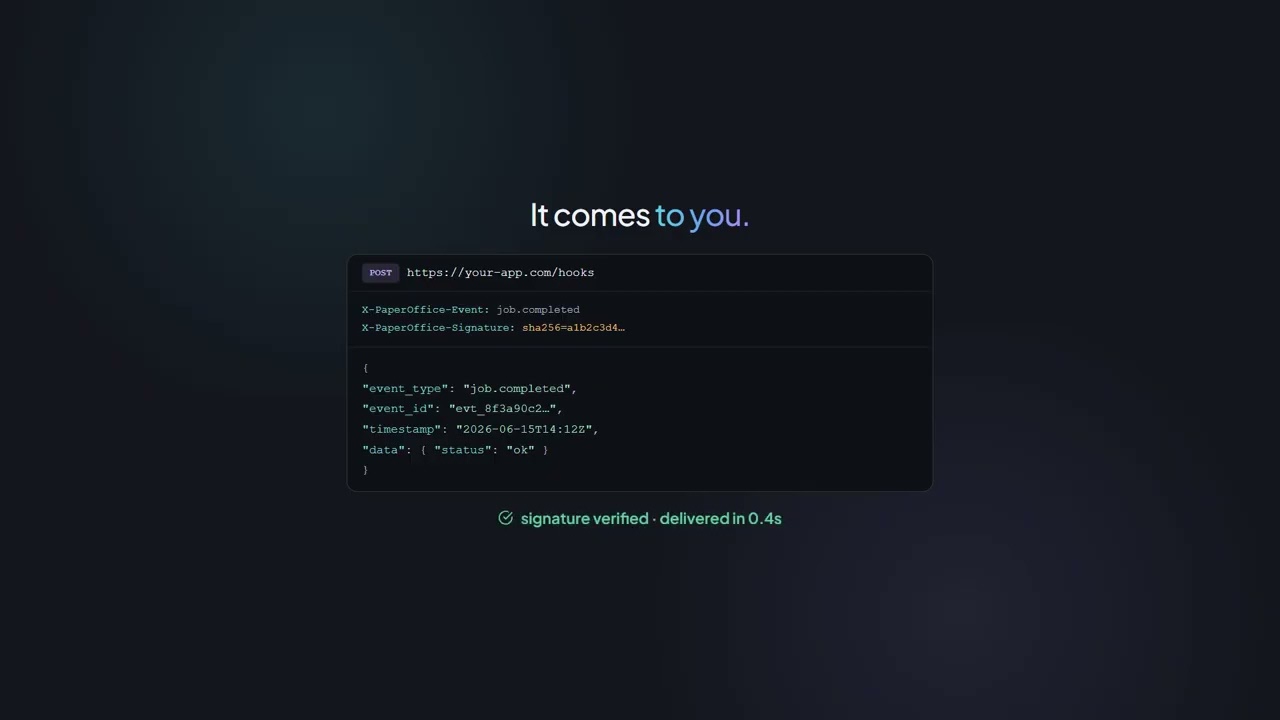
Webhooks — ประมวลผล job.completed

ลงทะเบียน Webhook → ส่งเอกสาร → รับเหตุการณ์ (Event) → ประมวลผล

พรอมต์
Read this llms.txt (AI-optimized API docs):
https://api.paperoffice.ai/latest/docs/llms.txt

Build a webhook event handler:
1. Register a webhook via POST /webhooks/subscribe
   (url, events: ["job.completed", "job.failed"], secret)
2. Verify the HMAC-SHA256 signature of every delivery
   with the subscription secret (see llms-full.txt, webhooks)
3. Process the payload whenever job.completed arrives

Note: webhooks always require a token (account binding).
Auth: Authorization: Bearer po_ut_YOUR_API_KEY

OCR → TTS — เอกสารเป็นเสียง

OCR เอกสาร → เตรียมข้อความ → สร้างเสียงพูด (TTS) → บันทึกไฟล์เสียง

พรอมต์
Read this llms.txt (AI-optimized API docs):
https://api.paperoffice.ai/latest/docs/llms.txt

Build a document-to-audio pipeline:
1. OCR via POST /job/add/paperoffice_aiocr___generate
   (file_1, ocr_mode=complete, processing_lane=instant)
2. Split the extracted text (result ?? job_result, pages) into 5000-character chunks
3. TTS per chunk: POST /job/add/paperoffice_voice___tts (text, voice=Nadja,
   output_format=mp3, output=url, processing_lane=instant)
4. Save all returned audio URLs as a playlist

Auth: Authorization: Bearer po_ut_YOUR_API_KEY

OCR แบบแบตช์ → ส่งออก CSV

สแกนโฟลเดอร์ → OCR แบบแบตช์ → รวบรวมข้อความ → ส่งออก CSV

พรอมต์
Read this llms.txt (AI-optimized API docs):
https://api.paperoffice.ai/latest/docs/llms.txt

Build a batch OCR-to-CSV exporter:
1. Scan a folder for PDF/PNG/JPG/TIFF/WEBP files
2. For each file: POST /job/add/paperoffice_aiocr___generate
   (file_1, ocr_mode=complete, processing_lane=instant)
3. Collect filename, page_count, text preview and confidence
4. Write everything to ocr_results.csv

Auth: Authorization: Bearer po_ut_YOUR_API_KEY

ขั้นตอนถัดไป

ดำเนินการต่อด้วย API

llms.txt และ Playground — โดยไม่มีการเบี่ยงเบนเส้นทาง

โทเค็นสำหรับ REST และ MCP ตอบกลับพร้อม credits_billed โครงสร้างพื้นฐาน EU ของคุณเอง
วิดีโอ

Cookbook ในการทำงาน

ดูว่า PaperOffice API ทำงานอย่างไรในทางปฏิบัติ — ในวิดีโอ

Cookbook ในการทำงาน

คำถามที่พบบ่อย

ข้อมูลสำคัญทั้งหมดในภาพรวม

ฉันต้องการ SDK หรือไม่?

ไม่ PaperOffice API เป็น REST ล้วน: จุดสิ้นสุดหนึ่งจุด โทเค็น Bearer และ multipart/form-data นอกจากนี้ยังมีเซิร์ฟเวอร์ MCP สำหรับ IDE และเอเจนต์

ทำไมไฟล์ llms.txt จึงปรากฏในทุก Prompt?

ไฟล์ llms.txt คือเวอร์ชันที่เครื่องอ่านได้ของเอกสาร API โมเดลของคุณจะอ่านจุดสิ้นสุด (endpoints) พารามิเตอร์ และรูปแบบการตอบกลับจากไฟล์นี้ โดยจะไม่สร้างฟิลด์ขึ้นมาเอง

ฉันควรกรอกคีย์ใด?

ใช้ User Token ที่มีคำนำหน้า po_ut_ คุณสามารถพบได้ภายใน PaperOffice App ที่ส่วนบัญชี → API แทนที่ po_ut_YOUR_API_KEY ใน Prompt ด้วยคีย์ของคุณเอง

ผลลัพธ์จะออกมาทันทีหรือต้องทำการ poll?

หากใช้ processing_lane=instant ระบบ API จะตอบกลับแบบ synchronous (HTTP 200 พร้อม result) หากไม่มีพารามิเตอร์นี้ จะได้ HTTP 202 พร้อม job_id; คุณสามารถดึงผลลัพธ์ผ่าน GET /job/get/{job_id} หรือ Webhook ได้

Prompt เหล่านี้ทำงานได้ในทุกสภาพแวดล้อมหรือไม่?

Prompt ไม่มีการระบุคำสั่งเฉพาะเครื่องมือ ได้รับการตรวจสอบกับ Claude, Claude Code และ Cursor — สภาพแวดล้อมใดๆ ที่สามารถอ่าน URL ได้ก็สามารถใช้งานได้อย่างลงตัว

ค่าใช้จ่ายต่อการเรียกใช้เท่าใด?

การตอบกลับแต่ละครั้งจะระบุ credits_billed ราคา Credit ของแต่ละ Pipeline มีอยู่ในหน้าสรุปราคา; จะมีการเรียกเก็บเฉพาะสิ่งที่ได้รับการประมวลผลจริงเท่านั้น

ท่านต้องการทดลอง PaperOffice ที่ใด

คอมพิวเตอร์และสมาร์ทโฟนเชื่อมต่อกันแล้ว: เวิร์กสเปซบนเครื่อง, บันทึกผ่านโทรศัพท์

เวอร์ชันทดสอบของคุณพร้อมใช้งานแล้ว

คุณต้องการเริ่มต้นที่ไหน?

เวิร์กสเปซเต็มรูปแบบได้รับการปรับให้เหมาะสมสำหรับคอมพิวเตอร์ เวอร์ชันมือถือเหมาะสำหรับการบันทึก ตรวจสอบ และอนุมัติเอกสาร

app.paperoffice.ai

เริ่มต้นบนคอมพิวเตอร์

เราจะส่งลิงก์การเข้าถึงส่วนบุคคลของคุณไปยังที่อยู่อีเมลของคุณ

สมัครฟรี เปิดแอป แอป PaperOffice ผลิตภัณฑ์เต็มรูปแบบ: เว็บ เดสก์ท็อป และมือถือ จับภาพ จัดระเบียบ ค้นหา และทำงานกับเอกสารร่วมกับทีม ต้องมีบัญชีฟรี เปิด Playground Playground ทดลองฟังก์ชันที่เลือกทันที — ไม่ต้องลงทะเบียน โดยใช้คีย์ API สาธิตแบบจำกัด ไม่ต้องลงทะเบียน แต่ใช้คีย์ API สาธิตแบบจำกัด