Build your first Document AI app with a single prompt.
Made for coding agents. Less API research, more focus on product and outcome.
How would you like to start?
Enter a valid po_ut_ key to copy the zero-shot prompt.
Kept only in this browser tab. Pasting transfers the key to the coding tool.
Give PaperOffice to the coding agent
AI-readable PaperOffice API specification
https://api.paperoffice.ai/latest/docs/llms.txt Use with
- Cursor
- Claude Code
- Codex
- AI Coding Agents
Copy the instruction and paste it
Ready Document AI build instruction
Read in full:
https://api.paperoffice.ai/latest/docs/llms.txt

Task:
Build, run and verify a production-ready Document AI batch web app with PaperOffice AI-OCR.

Access:
Demo mode:
Use the preprocessed responses and Sandwich PDFs from this manifest: https://paperoffice.ai/demos/ai-ocr/batch/manifest.json
Clearly label the mode as a static demo. Never claim live processing.

Synthetic batch source files:
- https://paperoffice.ai/demos/ai-ocr/batch/sample1-source.jpg
- https://paperoffice.ai/demos/ai-ocr/batch/sample2-source.jpg
- https://paperoffice.ai/demos/ai-ocr/batch/sample3-source.jpg

Preprocessed demo artifacts:
- Responses: https://paperoffice.ai/demos/ai-ocr/batch/sample1-response.json | https://paperoffice.ai/demos/ai-ocr/batch/sample2-response.json | https://paperoffice.ai/demos/ai-ocr/batch/sample3-response.json
- Sandwich PDFs: https://paperoffice.ai/demos/ai-ocr/batch/sample1-searchable.pdf | https://paperoffice.ai/demos/ai-ocr/batch/sample2-searchable.pdf | https://paperoffice.ai/demos/ai-ocr/batch/sample3-searchable.pdf
- Complete package: https://paperoffice.ai/demos/ai-ocr/batch/paperoffice-aiocr-batch-demo.zip

Requirements:
- Download and process all three source JPGs together as one batch
- Run AI-OCR Complete with ocr_mode=complete, output_searchable_pdf=true, processing_lane=instant and client_wait=true
- Call the documented endpoint once per file; send every live upload as multipart/form-data in file_1
- Coordinate the three jobs as one batch and show per-file progress and partial results
- In demo mode, use only the preprocessed responses and PDFs without new API processing
- Fully implement upload, processing, HTTP 202 polling, errors and result
- For every file, render and offer downloads for the source JPG, OCR text, bounding boxes, response and Sandwich PDF
- Offer individual downloads and the complete demo batch download
- Use only endpoints documented in llms.txt
- Do not invent APIs, fields or download URLs

Result:
Implement the complete batch app, start it and verify all three source files.- 1 Paste into the coding agent
- 2 Run the generated app
This is what the completed three-file batch looks like
3 synthetic source files
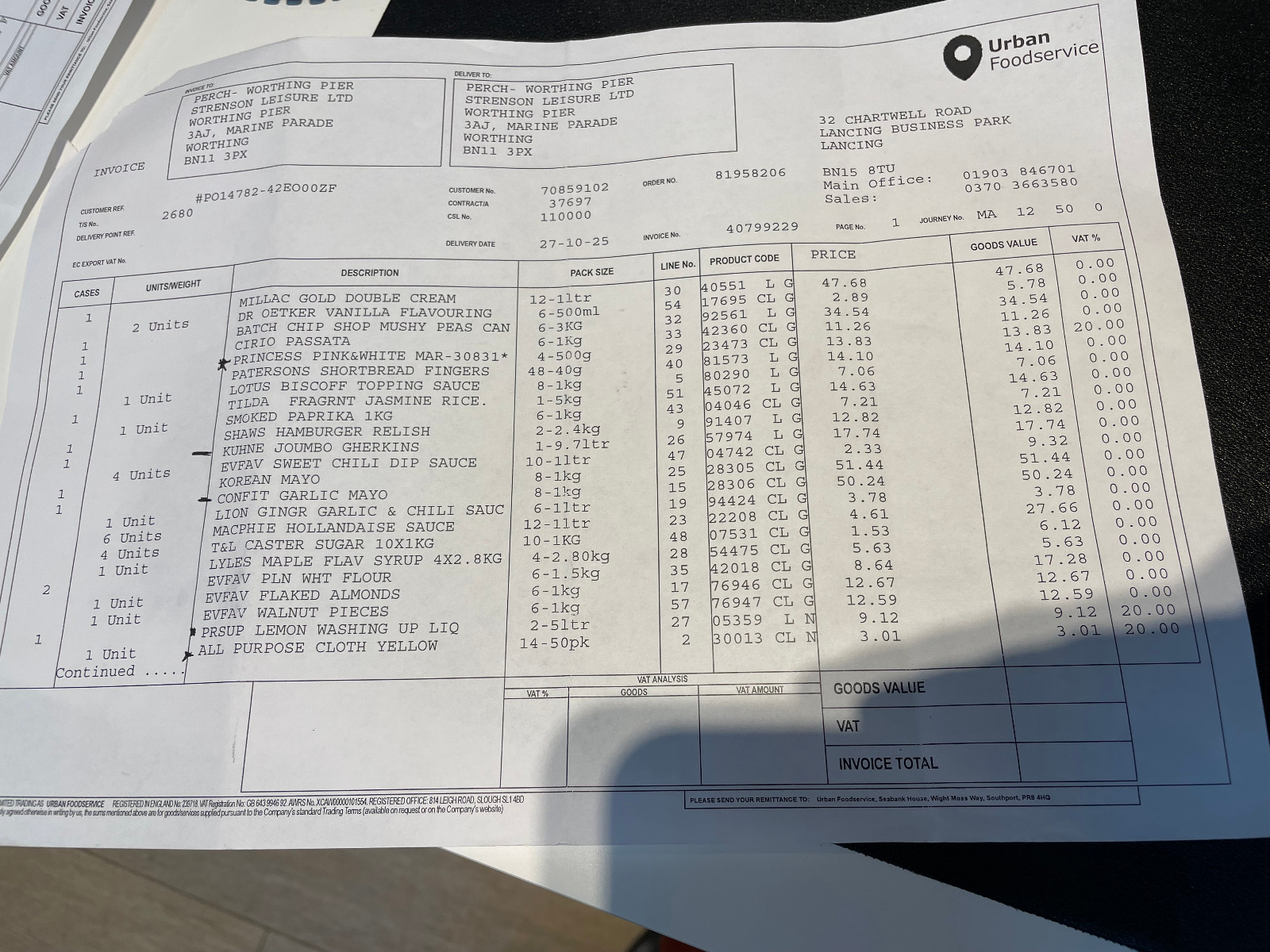
Loading static OCR response…
- OCR mode
- Complete (Ultra)
- Pages
- 1
- Detected language
- English (en)
- Text lines
- 260
- Characters
- 2728
- Bounding boxes
- 260
- Average confidence
- 98%
Searchable Sandwich PDF
The original appearance remains intact while an invisible text layer makes the document searchable.
Successfully processed Batch 1/3 · AI-OCR Ultra
GET STARTED
Try visitor mode now Now try it yourself
Continue directly with the selected access mode.
Show optional technical details
Only needed for debugging or manual verification. The AI-first path above does not require copying this code.
Underlying request
curl -O "https://paperoffice.ai/demos/ai-ocr/batch/sample1-source.jpg"
curl -O "https://paperoffice.ai/demos/ai-ocr/batch/sample2-source.jpg"
curl -O "https://paperoffice.ai/demos/ai-ocr/batch/sample3-source.jpg"

for file in sample1-source.jpg sample2-source.jpg sample3-source.jpg; do
  curl -X POST "https://api.paperoffice.ai/latest/job/add/paperoffice_aiocr___generate" \
    -H "Authorization: Bearer po_ut_YOUR_API_KEY" \
    -F "file_1=@${file};type=image/jpeg" \
    -F "ocr_mode=complete" \
    -F "output_searchable_pdf=true" \
    -F "processing_lane=instant" \
    -F "client_wait=true"
done
Response fixture
{
  "status": "success",
  "demo_fixture": true,
  "synthetic_documents": true,
  "live_processing": false,
  "batch_size": 3,
  "manifest": "/demos/ai-ocr/batch/manifest.json",
  "download_all": "/demos/ai-ocr/batch/paperoffice-aiocr-batch-demo.zip",
  "responses": [
    "/demos/ai-ocr/batch/sample1-response.json",
    "/demos/ai-ocr/batch/sample2-response.json",
    "/demos/ai-ocr/batch/sample3-response.json"
  ],
  "searchable_pdfs": [
    "/demos/ai-ocr/batch/sample1-searchable.pdf",
    "/demos/ai-ocr/batch/sample2-searchable.pdf",
    "/demos/ai-ocr/batch/sample3-searchable.pdf"
  ]
}